
1. Folasaga
The Jauarta MY8236B is a compact and reliable digital multimeter designed for accurate electrical measurements. It features a clear 4000-count display and a new generation layout for enhanced usability. This instrument is suitable for various applications including power electronic circuit measurement, new energy equipment testing, power system strength testing, automotive circuit maintenance, and educational purposes.
Fa'amatalaga Taua ole Saogalemu: Always keep the inside of the meter clean and dry to prevent electric shock or damage to the meter. Read all safety warnings and operating instructions before using this instrument.
2. Vaega o Oloa
- Fa'aaliga manino: Features a new display and function layout for improved readability.
- 4000 Counts Reading: Provides industrial-grade readings up to 4000 counts for precise measurements.
- Fa'aoga lautele: Versatile for power electronics, new energy, automotive, and educational testing.
- Sa'o ma Fa'atuatuaina: Designed for high reliability in electronic parameter detection.
- Fausiaga Tumau: Made from excellent ABS material, offering impact and scratch resistance.
3. Mea i totonu o le afifi
Please check the package contents upon receipt:
- 1 x Jauarta MY8236B Digital Multimeter
- 2 x Multimeter Test Leads (Red and Black)
- 1 x Tusi Fa'aoga
4. Seti
4.1 Fa'apipi'i ma'a
The Jauarta MY8236B multimeter requires two 1.5V AAA batteries (not included) for operation.
- Su'e le tapuni o le maa i tua o le multimeter.
- Faaaoga se sikulivili e tatala ai sikulivili o loʻo faʻamaufaʻailogaina ai le ufi o le maa.
- Remove the cover and insert two 1.5V AAA batteries, observing the correct polarity (+ and -) as indicated inside the compartment.
- Replace the battery cover and tighten the screw(s).
4.2 Feso'ota'i Su'ega Ta'ita'i
E taua tele le feso'ota'iga lelei o uaea o le su'ega mo le sa'o ma le saogalemu o fua.

Image: Close-up of the multimeter's input jacks. The black COM jack, the red VΩmA jack, and the red 10A jack are visible.
- Fa'aofi le ta'i su'e uliuli i totonu o le COM (Masa masani) jack.
- Mo le tele o voltage, resistance, and small current measurements (up to 400mA), insert the red test lead into the VΩmA jack.
- For high current measurements (up to 10A), insert the red test lead into the 10A jack. Ensure the rotary switch is set to the appropriate 10A range.

Image: The Jauarta MY8236B Digital Multimeter shown with its red and black test leads properly connected to the input jacks.
5. Fa'atonuga o Galuega
5.1 Fa'agaoioia/Tape ma le Filifiliga o Galuega
To power on the multimeter, rotate the central rotary switch from the 'OFF' position to the desired measurement function. To power off, rotate the switch back to 'OFF'.
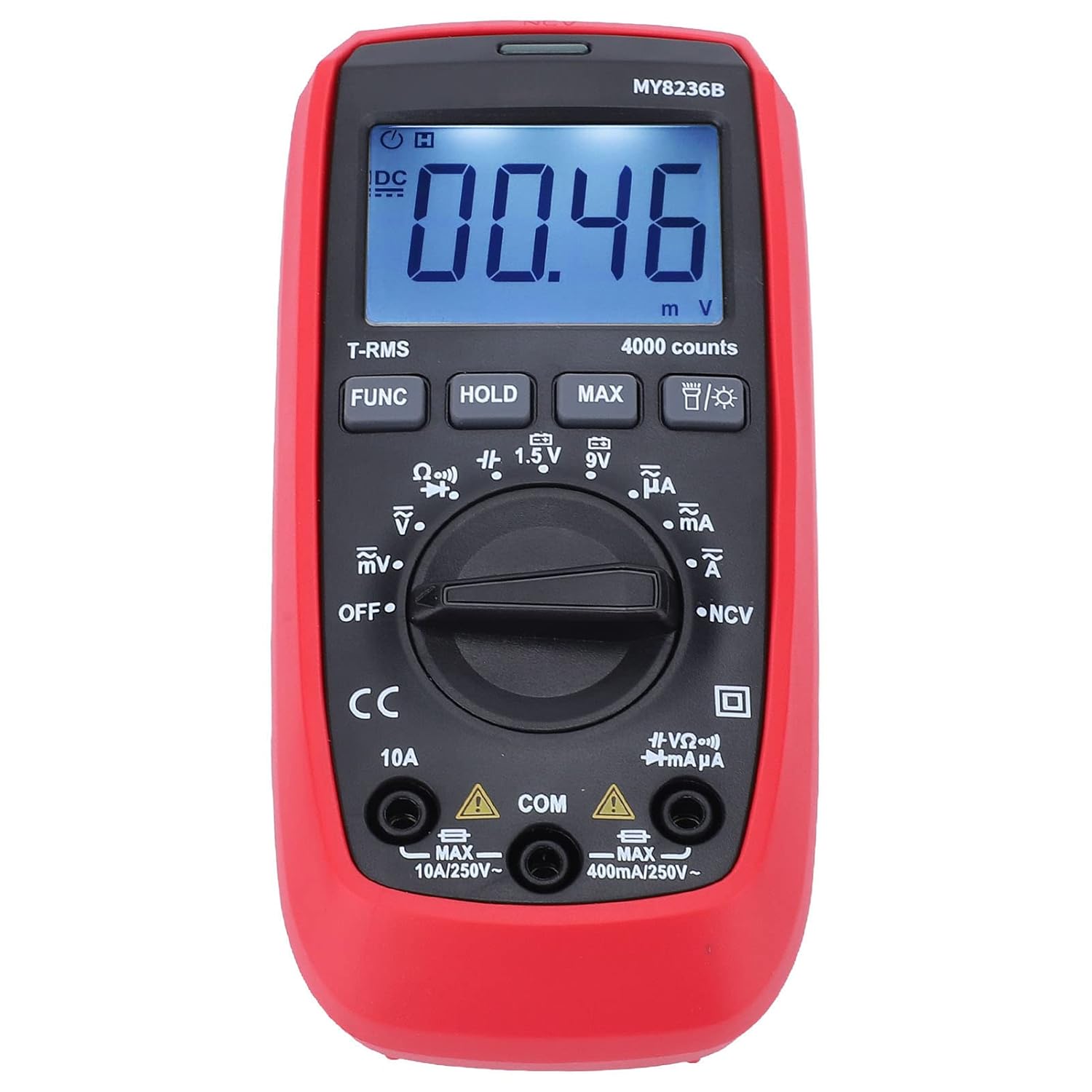
Ata: Luma view of the Jauarta MY8236B Digital Multimeter, highlighting the central rotary switch for function selection and the digital display.
5.2 Fuaina DC Voltage (V–)
- Set the rotary switch to the 'V–' range. Select an appropriate range (e.g., 4V, 40V, 400V) higher than the expected voltagu. Afai o le voltage le iloa, amata i le maualuga maualuga ma faʻaitiitia pe a manaʻomia.
- Fa'afeso'ota'i le uaea mumu o le su'ega i le itu lelei (+) o le matagaluega ma le uaea uliuli o le su'ega i le itu leaga (-).
- Faitau le voltage taua i luga o le faʻaaliga.
5.3 Fuaina AC Voltage (V∼)
- Set the rotary switch to the 'V∼' range. Select an appropriate range higher than the expected voltage.
- Fa'afeso'ota'i uaea fa'ata'ita'i i luga o le AC voltagetagu puna.
- Faitau le voltage taua i luga o le faʻaaliga.
5.4 Measuring DC Current (A–)
Lapata'iga: Aua ne'i fa'afeso'ota'i fa'atasi le multimeter ma se voltage.tage source when measuring current. Always connect it in series with the load. Ensure the correct input jack (VΩmA or 10A) is used.
- Tape le eletise i le matagaluega.
- Break the circuit at the point where current is to be measured.
- Set the rotary switch to the 'A–' range (e.g., µA, mA, or 10A).
- Connect the red test lead to the appropriate current input jack (VΩmA for up to 400mA, 10A for up to 10A).
- Fa'afeso'ota'i fa'asolosolo le multimeter ma le matagaluega.
- Restore power to the circuit and read the current value.
5.5 Measuring AC Current (A∼)
Follow the same safety precautions and connection method as for DC current, but set the rotary switch to the 'A∼' range.
5.6 Fuaina o le Tete'e (Ω)
Lapata'iga: Ensure the circuit is de-energized before measuring resistance. Do not measure resistance on a live circuit.
- Turn off power to the circuit or component.
- Set the rotary switch to the 'Ω' range.
- Fa'afeso'ota'i uaea e su'e ai i luga o le vaega po'o le matagaluega o le a fuaina.
- Faitau le teteʻe taua i luga o le faʻaaliga.
5.7 Galuega Fa'apitoa
- Fa'amau FUNC: Used to switch between different functions within a single rotary switch position (e.g., AC/DC, Diode/Continuity).
- UUUU faamau: Fa'a'aisa le faitauga o lo'o iai nei i luga o le fa'aaliga. Toe oomi e fa'asa'oloto.
- MAX faamau: Displays the maximum measured value.
- Fa'amau i tua: Activates or deactivates the display backlight for better visibility in low-light conditions.
6. Tausiga
6.1 Fa'amamāina
To maintain accuracy and prevent damage, keep the multimeter clean and dry. Wipe the case with a damp cloth and mild detergent. Do not use abrasives or solvents. Ensure no moisture enters the meter.
6.2 Suiga maa
When the battery indicator appears on the display, replace the batteries promptly to ensure accurate readings. Refer to Section 4.1 for battery installation instructions.
6.3 Teuina
If the multimeter is not used for an extended period, remove the batteries to prevent leakage and damage. Store the instrument in a cool, dry place away from direct sunlight and extreme temperatures.
7. Faʻafitauli
- Leai se fa'aaliga: Check if the batteries are correctly installed and have sufficient charge. Replace batteries if necessary. Ensure the rotary switch is not in the 'OFF' position.
- Faitauga Sese: Verify that the test leads are properly connected to the correct input jacks and that the rotary switch is set to the appropriate function and range. Ensure the circuit is de-energized for resistance measurements.
- No Reading for Current: Check if the fuse is blown. If measuring high current, ensure the red lead is in the 10A jack.
- Display Shows 'OL' (Overload): The measured value exceeds the selected range. Switch to a higher range or ensure the input is within the meter's maximum specifications.
8. Fa'amatalaga
| Parameter | Avanoa |
|---|---|
| DC Voltage | 400mV, 4V, 40V, 400V, 600V |
| AC Voltage | 400mV, 4V, 40V, 400V, 600V |
| DC A'o | 400µA, 4000µA, 40mA, 400mA, 10A |
| AC Nei | 400µA, 4000µA, 40mA, 400mA, 10A |
| Tete'e | 400Ω, 4kΩ, 40kΩ, 400kΩ, 4MΩ, 40MΩ |
| Faʻaaliga Faitauina | 4000 faitau |
| Ituaiga maa | 2 x 1.5V AAA maa |
| Mea | ABS |
| Mea mamafa | 323 g |
| Fua Fa'atatau | 16 x 11 x 5 cm |
9. Fa'amatalaga Saogalemu
- Always inspect the multimeter and test leads for any damage before use. Do not use if damaged.
- Aua le fa'aaogaina voltage or current that exceeds the maximum rated input for any range.
- Fa'aeteete pe a galue ma voltage sili atu i le 30V AC RMS, 42V tumutumu, poʻo le 60V DC. O nei voltage tula'i mai se lamatiaga te'i.
- Ia motusia uma uaea o le su'ega mai le matagaluega a'o le'i suia galuega faatino po'o laina.
- Do not operate the meter in explosive gas, vapor, or dusty environments.
- Ensure your hands are dry when operating the meter.
10. Fa'amaonia ma Lagolago
For warranty information or technical support, please refer to the documentation provided with your purchase or contact Jauarta customer service through your retailer. Keep your purchase receipt as proof of purchase.