
1. Oloa Ua Ovaview
The Hisense 65E7Q QLED Smart TV offers a premium viewing experience with its 65-inch QLED display. This television integrates advanced technologies such as Dolby Vision and Dolby Atmos for immersive audio-visuals, AI Smooth Motion for fluid images, and dedicated modes for gaming and sports. Powered by the VIDAA operating system, it provides easy access to a wide range of streaming content and smart features, including voice control.

Luma view of the Hisense 65E7Q QLED Smart TV.
Vaega Autu:
- QLED Colour: Experience rich, vibrant, and realistic colors.
- AI Smooth Motion: Advanced MEMC and 3D Noise Reduction for fluid, blur-free images.
- Dolby Vision & Dolby Atmos: Cinematic picture and immersive sound for an enhanced entertainment experience.
- Taaloga Fa'aopoopo: Reduces input lag to 16ms, with 60Hz VRR and ALLM for ultra-fluid gaming.
- AI Sports Mode: Optimizes picture and sound for sports content, reducing motion blur and enhancing stadium-like audio.
- AI 4K Upscaler: Enhances blurry images to near-4K quality.
- VIDAA Smart TV OS: Fast, secure, and intuitive operating system with access to popular streaming applications.
- Pulea leo: Integrated Alexa and VIDAA Voice for convenient operation.
2. Fa'amatalaga Saogalemu
Please read all safety instructions carefully before using your TV. Keep this manual for future reference. Always ensure the TV is placed on a stable surface to prevent tipping. Do not expose the TV to rain or moisture. Refer to the full safety guidelines in the included safety manual.
3. Mea i totonu o le afifi
Fa'amautinoa o lo'o iai mea uma ile pusa:
- Hisense 65E7Q QLED Smart TV
- Uaea Malosi
- Remote Control (with 1 AAAA battery included)
- Tu'u TV (2 vaega)
- Siu mo le Fonotaga Tu'u
- Tusi Lesona a le Tagata (lenei pepa)
- Kata Faamaonia
4. Seti
4.1 Fa'apotopotoina o le Tulaga
- Tuu ma le faaeteete le lau TV-i lalo i luga o se mea malu, mafolafola e puipuia ai le faaleagaina.
- Fa'atulaga vaega o le tulaga i avanoa talafeagai i le pito i lalo o le TV.
- Fa'amau fa'amau vaega o le tulaga i sikuliu ua saunia. Ia mautinoa ua fa'amau lelei.

Diagram illustrating TV dimensions and stand installation points.
4.2 Fa'amauina o puipui
If you plan to wall mount your TV, ensure you use a VESA-compatible wall mount kit (not included). The Hisense 65E7Q supports a VESA mounting standard of 600 x 400 mm. Follow the instructions provided with your wall mount kit for safe installation.
4.3 Feso'ota'i Peripheral
Connect your external devices to the TV's ports as needed. Refer to the port diagram below:

Tua view showing available ports and connections.
- Taulaga HDMI (x3): Connect Blu-ray players, game consoles, and other HDMI devices. One port supports eARC for enhanced audio return.
- Taulaga USB (x2): Connect USB flash drives for media playback. (1x USB 3.0, 1x USB 2.0)
- Antenna Inputs (x2): Fa'afeso'ota'i lau antenna terrestrial po'o le uaea.
- Ethernet (LAN): Mo feso'ota'iga feso'ota'iga uaea.
- Fa'alogo leo i fafo: Connect to a soundbar or audio receiver for digital audio.
- Ulu o le Headphone: Mo le faalogo patino.
- AV Ulufale: Mo le fa'afeso'ota'i o masini tuai e fa'aaoga ai uaea fa'alogo fa'atasi ma vitiō.
4.4 Malosiaga Muamua i luga
- Fa'afeso'ota'i le uaea eletise i le TV ona fa'afeso'ota'i lea i se palaka eletise.
- Oomi le ki o le mana i luga o le masini mamao po o le TV.
- Mulimuli i fa'atonuga i luga ole lau e fa'auma ai le seti muamua, e aofia ai le filifilia o le gagana, feso'ota'iga feso'ota'iga, ma le su'esu'eina o alalaupapa.
5. Fa'agaoioi lau TV
5.1 Pulea Mamao
The included remote control allows you to navigate the TV's features. Insert the provided AAAA battery into the remote. The remote supports voice control for convenient operation.
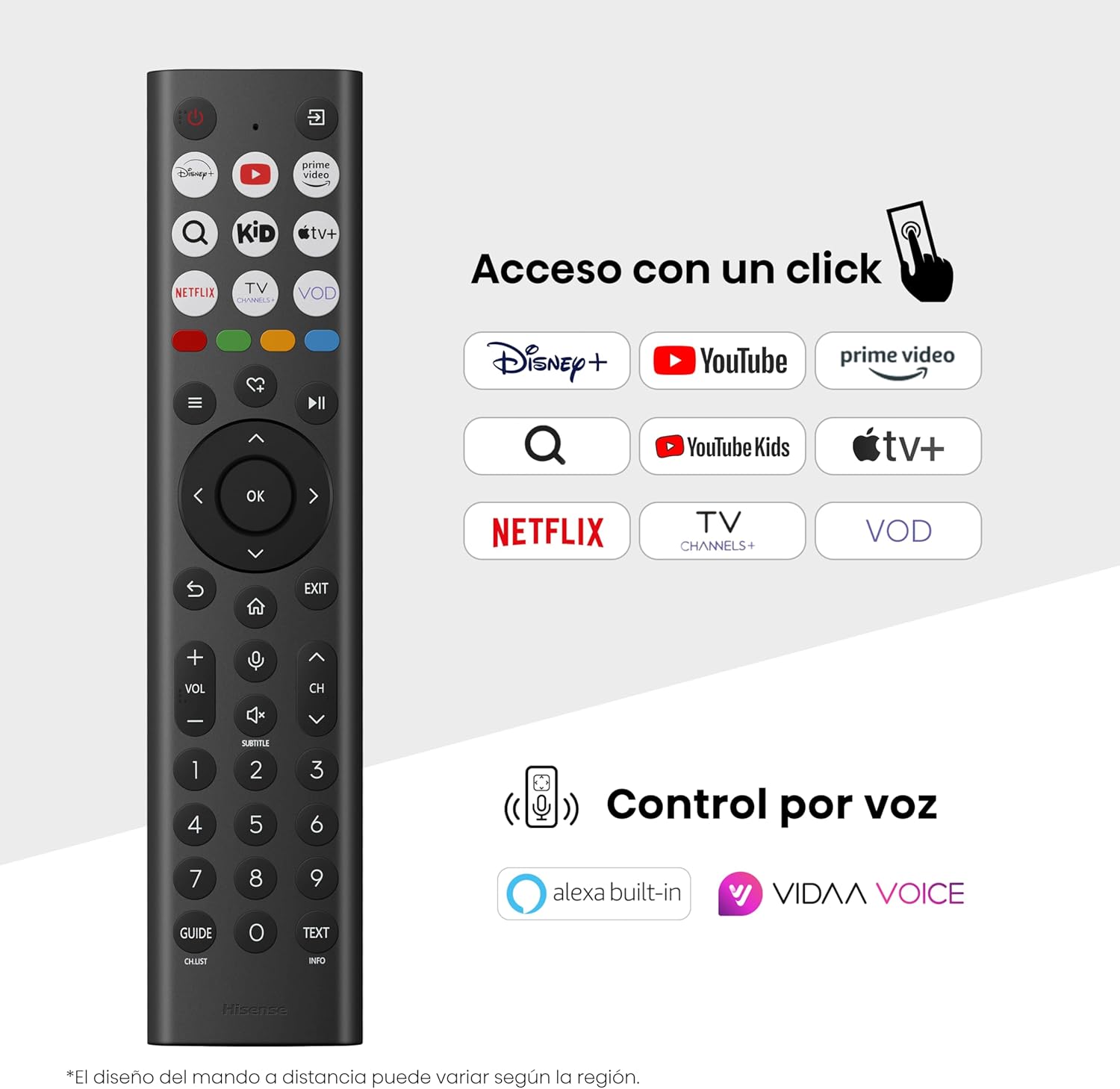
Hisense Smart TV remote control with dedicated app buttons and voice control.
5.2 Smart TV Features (VIDAA OS)
Your Hisense TV runs on the VIDAA operating system, offering a user-friendly interface for accessing various applications and services.

The VIDAA Smart TV interface with popular streaming applications.
- Talosaga: Avanoa i polokalama ua uma ona fa'apipi'i e pei o Netflix, YouTube, Prime Video, ma isi mea.
- Pulea leo: Use the remote's voice function to search for content, adjust settings, or interact with Alexa built-in and VIDAA Voice.
- Screen Mirroring (AirPlay): Share content from your Apple devices directly to the TV.
- Share to TV: Easily send content from your mobile devices to the TV.
5.3 Fa'atulagaina o Ata
Fa'alelei lau viewing experience with various picture enhancement technologies:
- QLED Colour: Delivers over a billion shades of vibrant, lifelike colors.
- AI 4K Upscaler: Automatically enhances lower-resolution content to near-4K quality.
- AI Smooth Motion: Reduces motion blur in fast-paced scenes, ensuring clear and fluid visuals.
- Dolby Vision: Provides stunning brightness, contrast, and color for a dramatic visual experience.
- Faiga fai ata: Preserves the original aspect ratio, colors, and frame rates to display movies as intended by the director.
- AI Light Sensor: Intelligently adjusts screen brightness based on ambient light for optimal viewing and energy efficiency.
- Faiga Tausiga Mata: Fa'aitiitia le susulu o le malamalama lanumoana e fa'aitiitia ai le tiga o mata.
- Faiga Fa'asao Malosi: Optimizes power consumption without significantly compromising picture quality.

QLED technology delivers over a billion vibrant color tones.

AI 4K Upscaler enhances lower resolution content to near 4K clarity.

AI Smooth Motion ensures fluid images without blur, especially in fast-moving scenes.

Filmmaker Mode presents content exactly as the director intended.
5.4 Fa'atonu leo
Enhance your audio experience with:
- Dolby Atmos: Immersive, multi-dimensional sound that fills your room.
- Tu'ufa'atasia le Fofoga Fetalai: Built-in speakers with a maximum output of 1 Watt per channel.
- EzPlay: Seamlessly control compatible Hisense soundbars directly from your TV screen.

Dolby Vision and Dolby Atmos combine for a spectacular audio-visual experience.
5.5 Fa'ailoga Taaloga
For gamers, the TV offers:
- Taaloga Fa'aopoopo: Reduces input lag to 16ms, ensuring responsive gameplay.
- 60Hz VRR (Variable Refresh Rate): Synchronizes the TV's refresh rate with the game console's output to prevent screen tearing.
- ALLM (Autometi Latency Latency Mode): Automatically switches the TV to low-latency mode when a game is detected.
- Pa ta'aloga: An integrated control center for quick access to game settings and real-time performance monitoring.

Game Mode Plus provides ultra-fluid, lag-free gaming.

The Game Bar offers centralized control for game settings.
5.6 Sports Features
- AI Sports Mode: Automatically detects sports content and optimizes picture and sound settings for a stadium-like experience, enhancing clarity and audio effects.
6. Tausiga
6.1 Fa'amama le TV
- Aveese i taimi uma le TV a'o le'i fufulu.
- Use a soft, dry, lint-free cloth to gently wipe the screen and TV body.
- Mo fa'ailoga ma'a'a, fa'amama le oampi totonu o le ie i le vai po'o se fa'amama fa'apitoa fa'amama (aua ne'i fa'apa sa'o i luga o le lau).
- Aloese mai le fa'aogaina o mea fa'amama, ava malosi, benzene, po'o mea manifinifi, aua e mafai ona fa'aleagaina ai luga ole TV.
6.2 Fa'afouga polokalame
Your TV may receive software updates periodically to improve performance and add new features. Ensure your TV is connected to the internet to receive these updates. You can usually check for updates manually in the TV's settings menu.
7. Faʻafitauli
Afai e te feagai ma faʻafitauli i lau TV, vaʻai i fofo masani nei:
- Leai se Malosi: Check if the power cable is securely connected and the power outlet is working. Try a different outlet.
- Leai se Ata/Leo: Ia mautinoa ua filifilia le puna sa'o. Siaki uma feso'ota'iga uaea (HDMI, antenna).
- Pulea mamao e le o galue: Check the battery (1 AAAA battery). Ensure there are no obstructions between the remote and the TV.
- Fa'afitauli Feso'ota'iga: Verify your Wi-Fi password or Ethernet cable connection. Restart your router.
- Le lelei o Ata: Fetuuna'i tulaga o ata (malamalama, fa'atusatusaga, ma'ai). Ia fa'amautinoa o lo'o maua e le puna fa'aoga se fa'ailoga maualuga.
- Fa'aletonu leo: Check audio settings. If using external speakers, ensure they are connected correctly.
For more detailed troubleshooting, consult the full electronic user manual or contact Hisense customer support.
8. Fa'amatalaga
Detailed technical specifications for the Hisense 65E7Q QLED Smart TV:
| Fa'aaliga | Fa'amatalaga |
|---|---|
| Numera Fa'ata'ita'i | 65E7Q |
| Tele lau | 65 Inisi |
| Fa'aaliga Tekonolosi | QLED |
| I'ugafono | 4K (3840 x 2160) |
| Fua Fa'afouina | 60 Hz |
| HDR Format Lagolago | Dolby Vision |
| Motion Enhancement Technology | AI Smooth Gaioiga |
| Fa'aleleia o Ata | AI 4K Upscaler, AI Smooth Motion, QLED Colour |
| Taimi Tali | 100 Miliseconds |
| Fa'asologa o moli tua | Direct Illumination, Dimming |
| Faamatalaga a le Fofoga Fetalai | Integrated speaker with Dolby Atmos |
| Mata'utia le Malosi o le Fofoga Fetalai | 1 Watt |
| Alaleo leo | Alano tele |
| Surround Sound Format | Dolby Atmos |
| Faiga Fa'atonu | VIDAA |
| Mafai e teu ai le manatua | 1 GB |
| Metotia Pulea | Leo |
| Tekinolosi Feso'ota'i | Bluetooth, HDMI, Wi-Fi |
| Internet Applications | Netflix, YouTube, Prime Video, AirPlay 2 |
| HDMI Taulaga | 3 (including HDMI 2.1 with eARC) |
| Taulaga USB | 2 (1x USB 3.0, 1x USB 2.0) |
| Tekonolosi uaealesi | Wi-Fi |
| Screen Mirroring Technology | AirPlay |
| VESA Fa'amauina tulaga | 600 x 400 mm |
| Fua o Mea (DxWxH) | 7.6 x 145.3 x 83.8 cm |
| Oloa mamafa | 15.2 kilokalama (faatasi ai ma tulaga) |
| Vasega Malosiaga | E |
| Fa'aaogaina Malosiaga Faaletausaga | 84 kWh/1000h (SDR), 160 kWh/1000h (HDR) |
| Malosiaga | 1 Watt (standby) |
| Voltage | 100-240 VCA 50-60 Hz |
| Fa'aaofia Vaega | Uaea Malosi, Pulea Mamao, Tu |
| Tausaga Fa'ata'ita'i | 2025 |
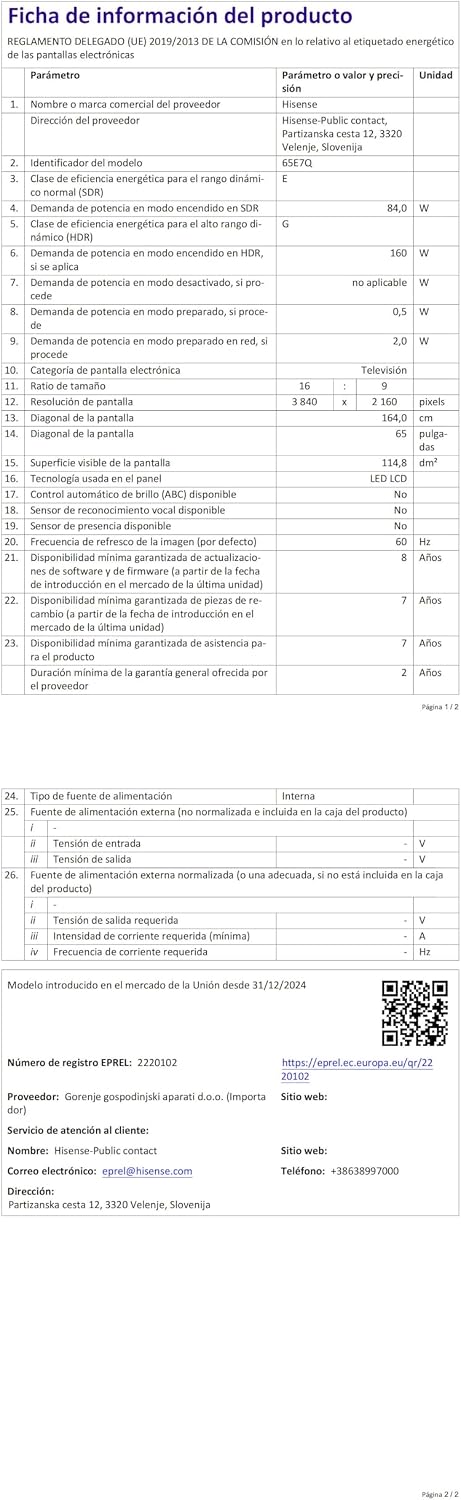
Energy label for the Hisense 65E7Q TV.
Mo nisi fa'amatalaga fa'amatalaga o oloa, fa'amolemole va'ai ile EPREL database: https://eprel.ec.europa.eu/qr/2220102
9. Fa'amaonia ma Lagolago
9.1 Oloa Tuutuuga
This Hisense TV comes with a 3 tausaga fa'amaonia oloa. Fa'amolemole taofi lau fa'amaoniga o le fa'atau mo tagi fa'amaonia.
9.2 Avanoa Vaega Fa'asao
Spare parts for this model are guaranteed to be available in the EU for a duration of 10 tausaga from the product's market introduction.
9.3 Fesoasoani mo Tagata Fa'atau
For technical assistance, troubleshooting, or warranty service, please contact Hisense customer support. Refer to the contact information provided in your warranty card or visit the official Hisense webnofoaga mo lau itulagi.