
Folasaga
Thank you for choosing the Transformers TF-T26 Pro Wireless Earbuds. These earbuds are designed to provide a high-quality audio experience for both gaming and music, featuring Bluetooth 5.4 technology for stable connectivity. This manual will guide you through the setup, operation, and maintenance of your new earbuds to ensure optimal performance.
O a mea i totonu o le Pusa
- Tusi Taiala
- Totogi Fua
- Aluga taliga (tusa eseese)
- Ituaiga-C Paʻu uaea
Ua Umaview
The Transformers TF-T26 Pro earbuds feature an ergonomic design with earhooks for a secure fit, making them suitable for sports and active use. The charging case includes an LED digital display to show battery status.
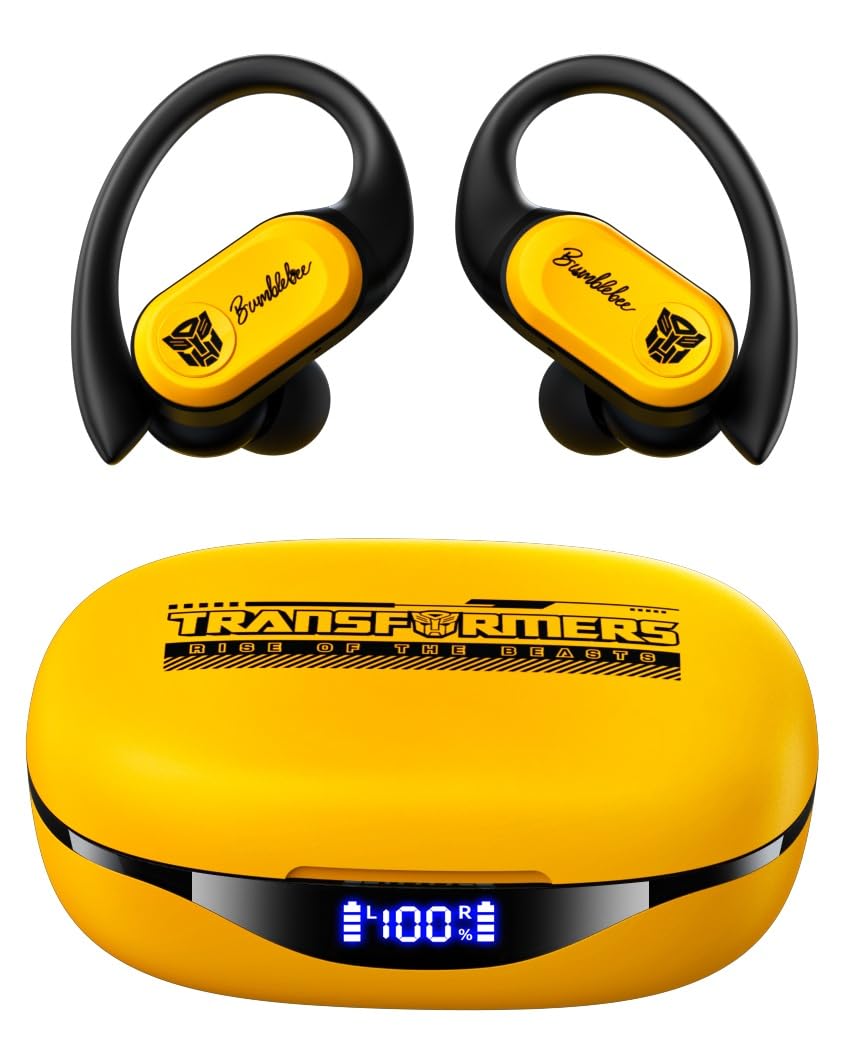
Image: Transformers TF-T26 Pro Wireless Earbuds in their charging case.

Image: Earbuds in charging case with LED battery display.
Seti
1. Totogiina le Earbuds ma Case
Before first use, fully charge the earbuds and charging case. Connect the provided Type-C charging cable to the charging port on the case and a power source. The LED digital display on the case will indicate the charging status and battery level.
- Taimi o Totogi: Approximately 1.5 hours for both earbuds and case.
- Earbud Taimi Ta'alo: E oʻo ile 8 itula ile totogi e tasi.
- Aofa'i Taimi ta'alo fa'atasi ma le fata: E oʻo atu ile 65 itula.

Image: Battery life and Type-C charging details.
2. Paʻaga Bluetooth
- Tatala le pusa o lo'o molia. E otometi lava ona ulufale le taliga i le faiga fa'apa'i.
- I luga o lau masini (smartphone, tablet, etc.), fa'aaga le Bluetooth.
- Saili mo available devices and select "TF-T26 Pro" from the list.
- Once connected, you will hear an audible confirmation, and the device will show "Connected".
The earbuds utilize Bluetooth 5.4 technology for a fast and stable connection.

Image: Bluetooth 5.4 fast pairing connection.
Fa'atonuga o Galuega
Fai le taliga
Select the appropriate ear cushions for a comfortable and secure fit. The earhooks are designed to keep the earbuds stable during movement.

Image: Ergonomic design and flexible earhooks for secure fit.
Pa'i Pule
The TF-T26 Pro earbuds feature intelligent touch controls for easy management of audio playback and calls.

Image: Intelligent Touch Control functions.
- Single Tap (L/R): Volume + (R), Volume - (L)
- Double Tap (L/R): Pause/Play, Answer/Hang Up Call
- Triple Tap (L): Pese Muamua
- Triple Tap (R): Sosoo Pese
- Long Press (2s) (L/R): Teena Valaau
- Long Press (2s) (L): Fesoasoani leo
- Long Press (2s) (R): Game Mode / Music Mode Switch
Faiga Fa'alogo
Switch between two distinct audio modes:
- Taʻaloga Taʻaloga: Provides ultra-low latency audio synchronization, ideal for mobile gaming and video playback.
- Faiga Musika: Delivers rich HiFi sound with deep bass, clear mids, and crisp highs for an immersive listening experience.
Tulaga Lelei
The earbuds are equipped with 13mm magnetically levitated drivers, providing rich and detailed audio across all frequencies.

Image: 13mm Magnetic Suspension Diaphragm Speaker.
ENC Call Clarity
Advanced Environmental Noise Cancellation (ENC) technology reduces ambient noise during calls, ensuring your voice is heard clearly.
Tausiga
Fa'amamaina
Regularly clean the earbuds and charging case with a soft, dry cloth. Avoid using harsh chemicals or abrasive materials. Ensure the charging contacts are free of debris.
Teuga
A le fa'aogaina, teu fa'alogo taliga i totonu o le pusa fa'atumu e puipui ai mai le pefu ma fa'aleagaina. Teu i se nofoaga malulu ma mago.
Suavai Tetee
The earbuds feature an IPX5 waterproof rating, making them resistant to splashes, sweat, and rain. They are suitable for workouts and outdoor activities but should not be submerged in water.

Image: IPX5 Waterproof rating for comfortable movement without fear of sweat.
Fa'afitauli
- E le fetaui taliga taliga: Ensure both earbuds are in the charging case, then open the lid to activate pairing mode. Check your device's Bluetooth settings and try reconnecting.
- Leai se leo: Verify the earbuds are connected to your device and the volume is turned up on both the earbuds and your device.
- Totogi fa'afitauli: Clean the charging contacts on both the earbuds and the case. Ensure the Type-C cable is securely connected to a working power source.
- Le lelei telefoni: Ensure the earbuds are properly seated in your ears. The ENC feature works best when the microphone is not obstructed.
Fa'amatalaga
| Fa'aaliga | Fa'amatalaga |
|---|---|
| Igoa Fa'ata'ita'iga | TF-T26 Pro |
| Fa'aliliuga Bluetooth | 5.4 |
| Lau'ele'ele Bluetooth | 26-32 FT (8-10 meters) |
| Malosiaga Pusa Earbud | 50mAh |
| Totogi Fa'atonuga Ma'a | 550mAh |
| Earbud Taimi ta'alo | E oʻo atu ile 8 itula |
| Aofa'i Taimi Ta'alo (fa'atasi ai ma atigipusa) | E oʻo atu ile 65 itula |
| Taulaga Totogi | Ituaiga-C |
| Taimi Totogi | Pe tusa. 1.5 itula |
| Fa'atelega Tali | 20Hz-20KHz |
| Fa'alavelave o le Fofoga Fetalai | 32Ω |
| Ma'ale'ale | 109dB±3dB |
| Tele Avetaavale | 13mm |
| Suavai Tetee | IPX5 |
| Pulea Pisa | Si'osi'omaga le pisa fa'ate'aina (ENC) |
Vitio Oloa Aloaia
Vitio: Ua umaview of the Transformers TF-T26 Pro Wireless Earbuds, demonstrating features like Bluetooth pairing, smart touch controls, secure fit for sports, IPX5 waterproofing, Hi-Fi sound quality, and ENC noise cancellation for calls.
Fa'amaonia ma Lagolago
Your Transformers TF-T26 Pro Wireless Earbuds come with a 30 aso fa'amaonia from the date of purchase. For any support inquiries or warranty claims, please refer to your purchase documentation or contact the retailer.