
1. Folasaga
Welcome to the user manual for your Emerson CKSS7071 Sunrise Smartset Alarm Clock Radio. This device is designed to enhance your daily routine with its unique features, including a sunrise simulation, soothing sound options, Bluetooth connectivity, and an 8-color dimmable LED display. Please read this manual thoroughly to understand the full functionality and ensure proper use and care of your new alarm clock radio.
Vitio 1: Ua umaview of the Emerson CKSS7071 Sunrise Smartset Alarm Clock Radio. This video demonstrates the key features and design of the product.
2. Fa'amatalaga Taua mo le Saogalemu
- Faitau uma faʻatonuga ae leʻi faʻaogaina le masini.
- Taofi nei faatonuga mo fa'amatalaga i le lumana'i.
- Aua ne'i fa'aogaina lenei masini e latalata ile vai.
- Fa'amama na'o se ie mago.
- Aua ne'i poloka so'o se avanoa e savili ai. Fa'apipi'i e tusa ai ma fa'atonuga a le gaosi oloa.
- Aua ne'i fa'apipi'i i tafatafa o so'o se mea fa'avevela e pei o fa'avevela, fa'amau fa'avevela, ogaumu, po'o isi masini (e aofia ai amplifiers) e maua ai le vevela.
- Puipui le uaea eletise mai le savali i luga poʻo le pine, aemaise lava i palaka, pusa faʻaoga faigofie, ma le mea e alu ese ai mai le masini.
- Fa'aaoga na'o mea fa'apipi'i/mea fa'apipi'i ua fa'ailoa mai e le gaosi oloa.
- Aveese le masini lenei i taimi o afa uila poʻo pe a le faʻaaogaina mo se taimi umi.
- Fa'asino atu auaunaga uma i tagata faigaluega agavaa. E manaʻomia le tautua pe a faʻaleagaina le masini i soʻo se auala, e pei o le uaea eletise poʻo le palaka ua faʻaleagaina, ua masaa le vai poʻo mea ua paʻu i totonu o le masini, ua faʻaalia le masini i le timu poʻo le susu, e le galue masani. , pe ua pa'u.
3. Mea i totonu o le afifi
Fa'amautinoa o lo'o iai mea uma pe a tatala le afifi:
- Emerson CKSS7071 Sunrise Smartset Alarm Clock Radio
- Adaptor Mana Mana
- Tusi Taiala
4. Oloa Ua Ovaview
4.1 Luma View

Ata 1: Luma view of the alarm clock, featuring the digital time display and the sunrise simulation light panel.
The front of the unit features the main 1.2-inch LED time display and the large circular light panel for sunrise simulation and ambient lighting. Indicators for AM/PM, Alarm 1/2, and Bluetooth status are also visible.
4.2 Itu View (Pule)
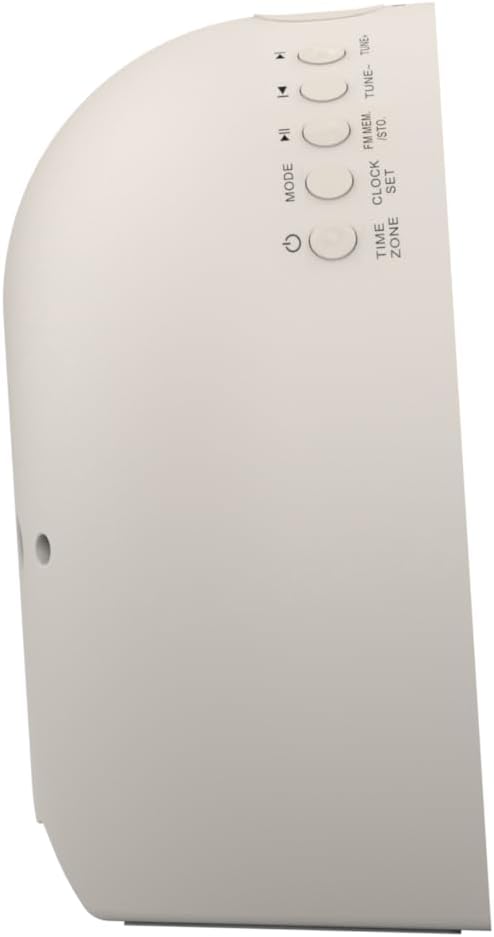
Ata 2: Itu view o le uati tatagi, ma fa'amamafaina ai ki e pulea ai galuega eseese.
The side panel houses the primary control buttons, including Power, Mode, Clock Set, Time Zone, Tune/Skip, and Volume controls. These buttons are used for setting time, alarms, and navigating audio functions.
4.3 Tua View

Ata 3: Tua view of the alarm clock, showing the speaker grille and power connection port.
The rear of the unit features the main speaker grille and the power input port for connecting the AC adapter.
5. Seti
5.1 So'oga Malosi
- Plug the AC power adapter into the DC IN jack located on the back of the unit.
- Plug the other end of the adapter into a standard wall outlet (AC 100-240V, 50/60Hz).
- E otometi lava le ola o le iunite.
5.2 SmartSet Automatic Time Setting
The SmartSet system automatically sets the correct time and date as soon as you plug in the unit. It also maintains time and alarm settings during power disruptions or outages, provided the button cell battery is installed.
5.3 Fa'apipi'iina o le Maa Fa'aleoleo
A button cell battery (CR2032, included) is required for battery backup. This ensures that time and alarm settings are retained during a power outage.
- Su'e le vaega o le maa i le pito i lalo ole iunite.
- Tatala le ufiufi o le vaega o maa.
- Insert one CR2032 button cell battery, ensuring the correct polarity (+/-).
- Tapuni lelei le ufiufi o le vaega o maa.
6. Fa'atonuga o Galuega
6.1 Setting the Clock Manually
- Oomi ma uu le Pusa seti faamau. O numera o le itula o le a emo.
- Fa'aaoga le TUNE -/+ faamau e fetuunai ai le itula. Tusitala Pusa seti e fa'amaonia.
- O le a emo mai numera o minute. Faaaoga le TUNE -/+ faamau e fetu'una'i ai minute. Oomi Pusa seti e fa'amaonia.
- Continue this process to set the year, month, and day.
- Tusitala Pusa seti again to exit time setting mode.
6.2 Fa'atulagaina o Fa'ailoilo (Fa'ailoilo 1 & Fa'ailoilo 2)
The unit features dual alarms. Follow these steps for each alarm:
- Oomi ma uu le FAʻAALIGA 1 or FAʻAALIGA 2 button. The alarm hour digits will flash.
- Fa'aaoga le TUNE -/+ buttons to adjust the alarm hour. Press the respective ALAGALO faamau e faamaonia ai.
- The alarm minute digits will flash. Use the TUNE -/+ buttons to adjust the alarm minutes. Press the respective ALAGALO faamau e faamaonia ai.
- Select the alarm source (Buzzer, FM Radio, or Soothing Sound). Press the respective ALAGALO faamau e faamaonia ai.
- Fetuuna'i le leo o le fa'ailo e fa'aaoga ai le VOL -/+ buttons. Press the respective ALAGALO faamau e faamaonia ai.
- The alarm is now set. The alarm indicator (AL1 or AL2) will appear on the display.
6.3 Sunrise Simulation
The sunrise simulation feature gradually brightens the light panel before your set alarm time, mimicking a natural sunrise to gently wake you.
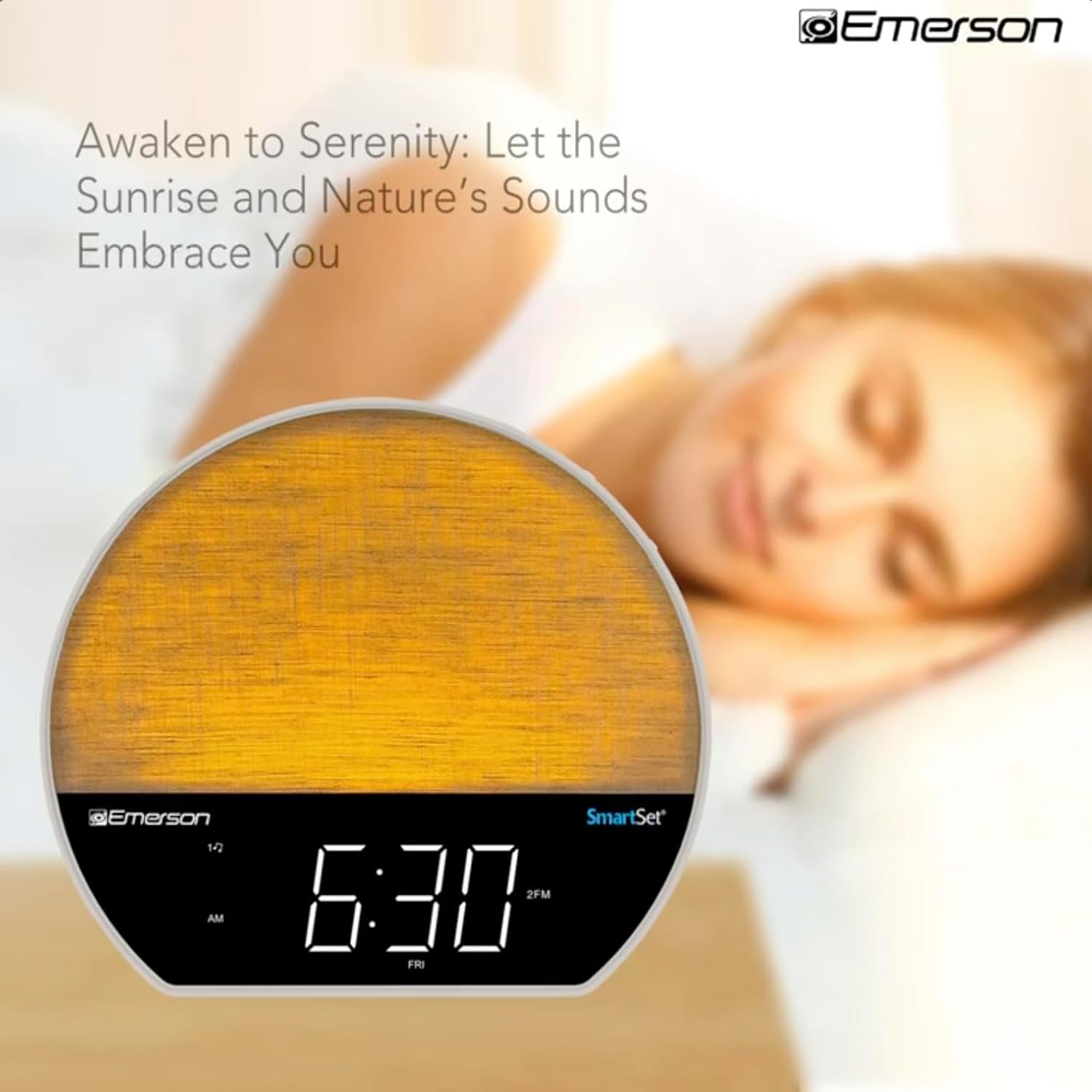
Ata 4: The alarm clock simulating a sunrise with a warm, increasing light intensity.
To activate, ensure the sunrise option is selected during alarm setup. The light will begin to brighten 30 minutes before the alarm sounds.
6.4 Soothing Sounds and White Noise
The unit includes 6 soothing sounds and white noise to help with relaxation or waking up.
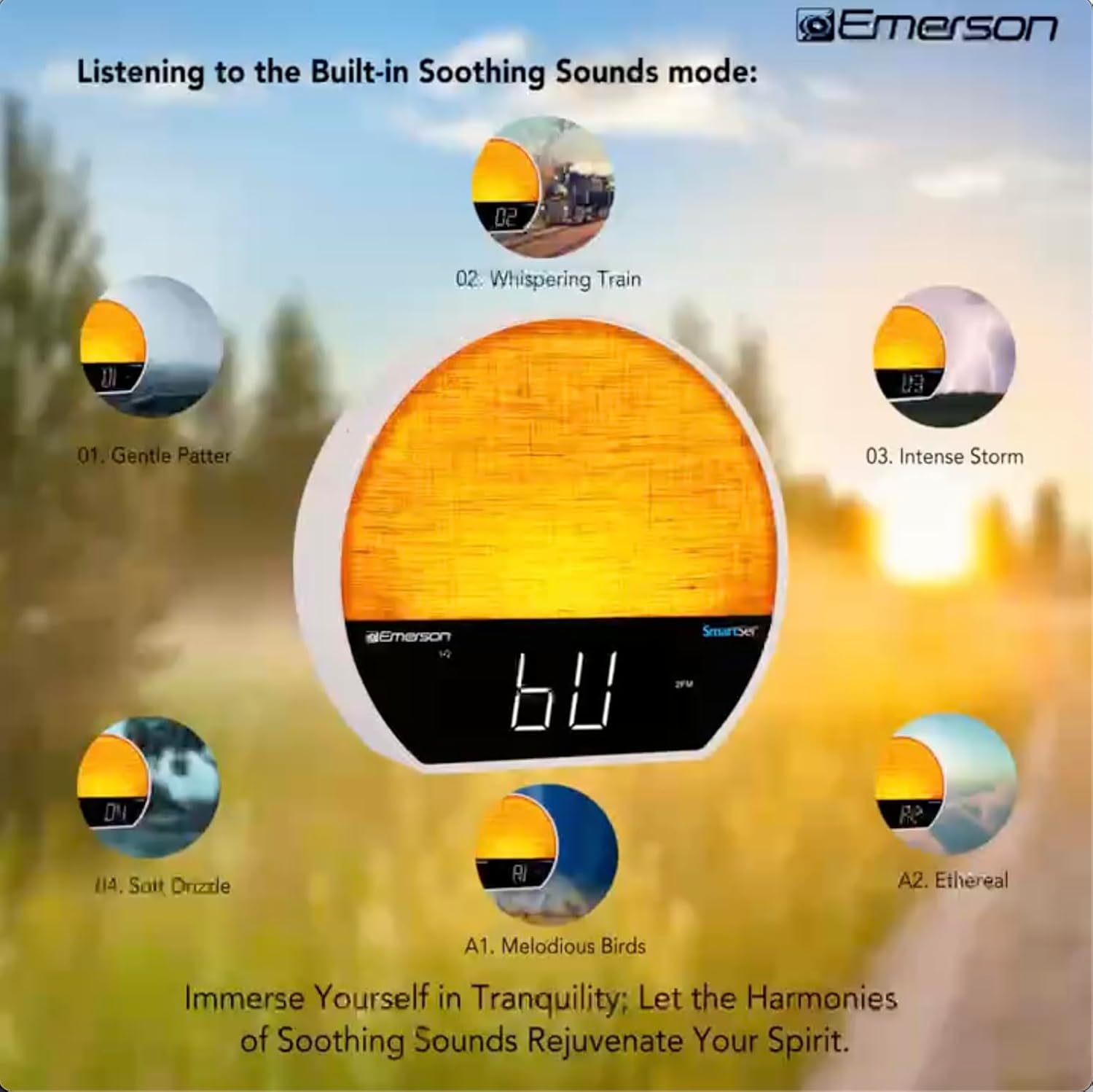
Ata 5: Visual representation of the six soothing sound modes available on the alarm clock.
- Oomi le TULAGA button repeatedly until the Soothing Sound mode is selected.
- Fa'aaoga le TUNE -/+ buttons to cycle through the available sounds (e.g., Gentle Patter, Whispering Train, Intense Storm, Soft Drizzle, Melodious Birds, Ethereal, White Noise).
- Fetuunai le leo e faaaoga ai le VOL -/+ faamau.
6.5 Galuega Fa'alogo Bluetooth
Fa'afeso'ota'i lau telefoni po'o isi masini e fa'aogaina ai le Bluetooth e fa'asolo ai leo leo.

Ata 6: The alarm clock in Bluetooth mode, paired with a mobile device for audio streaming.
- Oomi le TULAGA button until 'BT' appears on the display, indicating Bluetooth mode.
- On your device, enable Bluetooth and search for 'Emerson CKSS7071'.
- Select the device to pair. A confirmation tone will sound upon successful pairing.
- You can now play audio from your device through the alarm clock's speaker.
6.6 FM Leitio Galuega
Faalogologo i au leitio FM e te fiafia i ai.
- Oomi le TULAGA button until 'FM' appears on the display.
- Oomi le TUNE -/+ buttons briefly to manually tune to a station.
- Oomi ma uu le TUNE -/+ fa'amau e otometi lava ona su'esu'e mo le isi nofoaga o lo'o avanoa.
- To save a station, press and hold the FM MEM button until the preset number flashes. Use TUNE -/+ e filifili se numera ua uma ona setiina, ona oomi lea FM MEM toe faaola.
6.7 LED Decor and Dimmer Control
Customize the ambient light with 8 different colors and adjust the brightness.

Ata 7: The alarm clock demonstrating its 8-color dimmable LED decor options.
- Oomi le MALAMALAMA button to cycle through the 8 available colors or turn the light off.
- To adjust the brightness of the LED decor light, press and hold the MALAMALAMA button. The brightness will cycle through 5 levels. Release the button at your desired brightness.
6.8 Display Dimmer Control
Adjust the brightness of the 1.2-inch LED time display.

Ata 8: The alarm clock illustrating the five distinct levels of display luminescence.
Oomi le TAIMI button (often combined with another function, refer to button labels) to cycle through 4 levels of display brightness (Bright, Moderate, Dim, Faint).
6.9 Taimi moe
Set a timer for the audio to automatically turn off after a specified duration.

Ata 9: The alarm clock set for a sunset sleep timer, providing a harmonious end to the day.
- While audio is playing (FM or Soothing Sound), press the MOE faamau.
- Oomi soo le MOE button to cycle through available sleep timer durations (e.g., 15, 30, 60, 90 minutes, or OFF).
- The audio will automatically turn off after the selected time.
6.10 Faʻatino Galuega
A tatagi se faailo, oomi le SNOOSE faamau (e masani lava o se faamau tele i le pito i luga) e fa'agugu lemu le fa'ailo mo ni nai minute. O le a toe tatagi le fa'ailo pe a mae'a le ta'i.
7. Tausiga
7.1 Fa'amamāina
- Aveese i taimi uma le iunite mai le paoa a'o le'i faamamaina.
- Fa'aaogā se ie mālū ma mago e fa'amama ai fafo.
- Do not use liquid cleaners, abrasive cleaners, or chemical sprays, as these may damage the finish.
7.2 Suiga maa
Afai e le teuina le taimi ma le fa'atulagaga o le logo i le taimi e tape ai le eletisetage, the button cell backup battery may need to be replaced. Follow the instructions in section 5.3 to replace the CR2032 battery.
8. Faʻafitauli
| Fa'afitauli | Mafuaaga e ono tupu | Fofo |
|---|---|---|
| E le ola le iunite. | E le'o feso'ota'i pe faaletonu. | Ia mautinoa ua fa'apipi'i lelei le AC adapter i totonu o le masini ma se palaka eletise i le puipui o lo'o galue lelei. |
| Ua leiloa le setiina o le taimi/alarm ina ua uma ona tape le eletisetage. | Backup battery is dead or not installed. | Install or replace the CR2032 button cell battery (see section 5.3). |
| E le leo le faailo. | E le'o fa'agaoioia le fa'ailo pe ua maualalo tele le leo. | Ensure the alarm is set and activated (AL1/AL2 indicator on). Increase alarm volume. |
| O masini Bluetooth e le mafai ona fetaui. | Unit not in Bluetooth mode or device too far. | Ensure the unit is in Bluetooth mode ('BT' displayed). Move your device closer to the unit. Try unpairing and re-pairing. |
| Le lelei le taliaina o leitio FM. | E le'i fa'alauteleina pe fa'alavelaveina le antenna. | Extend the FM wire antenna fully and reposition it for better reception. Avoid placing near other electronic devices. |
| O le fa'aaliga e matua susulu/puupuu. | Display dimmer setting needs adjustment. | Oomi le TAIMI button to cycle through brightness levels (see section 6.8). |
9. Fa'amatalaga
| Fa'aaliga | Fa'amatalaga |
|---|---|
| Numera Fa'ata'ita'i | CKSS7071 |
| Punavai Malosi | AC 100-240V, 50/60Hz (via AC adapter) |
| Lagolago ma'a | 1 x CR2032 Button Cell Battery (included) |
| Fa'aaliga Ituaiga | 1.2-inch LED Display |
| Fa'aliliuga Bluetooth | V5.4 |
| Leo Faamafanafana | 6 Nature Sounds + White Noise |
| LED Decor Colors | 8 Dimmable Colors |
| Vaaiga Fua (W x D x H) | 7.09" x 3.15" x 6.37" |
| mamafa | E le o ta'ua |
10. Fa'amatalaga Fa'amaonia
Emerson products are manufactured to the highest quality standards. This product is covered by a limited warranty against defects in materials and workmanship for a period of one (1) year from the original date of purchase. This warranty does not cover damage caused by misuse, accident, unauthorized modification, or normal wear and tear. Proof of purchase is required for all warranty claims. Please retain your receipt.
11. Lagolago Tagata Fa'atau
If you have any questions, require assistance, or experience issues with your Emerson CKSS7071 Sunrise Smartset Alarm Clock Radio, please contact our customer support team.
- Webnofoaga: Asiasi i le Emerson aloaia webnofoaga mo FAQs ma punaoa lagolago.
- imeli: Va'ai i lau afifi oloa po'o le ofisa aloaia website for customer service email contact.
- Telefoni: Va'ai i lau afifi oloa po'o le ofisa aloaia web'upega tafa'ilagi mo numera telefoni a tagata fa'atau.
Please have your model number (CKSS7071) and proof of purchase ready when contacting support.