
1. Folasaga
This manual provides detailed instructions for the installation, operation, and maintenance of the Huacaoe Zigbee 1-Channel Intelligent Temperature Sensor Smart Switch (Model TYZGTH1CH-D1RF). This device combines a smart switch with a high-precision waterproof temperature probe, enabling remote monitoring and control of electrical appliances based on temperature. It requires a Tuya Zigbee hub for full functionality.
2. Oloa Ua Ovaview
2.1 Fa'amaumauga o Mea
- 1 x Huacaoe Zigbee 1CH Smart Switch
- 1 x 1-meter Waterproof DS18B20 Temperature Probe Sensor Cable
- 1 x Fa'atonuga Tusi Taiala (lenei pepa)
2.2 Vaega Autu
- Tulaga uaealesi: Zigbee 3.0 protocol for reliable connectivity.
- Paoa sapalai: AC 85-250V or USB 5V.
- Uta maualuga: 10A, 3000W.
- Su'esu'ega vevela: DS18B20 stainless steel waterproof probe.
- Fua Fa'atatau: -40°C to 80°C (device operating temp), -55°C to 125°C (probe measurement range).
- Pulea Mamao: Turn devices ON/OFF from anywhere via the Tuya Smart Life app.
- Temperature Automation: Automatically control appliances based on preset temperature ranges.
- Mata'ituina taimi moni: View current temperature and device status in the app.
- Pulea leo: Compatible with Amazon Alexa.
- Taimi Galuega: Schedule ON/OFF times, countdowns, and cycle timers.
- Mataituina Malosiaga: Monitor daily power consumption in the Tuya Smart Life app.
- Zigbee Repeater: Strengthens your Zigbee mesh network.
2.3 Ata o oloa
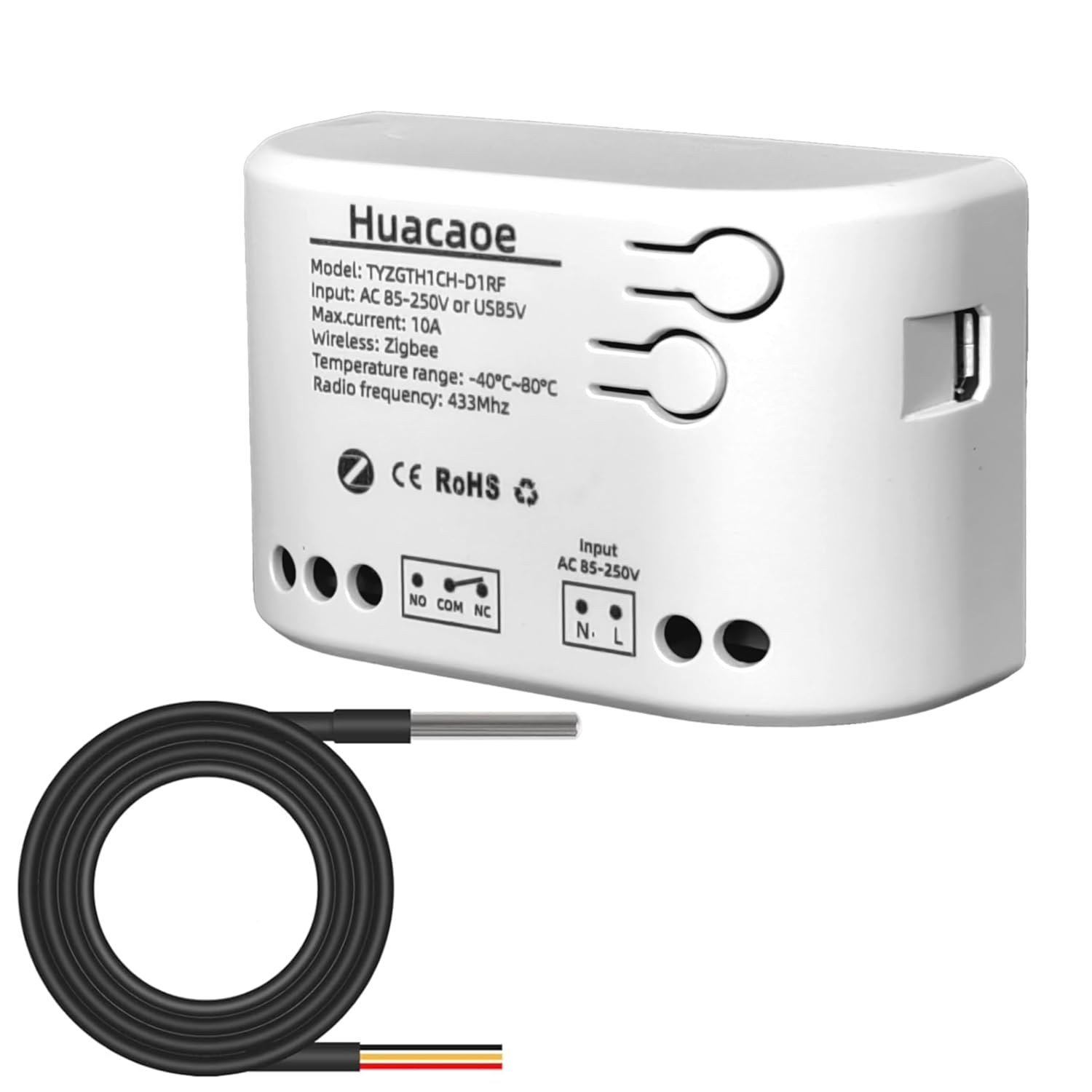
Ata 1: Huacaoe Zigbee 1CH Smart Switch and included waterproof temperature probe. The switch features input terminals for AC 85-250V or USB 5V, output terminals (NO, COM, NC), and a port for the temperature sensor.
Ata 2: Latalata view of the waterproof stainless steel temperature sensor probe. It has a measurement range of -55°C to 125°C and operates at 3.0-5.5V.
3. Fa'amatalaga Saogalemu
- Saogalemu Faaeletise: Installation should be performed by a qualified electrician or individuals with knowledge of electrical wiring. Always turn off power at the circuit breaker before performing any wiring.
- Voltagu Fesoasoani: Ia mautinoa le sapalai eletise voltage (AC 85-250V or USB 5V) matches the device's requirements.
- Uta maualuga: Do not exceed the maximum load current of 10A or 3000W to prevent damage to the device and potential hazards.
- Siosiomaga: Do not expose the main switch unit to water or extreme humidity. The temperature probe is waterproof, but the main unit is not.
- Tamaiti: Taofi le masini mai le aapa atu i tamaiti.
4. Seti
4.1 Fa'atonuga uaea
The Huacaoe Smart Switch can be powered by AC 85-250V or USB 5V. The output terminals (NO, COM, NC) allow for flexible control of connected appliances.
- Tapē le eletise: Before any wiring, ensure the main power supply is turned off at the circuit breaker.
- Feso'ota'i le Malosiaga Fa'aoga:
- For AC 85-250V: Connect the Live wire to the 'L' terminal and the Neutral wire to the 'N' terminal.
- For USB 5V: Connect a micro USB cable to the USB port on the side of the device.
- Feso'ota'i Meafaigaluega:
- To control an appliance (e.g., a light bulb), connect the Live wire from the power supply to the 'COM' (Common) terminal.
- Connect one wire from the appliance to the 'NO' (Normally Open) terminal for standard ON/OFF control. When the switch is activated, the circuit between COM and NO will close.
- Alternatively, use the 'NC' (Normally Closed) terminal if you require the circuit to be closed by default and open when the switch is activated.
- Connect the other wire from the appliance to the Neutral wire of the power supply.
- Feso'ota'i Su'esu'ega Temperature: Insert the 3-pin connector of the DS18B20 temperature probe into the dedicated port on the switch.
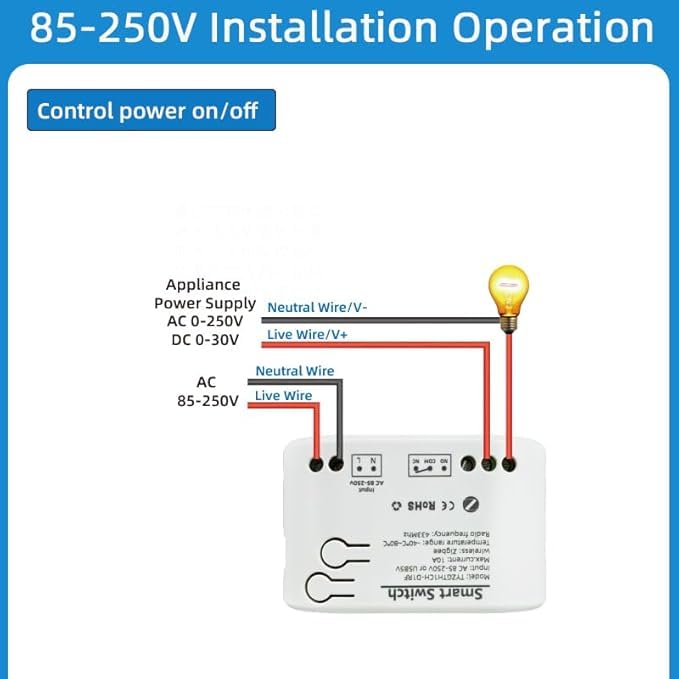
Ata 3: Wiring diagram illustrating how to connect the Huacaoe Smart Switch to an AC 85-250V power supply and an appliance for ON/OFF control.
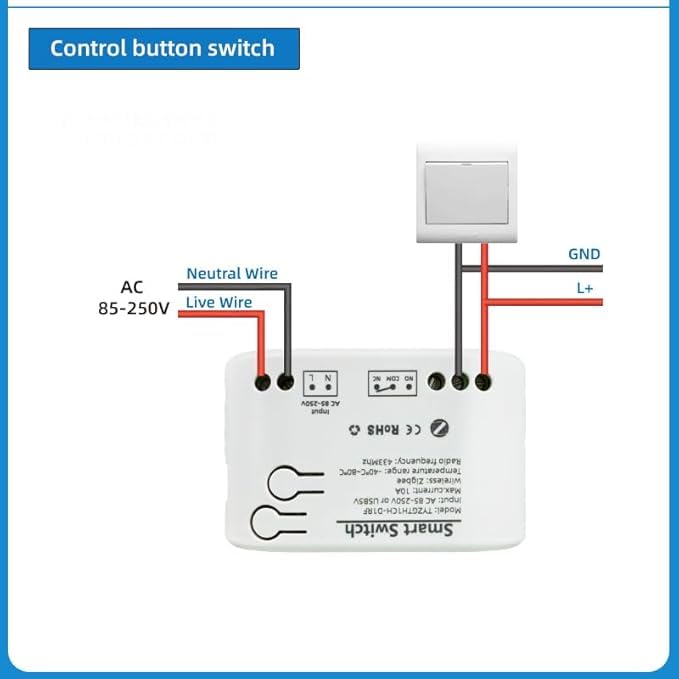
Ata 4: Wiring diagram showing how to connect an external control button switch to the Huacaoe Smart Switch.
4.2 Pairing with Tuya Smart Life App
The Huacaoe Smart Switch requires a Tuya Zigbee hub (sold separately) to connect to the Tuya Smart Life app.
- Install Tuya Smart Life App: Download and install the "Tuya Smart Life" app from your smartphone's app store (iOS or Android). Register or log in to your account.
- Add Zigbee Hub: If you haven't already, add your Tuya Zigbee hub to the app.
- Ulufale Pairing Mode: Power on the Huacaoe Smart Switch. Press and hold the pairing button on the switch (refer to device for exact location, usually a small button) until the indicator light flashes rapidly.
- Fa'aopoopo le masini ile App: Open the Tuya Smart Life app, go to your Zigbee hub, and select "Add sub-device" or "Add device". The app will scan for nearby Zigbee devices.
- Fa'amaonia le Fa'atasi: Once the switch is discovered, confirm its addition in the app. You may need to rename the device for easier identification.
- Latalata: For best results during pairing, place the switch close to your Zigbee hub.
5. Galuega
5.1 App Interface and Control
After successful pairing, you can control and monitor the device through the Tuya Smart Life app.
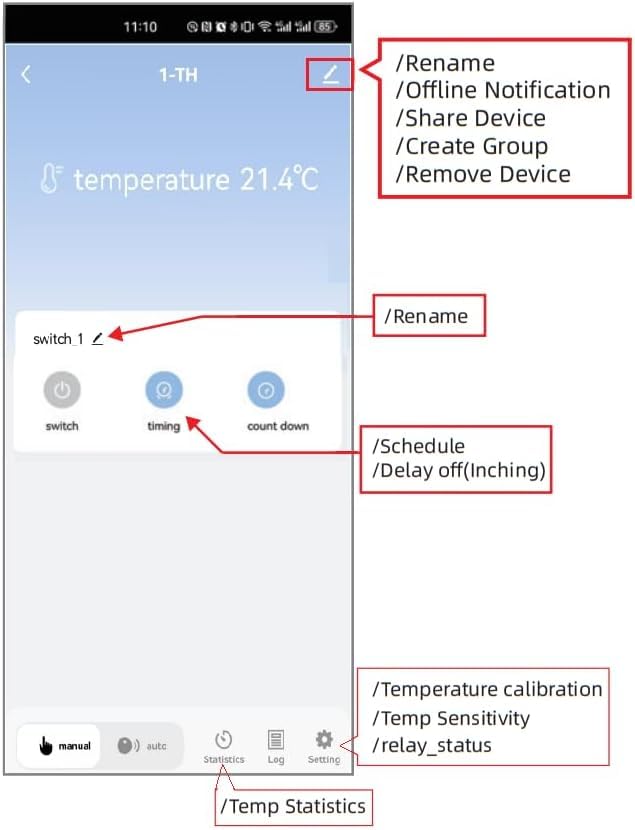
Ata 5: Screenshot of the Tuya Smart Life app interface for the temperature sensor switch. It shows current temperature, switch control, timing options, and settings for calibration and sensitivity.
- Mamao ON/OFF: Tap the "switch" button in the app to manually turn the connected appliance on or off.
- Mata'ituina le vevela: The app displays the current temperature detected by the probe. You can switch between Celsius (°C) and Fahrenheit (°F).
- Faiga taavale: Set specific temperature thresholds to automatically turn the appliance ON or OFF. For example, turn on a heater if the temperature drops below 18°C, or turn on a fan if it exceeds 25°C.
- Faiga Tusia: Override automatic settings and control the switch manually.
- Su'ega o le vevela: Adjust the temperature reading for accuracy if needed, found in the settings.
- Ma'ale'ale vevela: Configure how sensitive the device is to temperature changes before triggering actions.
- Fa'amaumauga: View historical temperature data and power consumption.

Ata 6: Illustration of the app's remote monitoring and control capabilities, demonstrating how it can manage heating and cooling based on temperature thresholds (e.g., 20°C for heating, 30°C for cooling).
5.2 Galuega Fa'atino Taimi
The app allows you to set various timing functions for automated control.

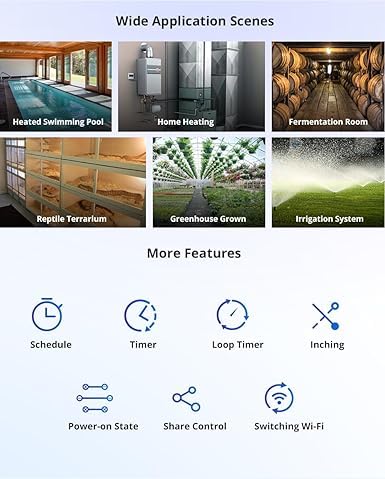
Ata 7: Examples of devices that can be controlled using the timing function, such as humidifiers, fish tanks, kettles, and lamps.
- Fa'asologa: Set specific times for the switch to turn ON or OFF daily or on selected days of the week.
- Faitauga: Set a timer for the switch to turn ON or OFF after a specified duration.
- Taimi Ta'amilosaga: Configure the switch to repeatedly turn ON and OFF at set intervals.
5.3 Pulea leo
Once configured with the Tuya Smart Life app, the device can be linked to Amazon Alexa for voice control. Follow the instructions within the Tuya Smart Life app to connect to your Alexa account.
6. Tausiga
- Fa'amamaina: Wipe the main switch unit with a dry, soft cloth. Do not use harsh chemicals or abrasive cleaners.
- Tausiga Su'esu'e: The stainless steel temperature probe is waterproof and can be submerged. Ensure the cable is not kinked or damaged.
- Faʻalauiloa Firmware: Periodically check the Tuya Smart Life app for any available firmware updates for the device to ensure optimal performance and security.
7. Faʻafitauli
- E le o Feso'ota'i le Masini:
- Ensure a Tuya Zigbee hub is powered on and connected to your network.
- Place the smart switch close to the Zigbee hub during pairing.
- Confirm the switch is in pairing mode (indicator light flashing rapidly).
- Check your Wi-Fi network for stability.
- No Temperature Reading in App:
- Ensure the temperature probe is securely connected to the switch.
- Verify the device is correctly added to the Tuya Smart Life app.
- For advanced users integrating with Home Assistant or other platforms, a specific "ZHA quirk" or custom integration might be required to display temperature data. Search relevant community forums for "TYZGTH1CH-B1RF ZHA quirk" for guidance.
- Device Does Not Respond After Power Cycle:
- Some units may require a manual button press to resume operation after a power outage or unplugging. If this occurs, consider the placement of the device for easy access.
- Appliance Not Turning ON/OFF:
- Check all wiring connections for security and correctness (refer to Section 4.1).
- Ensure the appliance itself is functional and properly connected.
- Verify the switch is receiving power.
- Check the maximum load (10A/3000W) is not exceeded.
- Faitauga o le vevela le sa'o:
- Use the temperature calibration feature in the Tuya Smart Life app settings to adjust the reading.
- Ensure the probe is placed in a location representative of the temperature you wish to measure and away from direct heat sources or drafts that could skew readings.
8. Fa'amatalaga
| Parameter | Taua |
|---|---|
| Numera Fa'ata'ita'i | TYZGTH1CH-D1RF |
| Paoa sapalai | AC 85-250V or USB 5V |
| Faʻasalalauga Lelei | Zigbee 3.0 |
| Max. I le taimi nei | 10A |
| Max. Malosiaga | 3000W |
| Operating Temperature (Device) | -40°C i le 80°C |
| Ituaiga Su'esu'e vevela | DS18B20 Waterproof Stainless Steel |
| Temperature Probe Measurement Range | -55°C i le 125°C |
| Temperature Probe Operating Voltage | 3.0-5.5V |
| Fua o Mea | 2.8 x 1.8 x 1.1 inisi (7.1 x 4.6 x 2.8 cm) |
| mamafa | 1.76 aunese (50g) |
9. Fa'amaonia ma Lagolago
For warranty information and technical support, please refer to the official Huacaoe web'upega tafaʻilagi pe faʻafesoʻotaʻi lau faioloa. Taofi lau lisiti faʻatau e fai ma faʻamaoniga o le faʻatau.