
1. Folasaga
This manual provides detailed instructions for the installation, operation, and maintenance of your Stinger Audio MT-1000.1M 1-Channel Monoblock Marine Audio Subwoofer Amplifier. Please read this manual thoroughly before attempting installation or operation to ensure proper use and to prevent damage to the unit or your audio system. Keep this manual for future reference.
2. Oloa Ua Ovaview
The Stinger Audio MT-1000.1M is a high-efficiency Class-D monoblock amplifier designed for marine environments. It delivers 1000 Watts RMS of power, optimized for subwoofer applications. Its robust, water-resistant design ensures reliable performance in challenging conditions.
Vaega Autu:
- Digital Class-D Monoblock Ampola: High efficiency and compact form factor.
- Fuafuaga Ma'oti ma Malosi: Built for lasting reliability.
- Robust Unregulated Power Supplies: Designed for superior performance and efficiency.
- Advanced HEXFET Power MOSFET: Features reduced on-resistance, faster switching speeds, and enhanced reliability.
- Direct Insert Power and Speaker Terminals: Decreased resistance for higher power transfer and efficiency.
- Fuafuaga Tetee Suavai: Puipuia le amplifier against weather elements for uninterrupted performance.
- Bass Boost Q: Adjustable bass boost from 0dB to 12dB at a selected frequency.
- Remote Bass Knob Included: Flush-mount design for effortless bass level adjustment.

3. Fa'amatalaga Saogalemu
Ia matau i taimi uma ia puipuiga malu:
- Disconnect the vehicle's negative battery terminal before any installation.
- Ia mautinoa ua lelei le fa'a'ele'eleina o le chassis o le ta'avale.
- Faaaoga uaea talafeagai mo feso'ota'iga o le eletise, eleele, ma le sipika.
- Fa'apipi'i le amplifier in a well-ventilated area, away from direct heat sources.
- Aloese mai le faapipiiina o le amplifier in locations where it may be submerged in water, despite its water-resistant rating.
- Fa'afeso'ota'i se tagata fa'apipi'i fa'apolofesa pe afai e te le mautinoa e uiga i so'o se vaega o le fa'apipi'iina.
4. O a mea oi totonu o le Pusa
Fa'amautinoa o lo'o iai mea uma a'o le'i amata fa'apipi'i:
- 1000 Watt Monoblock Amplifier (MT-1000.1M)
- Remote Level Control (Bass Knob)
- Fa'apipi'i Meafaigaluega
- Tusi Taiala
5. Fa'ailoga Fa'ailoga
Faamasani oe lava i le amplifier's controls and connections.

5.1 Control Panel (Input Side)

- POWER/PRT/CLIP Indicators: LEDs indicating power status, protection mode, and signal clipping.
- REMOTE Port: RJ11 connection for the included remote bass level control.
- INPUT (RCA): Audio input from your head unit or source.
- BRIDGE IN/OUT (RCA): For linking multiple amplifi
- GAIN Pulea: Adjusts the input sensitivity to match the output of your source unit.
- LPF (Low-Pass Filter) Control: Adjusts the upper frequency limit for the subwoofer. Range: 40Hz - 180Hz.
- SUBSONIC Filter: Removes ultra-low frequencies below the audible range to protect the subwoofer. Range: OFF - 50Hz.
- FREQ (Bass Boost Frequency) Control: Selects the center frequency for the bass boost. Range: 30Hz - 80Hz.
- BOOST (Bass Boost Level) Control: Adjusts the level of bass boost. Range: 0dB - 12dB.
5.2 Terminal Panel (Output Side)

- GND (Ground) Terminal: Connects to the vehicle's chassis ground.
- REM (Remote) Terminal: Connects to the remote turn-on lead from your source unit.
- +12V (Power) Terminal: Connects to the positive terminal of the vehicle's battery via an inline fuse.
- MONO OUTPUT (Speaker Terminals): Connects to your subwoofer(s). Minimum impedance 1 Ohm.
6. Fa'apipi'i
Proper installation is crucial for optimal performance and safety. Ensure all connections are secure and correctly polarized.
6.1 Faʻaputuga Nofoaga
Choose a mounting location that is secure, provides adequate ventilation, and is protected from excessive moisture. While the amplifier is water-resistant, direct exposure to heavy water spray or submersion should be avoided.

6.2 Feso'ota'iga Uaea
- Malosiaga (B+): Connect a 4-gauge power cable from the +12V terminal of the amplifier directly to the positive terminal of the vehicle's battery. Install an appropriate inline fuse (100A recommended) within 18 inches of the battery.
- Eleele (GND): Connect a 4-gauge ground cable from the GND terminal of the amplifier to a clean, bare metal point on the vehicle's chassis. Ensure a solid, low-resistance connection.
- Mamao (REM): Connect a 18-gauge remote turn-on wire from the REM terminal of the amplifier to the remote output of your head unit.
- RCA Ulufale: Connect RCA cables from the subwoofer output of your head unit to the INPUT RCA jacks on the ampola
- Galuega Fa'atino: Connect your subwoofer(s) to the MONO OUTPUT terminals. Ensure the total impedance is not below 1 Ohm. Observe correct polarity (+ to + and - to -).
- Kipi Bass Mamao: Connect the remote bass knob to the REMOTE port on the amplifier using the provided cable.
7. Galuega
After installation, follow these steps to configure and operate your ampola
7.1 Seti Muamua ma le Fetuunaiga o le Gain
- Liliu le pulea o le GAIN i le amplifer i lona tulaga maualalo (faasaga i le itu taumatau).
- Seti le leo o lau head unit i le pe ā ma le 75% o lona maualuga maualuga.
- Play a dynamic piece of music with strong bass content.
- Fa'ateleina malie le pulea o le GAIN i luga o le amplifier until you hear distortion, then back it off slightly until the sound is clear. The CLIP indicator should not illuminate continuously.
7.2 Crossover and Filter Settings
- LPF (Fa'amama Maualalo): Adjust the LPF control to set the upper frequency limit for your subwoofer. A common starting point is 80Hz-100Hz, but this may vary depending on your subwoofer and other speakers in your system.
- SUBSONIC Filter: Set the SUBSONIC filter to protect your subwoofer from playing frequencies below its resonant frequency. A common setting is 25Hz-30Hz, or slightly below your subwoofer's tuning frequency if it's in a ported enclosure. If you have a sealed enclosure, you may set it to OFF or a very low frequency.
7.3 Fa'aola Bass
- FREQ (Bass Boost Frequency): Select the frequency at which you want the bass boost to be centered. This is typically between 30Hz and 80Hz, depending on the desired effect.
- BOOST (Bass Boost Level): Adjust the level of boost from 0dB to 12dB. Use this sparingly to avoid distortion and potential damage to your subwoofer.
7.4 Remote Bass Knob
The remote bass knob allows for convenient adjustment of the subwoofer output level from your listening position. It acts as a master volume for the subwoofer channel, allowing you to increase or decrease the bass intensity without affecting other ampfa'atonuga lifi.
8. Tausiga
O le tausiga masani e fesoasoani e faʻamautinoa ai le umi ma le faʻatinoga o lau ampola
- Fa'amamaina: Ta'i ma solo le amppito i fafo ma se ie vaivai ma mago. Aloese mai le fa'aaogaina o vaila'au malolosi po'o ni mea e fa'amama ai.
- Siaki So'oga: Annually inspect all power, ground, remote, and speaker connections for corrosion or looseness. Tighten as necessary.
- Savili: Ia mautinoa o le ampE leai ni mea e fa'alavelave ai apa'au fa'amālūlū o le lifier ina ia mafai ai ona fa'asalalauina lelei le vevela.
9. Faʻafitauli
Afai e te feagai ma faʻafitauli i lau amplifier, va'ai i fa'afitauli masani ma fofo.
| Fa'afitauli | Mafuaaga e ono tupu | Fofo |
|---|---|---|
| Leai se Malosiaga / Tape le LED Malosiaga | Blown fuse, loose power/ground/remote wire, no remote signal. | Check inline fuse, verify all power connections, ensure head unit remote output is active. |
| Pupuni le LED Puipuiga | Pu'upu'u le matagaluega o le sipika, maualalo tele le impedance, vevela tele, DC offset. | Check speaker wiring for shorts, verify speaker impedance, ensure adequate ventilation, disconnect speakers and test. |
| Leai se fa'alogo leo | No input signal, incorrect gain setting, speaker wires disconnected. | Check RCA connections, adjust gain, verify speaker connections. |
| Leo Misē | Gain set too high, improper crossover settings, poor ground connection. | Reduce gain, adjust LPF/Subsonic filters, check ground wire for secure connection. |
10. Fa'amatalaga
Detailed technical specifications for the Stinger Audio MT-1000.1M ampola
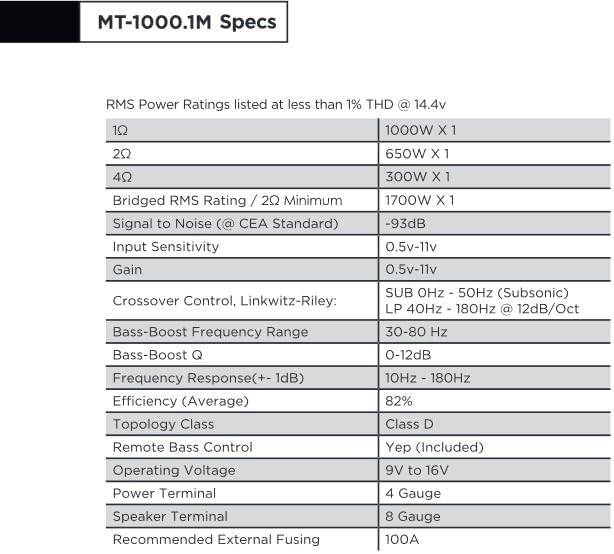
| Fa'aaliga | Fa'amatalaga |
|---|---|
| RMS Malosi (1Ω) | 1000W x 1 |
| RMS Malosi (2Ω) | 650W x 1 |
| RMS Malosi (4Ω) | 300W x 1 |
| Bridged RMS Rating (2Ω Minimum) | 1700W x 1 |
| Signal to Noise (CEA Standard) | -93dB |
| Ma'ale'ale Fa'aofi | 0.5V - 11V |
| Manuia | 0.5V - 11V |
| Crossover Control (Linkwitz-Riley) | SUB 0Hz - 50Hz (Subsonic), LP 40Hz - 180Hz @ 12dB/Oct |
| Bass-Fa'aoso Fa'asa'o Va'aiga Fa'atele | 30Hz - 80Hz |
| Bass-Boost Q | 0 - 12dB |
| Tali Faatele (+/- 1dB) | 10Hz - 180Hz |
| Lelei (Vaave) | 82% |
| Vasega Topology | Vasega D |
| Pulea Bass Mamao | Ioe (E aofia ai) |
| Faagaioiga Voltage | 9V i le 16V |
| Mana tigaina | 4 Faʻamasinoga |
| Faletalimalo | 8 Faʻamasinoga |
| Fautuaina Fa'atasi Fafo | 100A |
| Mea mamafa | 6.14 pauna |
| Fuafuaga Mea | 14.5 x 7.8 x 3.2 inisi |
| Aso Muamua Maua | Mati 13, 2024 |
| Tufuga | TULAGA |
11. Fa'amaonia ma Lagolago
11.1 Fa'amatalaga Fa'amaonia
The Stinger Audio MT-1000.1M ampliifier e sau ma a 1 Tausaga Fa'amaonia from the date of purchase. Please retain your proof of purchase for warranty claims. The warranty covers manufacturing defects and workmanship under normal use. It does not cover damage caused by improper installation, accident, misuse, abuse, neglect, or unauthorized modification.
11.2 Fesoasoani mo Tagata Fa'atau
For technical assistance, troubleshooting, or warranty inquiries, please contact Stinger Audio customer support. You can find more information and contact details by visiting the official STINGER brand store: