
1. Folasaga
Thank you for choosing the Gosund SP111 Smart WiFi Plug. This device allows you to control your electronic appliances remotely via a smartphone application or voice commands, and to set schedules for automated operation. Please read this manual carefully before use to ensure proper installation and operation.
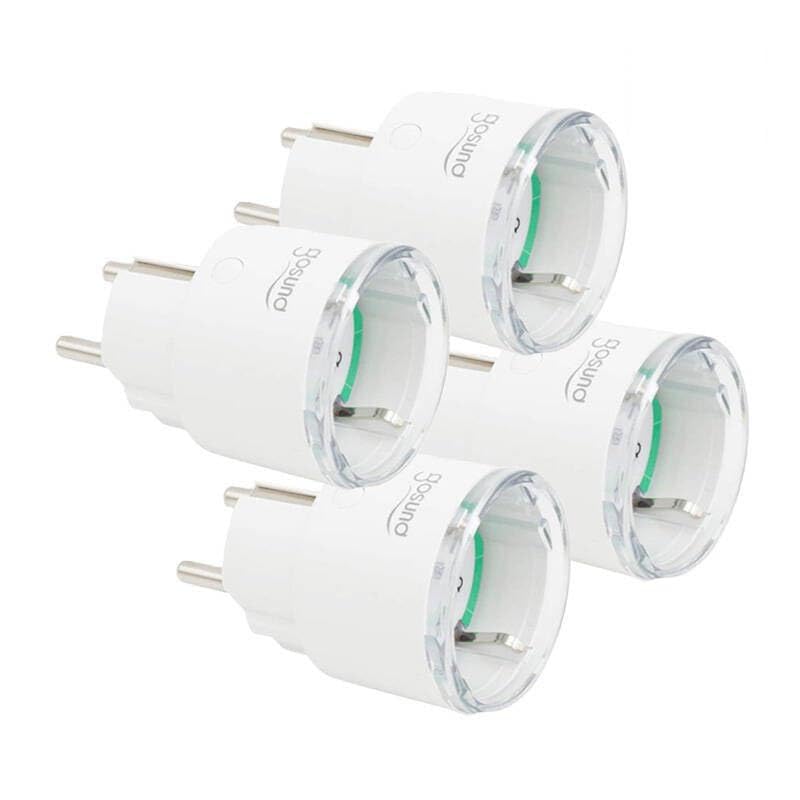
This image displays four white Gosund SP111 Smart WiFi Plugs. Each plug features a standard European Type F (Schuko) plug on one side and a corresponding socket on the other, with the Gosund logo printed on the side. A small indicator light and a button are visible on the top surface of each plug.
2. Fa'amatalaga Saogalemu
- Do not exceed the maximum load current of 16A or power of 3680W.
- Aua le talepe pe suia le masini.
- Keep the device away from water, moisture, and high temperatures.
- Mo na'o totonu ole fa'aoga.
- Ensure the plug is fully inserted into the wall socket.
- Do not connect appliances that could cause a fire hazard if left unattended (e.g., irons, heaters).
3. Mea i totonu o le afifi
O le afifi e aofia ai mea nei:
- 4 x Gosund SP111 Smart WiFi Plugs
- 1 x User Manual (lenei pepa)
4. Oloa Ua Ovaview
Familiarize yourself with the components of your Gosund SP111 Smart WiFi Plug:
- Ki Malosi: Press to manually turn the plug on/off. Press and hold for 5 seconds to enter pairing mode.
- Fa'ailoga moli: Indicates the status of the plug (e.g., solid blue for ON, flashing blue for pairing mode, off for OFF).
- Type F (Schuko) Socket: Mo le fa'afeso'ota'iina o lau masini.
- Type F (Schuko) Plug: For inserting into a wall outlet.
5. Seti
5.1 La'u mai le App
The Gosund SP111 Smart WiFi Plug works with the Tuya Smart or Smart Life app. Download the app from the App Store (iOS) or Google Play Store (Android).
- Saili mo "Tuya Smart" or "Smart Life".
- Fa'apipi'i le app ma resitala se teugatupe.
5.2 Faʻaopopo meafaitino
- Plug the Gosund SP111 Smart WiFi Plug into a wall outlet.
- The indicator light should flash rapidly (approximately twice per second), indicating it's in pairing mode. If not, press and hold the power button for 5 seconds until it flashes rapidly.
- Tatala le Tuya Smart po'o le Smart Life app.
- Tap le "+" icon i le tulimanu pito i luga taumatau e faʻaopoopo ai se masini.
- Select "Electrical Outlet" or "Socket (Wi-Fi)".
- Confirm that the indicator light is flashing rapidly.
- Enter your 2.4 GHz Wi-Fi network password (5 GHz Wi-Fi is not supported).
- Wait for the device to connect. Once connected, you can rename the plug.
6. Faʻagaioiga
6.1 Pulea Tusia
Press the power button on the plug to manually turn the connected appliance on or off.
6.2 Puleaina o App
- Mamao Ki/Pepe: Tap the plug icon in the app to turn it on or off from anywhere.
- Fa'atulagaina: Set timers or schedules for the plug to turn on or off automatically at specific times.
- Faitauga: Set a countdown timer for the plug to turn off after a set duration.
- Mataituina Malosiaga: (If supported by the specific SP111 variant) View real-time and historical power consumption.
6.3 Pulea leo
The Gosund SP111 Smart WiFi Plug can be integrated with voice assistants like Amazon Alexa and Google Assistant via the Tuya Smart or Smart Life app. Follow the instructions within the app to link your smart home assistant account.
- Example tulafono:
- "Alexa, turn on [Plug Name]"
- "Hey Google, turn off [Plug Name]"
7. Tausiga
- Aveese le masini a'o le'i fa'amamā.
- Solo le mea i se ie vaivai ma mago. Aua le fa'aaogaina ni vai fa'amama po'o ni mea e olo ai.
- Teu i se nofoaga malulu ma mago pe a le faʻaaogaina mo se taimi umi.
8. Faʻafitauli
| Fa'afitauli | Fofo |
|---|---|
| Plug cannot connect to Wi-Fi. |
|
| Pepe moli fa'ailoga. |
|
| Appliance connected to the plug does not turn on. |
|
9. Fa'amatalaga
| Fa'ata'ita'iga: | SP111-4 |
| Sao Voltage: | AC 230V, 50/60Hz |
| Max Uta i le taimi nei: | 16A |
| Malosi maualuga: | 3680W |
| Ituaiga uaealesi: | Wi-Fi 2.4GHz (802.11 b/g/n) |
| Polokalama Lagolago: | Tuya Smart / Smart Life |
| Tempera galue: | 0°C i le 40°C (32°F i le 104°F) |
10. Fa'amaonia ma Lagolago
Gosund products are designed and manufactured to the highest quality standards. For warranty information and technical support, please refer to the official Gosund web'upega tafaʻilagi pe faʻafesoʻotaʻi lau faioloa. Taofi lau lisiti faʻatau e fai ma faʻamaoniga o le faʻatau.
Mo nisi fesoasoani, fa'amolemole asiasi: www.gosund.com/support