
Folasaga
This manual provides instructions for the Ceybo 3026000066 Remote Control, designed for use with Onn Roku Smart TVs. This remote offers an intuitive layout and simple button configuration for ease of use. It is a direct replacement and requires no programming.

Luma view of the Ceybo 3026000066 remote control, showing its ergonomic design and button layout.
Seti
Fa'apipi'i ma'a
The Ceybo 3026000066 remote control requires two AAA batteries (not included) for operation. Follow these steps to install the batteries:
- Su'e le ufiufi o le vaega o maa i tua o le masini mamao.
- Oomi i lalo le fa'ailoga ma fa'ase'e le ufiufi i lalo e tatala ai le vaega.
- Fa'aofiofi maa fou AAA se lua, ia mautinoa le fetaui lelei (+) ma le leaga (-) ma fa'ailoga i totonu o le vaega.
- Toe fa'asolo le ufiufi o le vaega o le maa i le tulaga se'ia o'o lelei.
Fa'aaliga: This remote control does not require any programming or pairing. Once batteries are installed, it is ready for use with compatible Onn Roku Smart TVs.
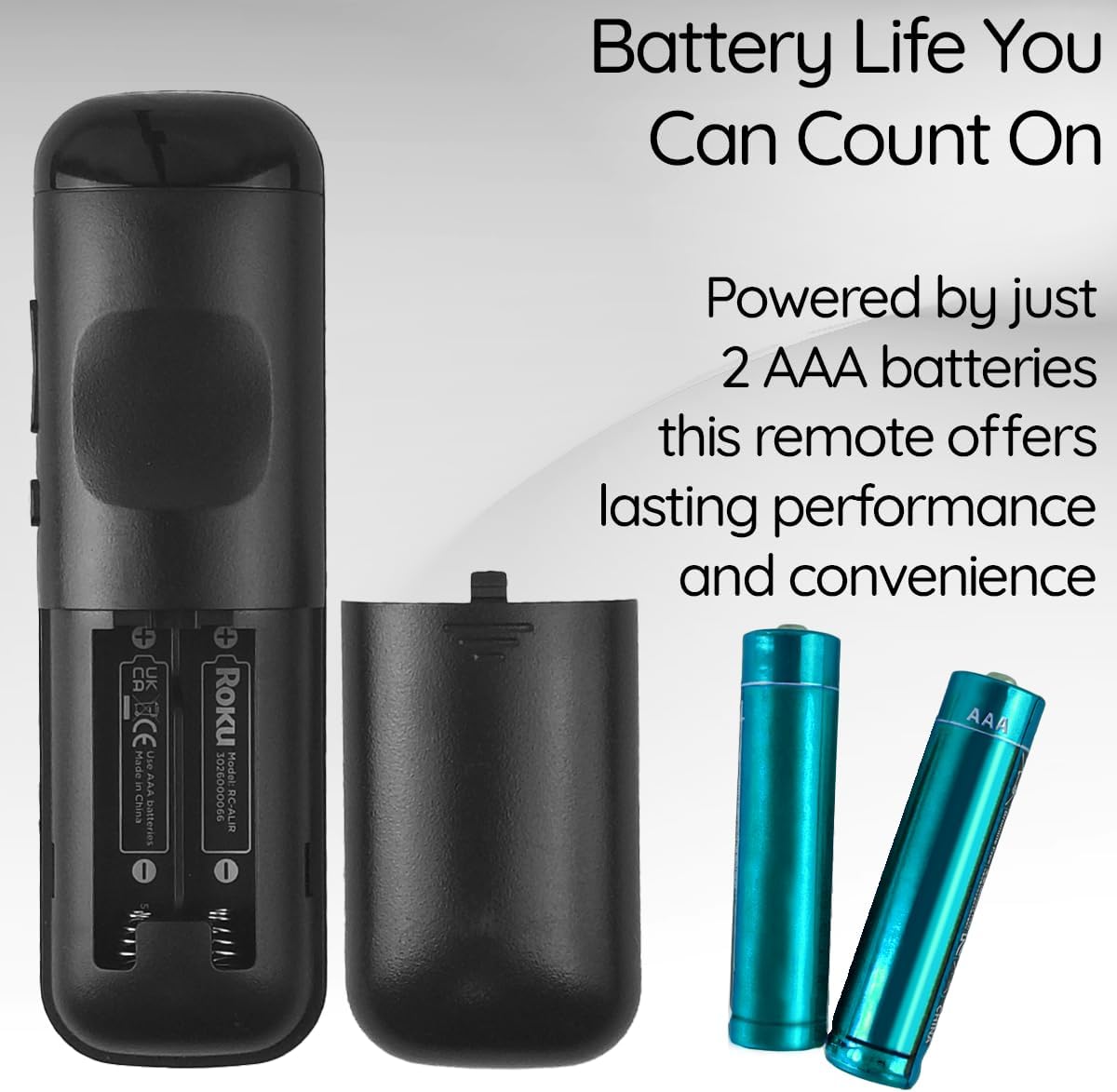
View of the remote control's battery compartment, indicating the use of two AAA batteries.
Fa'atonuga o Galuega
The Ceybo 3026000066 remote control features a user-friendly design with clearly labeled buttons for easy navigation and quick access to your entertainment options.
Galuega Autu:
- Ki Malosi: Ki pe tape le TV.
- Directional Pad (Up, Down, Left, Right) & OK Button: Su'e menus ma filifili filifiliga.
- Ki tua: Toe fo'i i le lau muamua po'o le lisi.
- Ki Fale: Toe foʻi i le lau autū o le Roku.
- Volume i luga/lalo: Fa'atonu le leo o le TV.
- Faʻamau faʻamau: Gūgū pe fa'atala le leo o le TV.
- Play/Pause, Fast Forward, Rewind: Faʻatonutonu le toe taina o faʻasalalauga.
- Fa'amau Fetu (*): Accesses options within certain apps or menus.
Fa'amau Pupuu Fa'apitoa:
This remote includes dedicated shortcut buttons for popular streaming services, allowing for instant access with a single press:
- Netflix
- Fa'asilisili +
- Apple TV
- HBOMax

Latalata view of the remote control highlighting the dedicated shortcut buttons for Netflix, Paramount+, Apple TV, and HBOMax.
Fegalegaleaiga
The Ceybo 3026000066 Remote Control is compatible with the following Onn Roku Smart TV models:
- 100005843
- 100007147
- 100012586
- 100005397
- 100018971
- 100005844
- 100024699
- 100012587
- 100021261
- 100012588
- 100012590
- 100012589
- 100005395
- 100005842
- 100068372
- 100018254
- 100012584
- 100012585
- 100021258
- 100005396
Taua: O lenei pulea mamao e le fetaui with Roku Box or Roku Stick devices.

Image illustrating the Ceybo remote control alongside various Onn Roku Smart TV models, indicating broad compatibility.
Tausiga
To ensure optimal performance and longevity of your remote control, consider the following maintenance tips:
- Suiga maa: Replace both AAA batteries when the remote's responsiveness decreases or it stops functioning. Always replace both batteries at the same time with new ones.
- Fa'amamaina: Use a soft, dry cloth to clean the remote's surface. Avoid using liquid cleaners or abrasive materials, as these can damage the remote.
- Teuina: Store the remote in a dry place away from extreme temperatures and direct sunlight. If the remote will not be used for an extended period, remove the batteries to prevent leakage.
Fa'afitauli
If you encounter issues with your Ceybo 3026000066 remote control, try the following troubleshooting steps:
- Mamao Le Tali:
- Siaki pe ua sa'o le fa'aofiina o maa ma le polarity sa'o (+/-).
- Replace the batteries with new AAA batteries. Weak or dead batteries are a common cause of remote control issues.
- Ensure there is a clear line of sight between the remote control and the TV's infrared receiver. Obstructions can block the signal.
- Fa'amau e le o galue:
- If only specific buttons are not working, try cleaning the remote's surface around those buttons.
- Replace the batteries, as low power can sometimes affect individual button responsiveness.
- Remote Works Intermittently:
- This often indicates low battery power. Replace the batteries.
- Ensure you are within the maximum operating range of 30 feet from the TV.
If these steps do not resolve the issue, please refer to the Warranty and Support section.
Fa'amatalaga
| Fa'ailoga | Ceybo |
| Igoa ole numera / numera | 3026000066 |
| Fa'apitoa Fa'apitoa | Ergonomic, Lightweight, No Programming Required |
| Lanu | Lanu uliuli |
| Max Numera o Masini Lagolago | 1 |
| Masini Fegalegaleai | Television (Onn Roku Smart TVs) |
| Tekinolosi Feso'ota'i | Infrared |
| Aofa'i o le Fa'amau | 15 |
| Ituaiga Pule | Pule Pule |
| Avanoa aupito maualuga | 30 Futu |
| Ituaiga maa | AAA (2 required, not included) |
| UPC | 689176329575 |
Fa'amaonia ma Lagolago
This Ceybo remote control comes with a 1 Tausaga Gaosi Fa'amaumauga.
For technical support, warranty claims, or further assistance, please contact Ceybo customer service. Refer to the product packaging or the Ceybo official webnofoaga mo faʻamatalaga faʻafesoʻotaʻi.