
Juno WF6 ALO20 SWW5 90CRI MVOLT MW M6
Tusitaiala mo le Juno WF6 ALO20 SWW5 90CRI MVOLT MW M6 Moli Fa'asolo LED e leai se Canless
Model: WF6 ALO20 SWW5 90CRI MVOLT MW M6
Fa'ailoga: Juno
1. Oloa Ua Ovaview
The 6-inch Canless Wafer Downlight from Juno features an innovative, slim design that allows for quick and easy installation into as little as 3 inches of plenum space. This makes it suitable for ceiling spaces where traditional recessed housings may not fit. Wafers install directly into drywall, eliminating the need for separate recessed housings. Once installed, this versatile downlight offers an all-in-one design with switchable white color temperature and adjustable lumen output technology, providing the equivalent of 15 static products in one unit.
2. Vaega Autu
- Canless Design: No housing required, installs directly from below the ceiling.
- Malosiaga Fa'asao: Long-life LEDs with a high-efficiency driver for superior illumination and extended service life.
- Fa'amatagofie: Smooth dimming capability down to 10 percent.
- Ratings & Listings: Certified for wet locations, CSA certified, and IC Rated for direct contact with insulation.
- Faigofie Fa'apipi'i: Designed for quick retrofit, remodel, or new construction without the need for housing.
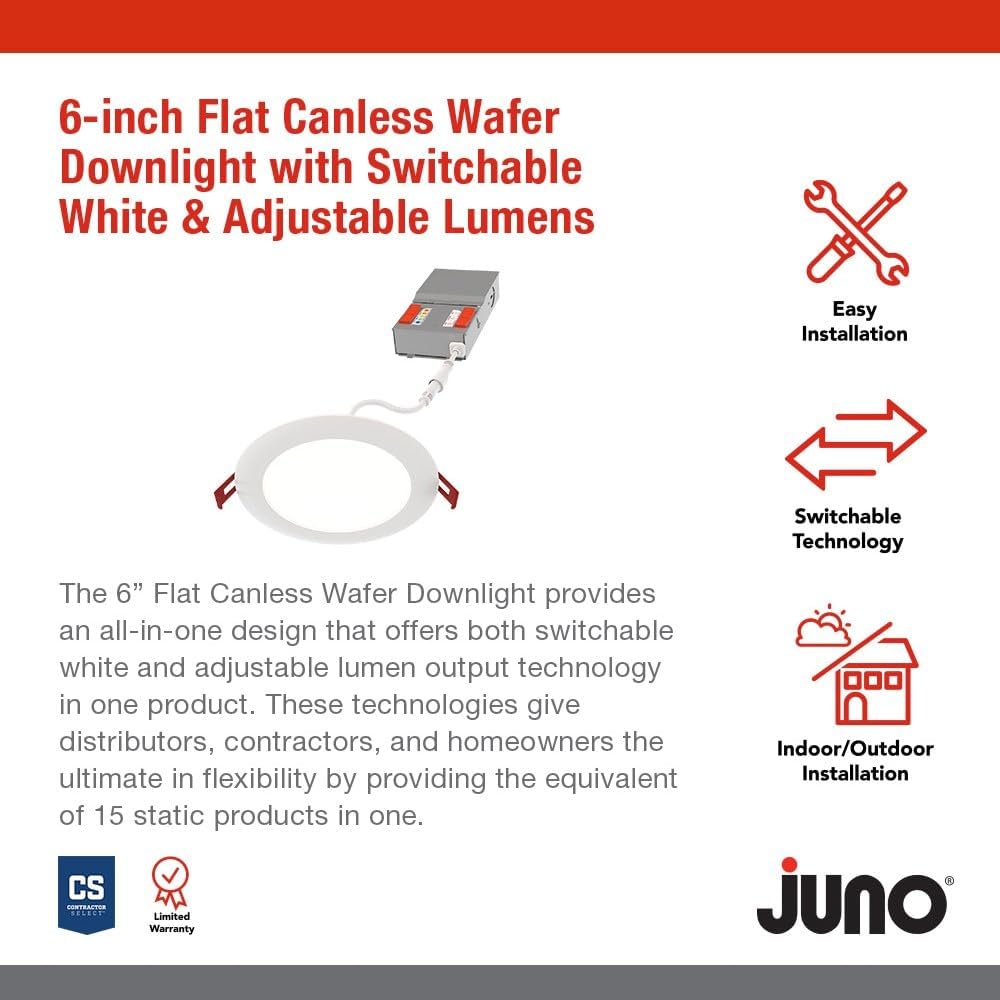
Ata: Ua umaview of key features including easy installation and switchable technology.
3. Seti & Fa'apipi'i
The Juno Canless LED Wafer Downlight is designed for straightforward installation. Please ensure power is turned off at the circuit breaker before beginning any electrical work.
3.1. Vaega
The product includes the LED wafer downlight and a remote driver box. The fixture and remote driver box are IC rated for direct contact with insulation.

Image: The main components of the downlight system, showing the LED wafer and its remote driver box.
3.2. Laasaga Fa'apipi'i
- Ensure power is disconnected at the main circuit breaker.
- Cut a hole in the ceiling according to the specified diameter for the 6-inch model. Refer to the product dimensions for precise measurements.
- Connect the remote driver box to the building's electrical wiring. Follow local electrical codes and guidelines.
- Connect the LED wafer downlight to the remote driver box.
- Insert the remote driver box into the ceiling opening.
- Push the LED wafer downlight into the ceiling opening. The spring clips will secure the fixture in place.
- Toe faʻafoisia le mana ma suʻe le malamalama.

Image: Detailed dimensions of the 6-inch downlight, showing its slim profile mo faʻapipiʻi faigofie.
4. Fa'atonuga o Galuega
This downlight offers adjustable settings to customize your lighting experience.
4.1. Fetuunaiga o le vevela o lanu
The remote driver box features a switch to select from five color temperature options:
- 2700K Papa'e vaivai
- 3000K White White
- 3500K Neutral White
- 4000K White White
- 5000K Ao
4.2. Lumen Output Adjustment
The remote driver box also includes a switch for three adjustable lumen output settings:
- Maulalo
- Alafua
- Maualuga

Image: Close-up of the remote driver box, highlighting the switches for adjusting color temperature and lumen output.
4.3. Fa'apouliuli
The downlight is dimmable to 10 percent with compatible dimmers. Ensure your dimmer switch is suitable for LED lighting to achieve optimal performance.
5. Tausiga
The Juno Canless LED Wafer Downlight requires minimal maintenance. To clean the fixture, ensure power is off and gently wipe the surface with a soft, dry cloth. Avoid using abrasive cleaners or solvents, as these may damage the finish or electrical components.
6. Faʻafitauli
If you experience issues with your downlight, consider the following common solutions:
- Leai se Malamalama: Check the circuit breaker to ensure power is on. Verify all electrical connections are secure.
- Malamalama emoemo: Ensure the dimmer switch is compatible with LED lighting. Check for loose connections.
- Incorrect Color/Brightness: Verify the switches on the remote driver box are set to your desired color temperature and lumen output.
Mo nisi fa'amatalaga auiliili e uiga i le foia o fa'afitauli, fa'amolemole taga'i i le ofisa Taiala Fa'afitauli (PDF).
7. Fa'amatalaga
| Uiga | Taua |
|---|---|
| Fa'ailoga | Juno |
| Igoa Fa'ata'ita'iga | leai se apa |
| Numera Vaega | WF6 ALO20 SWW5 90CRI MVOLT MW M6 |
| Tele | 6-Inisi |
| Lanu | Pae'e Pa'epa'e |
| Mea | Alumini |
| Sitaili | Tipi mafolafola |
| Pepa Fa'amalama | Fa'amuta |
| Ituaiga Potu | Bathroom, Bedroom, Conference Room, Game Room, Living Room |
| Fua o Mea | 6.69"L x 6.69"W x 1.25"L |
| Fa'aoga i totonu/I fafo | I totonu, i fafo |
| Punavai Malosi | Uaea uaea |
| Ituaiga Fa'apipi'i | Fufulu le Mauga |
| Fa'apitoa Fa'apitoa | Adjustable Color Temperature, Dimmable, Energy Efficient, Low Voltage, Waterproof |
| Ituaiga Puna Malamalama | LED |
| Voltage | 120 Volts |
| Lanu Malamalama | Fa'atonu Pa'epa'e |
| Uatage | 16 watts |
| Suavai Tetee Level | Suavai |
| Tufuga | Acuity Faʻailoga Moli |
| UPC | 197589217360 |
8. Tuutuuga & Lagolago
This Juno product comes with a Limited Warranty. For specific terms and conditions, please refer to the warranty documentation included with your purchase or contact the manufacturer directly.
For additional support and to explore other Juno products, visit the official Faleoloa Juno i luga o le Amazon.
Ask a question about this manual
Ask about setup, troubleshooting, compatibility, parts, safety, or missing instructions. Manuals+ will review the question and use this page’s manual context to help answer it.