
Folasaga
Thank you for choosing the Bigben 5000mAh MagSafe Compatible Wireless Power Bank. This portable power bank is designed to provide convenient wireless charging for compatible devices, as well as wired charging via its USB-C port. Please read this manual carefully before using the product to ensure safe and optimal performance.
Fa'amatalaga Saogalemu
Ina ia puipuia lau masini mai manu'a pe fa'aleagaina, fa'amolemole ia matau puipuiga nei:
- Aua ne'i tu'u le pusa eletise i le vevela tele, sa'o le la, po'o le afi.
- Aua ne'i fa'atofuina le power bank i le vai po'o isi lava vai.
- Avoid dropping, hitting, or disassembling the power bank.
- Taofi ese mai tamaiti.
- Fa'aaoga na'o uaea fa'amaonia ma mea fa'apipi'i.
- If the power bank swells, emits an odor, or becomes excessively hot, discontinue use immediately.
- Lafoa'i ma le fa'aeteete le power bank e tusa ai ma tulafono a le lotoifale.
O mea o lo'o i totonu
Fa'amolemole siaki le afifi mo mea nei:
- Bigben 5000mAh MagSafe Compatible Wireless Power Bank
- USB-C i le USB-C Uaea Fa'atauina
- Tusi Lesona a le Tagata (lenei pepa)
Ua Umaview
Familiarize yourself with the components of your power bank:

Ata: Luma view of the Bigben 5000mAh Power Bank, highlighting the LED indicator lights and the USB-C port.
- Molī Fa'ailoga LED: Four small lights indicating the remaining battery level.
- Port USB-C: For charging the power bank and for wired device charging.
- Uaea Uea Totogi Laupapa: The flat surface designed for MagSafe compatible wireless charging.
- Ki Malosi: Activates wireless charging and checks battery level.
Seti
Totogiina le Faletupe Malosiaga
Before first use, fully charge your power bank.
- Connect the provided USB-C cable to the power bank's USB-C port.
- Connect the other end of the USB-C cable to a compatible USB wall adapter (not included).
- The LED indicator lights will illuminate to show the charging status. When all four LEDs are solid, the power bank is fully charged.
Tulaga Fa'ailoga LED:
- 1 LED: 0-25% ua fa'atumuina
- 2 LEDs: 25-50% ua fa'atumuina
- 3 LEDs: 50-75% ua fa'atumuina
- 4 LEDs: 75-100% ua fa'atumuina
Fa'agaioiga
Wireless Charging (MagSafe Compatible)
This power bank supports MagSafe compatible wireless charging up to 10W.
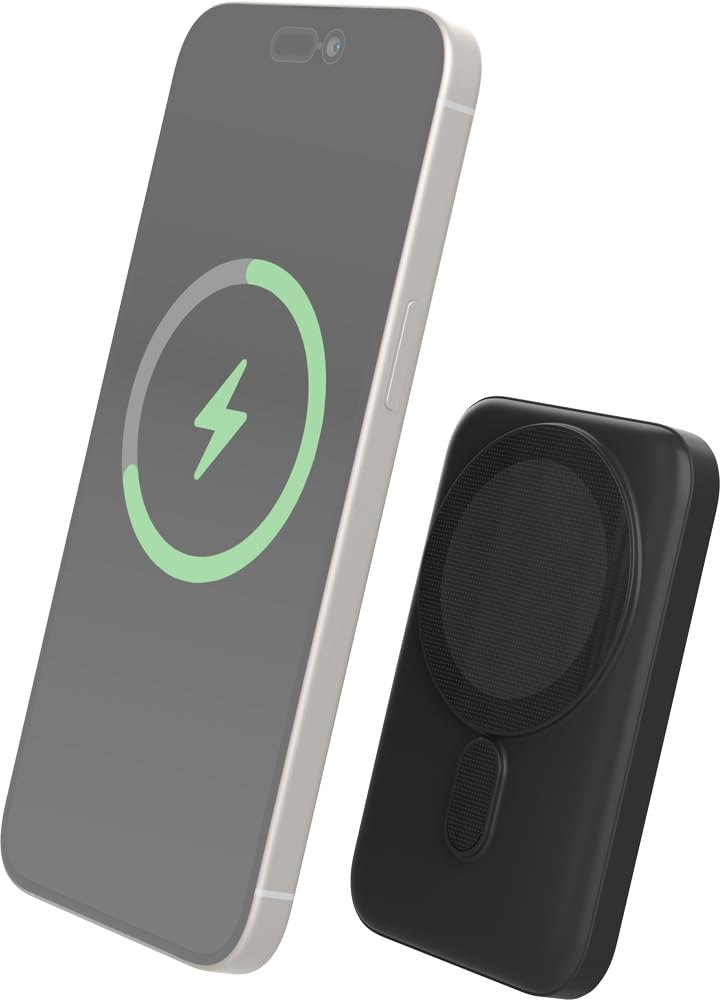
Image: The Bigben power bank magnetically connected to the back of a smartphone, illustrating the wireless charging function.
- Ensure your device is MagSafe compatible or has a MagSafe compatible case.
- Align the power bank with the back of your device. The magnets will snap it into place.
- The power bank will automatically begin charging your device. The LED indicators on the power bank will show its remaining charge.
- To stop charging, simply detach the power bank from your device.
Note: For optimal magnetic attachment and charging efficiency, ensure there are no obstructions between the power bank and your device.
Totogi uaea
You can also charge devices using a USB-C cable.
- Connect one end of a USB-C cable (not included, or use the provided one if suitable) to the power bank's USB-C port.
- Fa'afeso'ota'i le isi pito o le uaea i le uafu e fa'atumu ai le la'au a lau masini.
- O le power bank o le a otometi lava ona amata fa'atumuina lau masini.
Tausiga
Fa'amamaina
- Disconnect the power bank from all devices and power sources before cleaning.
- Wipe the surface with a soft, dry, lint-free cloth.
- Aua ne'i fa'aogaina vaila'au malolosi, vai fa'amama, po'o vai fa'amama malolosi.
Teuga
- Teu le pusa eletise i se nofoaga malulu, matutu mamao ese mai le susulu o le la ma le vevela tele.
- Afai e teuina mo se vaitaimi umi, totogi le faletupe e tusa ma le 50% i masina ta'i tolu e tausia ai le soifua maloloina o le maa.
Fa'afitauli
| Fa'afitauli | Fofo e ono mafai |
|---|---|
| E le o totogi le faletupe eletise |
|
| E le o fa'atauina le masini i luga ole laiga |
|
| Device not charging via cable |
|
| E le o galue fa'ailoga LED |
|
Fa'amatalaga
| Fa'aaliga | Fa'amatalaga |
|---|---|
| Numera Fa'ata'ita'i | 6128 |
| Malosiaga ma'a | 5000mAh |
| Fa'amatalaga uaealesi | Up to 10W (MagSafe Compatible) |
| Ulufale/Talaga Fa'aaogā | USB-C |
| mamafa | E tusa ma le 300g |
Fa'amaonia ma Lagolago
Bigben products are designed and manufactured to the highest standards. For warranty information or technical support, please refer to the warranty card included with your purchase or visit the official Bigben webnofoaga.
For further assistance, please contact Bigben customer service.