
1. Oloa Ua Ovaview
This manual provides instructions for the CHUNGHOP ASK-STI6220 Voice Remote Control. This remote is designed as a replacement for specific Verizon Stream TV Box models, offering intelligent voice control and responsive button functionality for an enhanced entertainment experience.
2. Fa'amatalaga Fesootaiga
The ASK-STI6220 Voice Remote Control is specifically designed to work ONLY with Verizon Stream TV Box voice remote control V2 ARRIS CCAM21LP1890T2, 2AGOFRC451A, RC451A, STI6220-D315, ASK-STI6220. It is NOT a universal remote for Verizon FiOS and is NOT compatible with Verizon Stream TV JS8V, Verizon FiOS TV 2019 - MG3-R32140B VRC4100 BLE Remote, or any Verizon remote with a "LAST" button. Please ensure your original remote's design and button layout match this model for proper functionality.
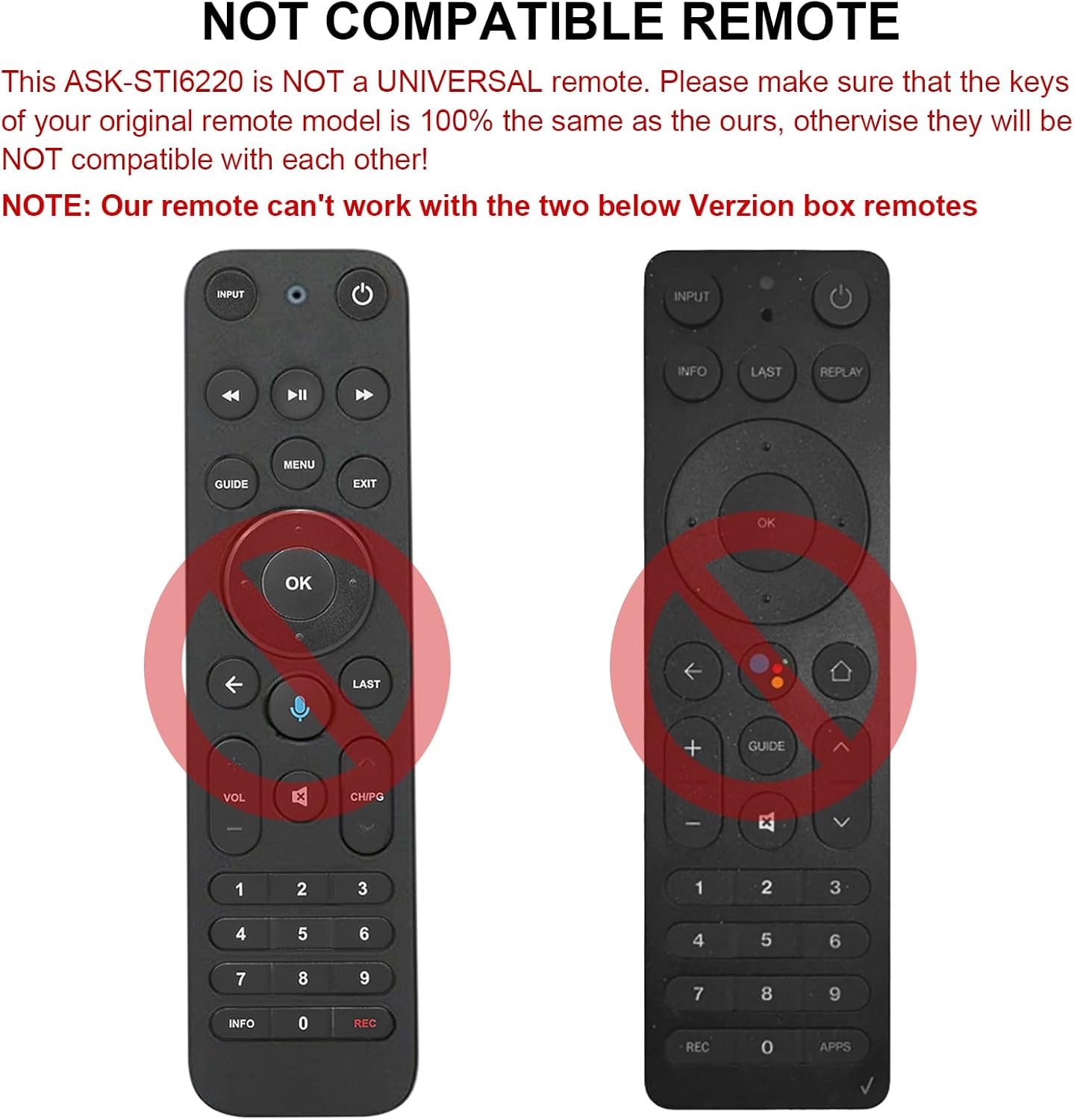
Ata 2.1: Esoamples of incompatible Verizon remotes. Ensure your original remote's buttons match the ASK-STI6220 model.

Figure 2.2: The ASK-STI6220 Voice Remote Control, compatible with Verizon Stream TV Box.
3. Seti ma Fa'apipi'i
3.1 Fa'apipi'i ma'a
Ole fa'atonu mamao e mana'omia ni ma'a AAA se lua (e le'o aofia ai). Ina ia fa'apipi'i maa:
- Aveese le ufiufi o le maa mai tua o le masini mamao.
- Insert two AAA batteries, ensuring correct polarity (+ and - ends match the markings inside the compartment).
- Toe sui lelei le ufiufi o le maa.

Figure 3.1: Battery compartment for two AAA batteries.
Video 3.1: Demonstration of battery installation and initial setup for the ASK-STI6220 Voice Remote.
3.2 Fa'atonuga Fa'atasi
To use the voice remote, it must first be paired with your Verizon Stream TV Box. Follow one of the methods below:
- Metotia 1: Oomi le "Toe fo'i"ma"APP" buttons simultaneously to initiate pairing.
- Metotia 2: Alternatively, press the "OK"ma"FALE" buttons simultaneously to initiate pairing.
Fa'amatalaga Taua:
- A device can only be paired with one voice remote at a time. Before pairing this new remote, please disconnect your old remote control (e.g., by removing its batteries).
- If pairing fails on the first attempt, try turning your TV Box off and then back on. If you continue to experience issues, clear any existing remote settings on your TV Box before attempting to pair again.

Figure 3.2: Visual guide for pairing the remote control.
4. Fa'atonuga o Galuega
4.1 General Button Functions
The ASK-STI6220 remote features a standard layout for easy navigation and control of your Verizon Stream TV Box:
- Ki Malosi: Turns the TV Box on or off.
- Fa'amau fa'aofi: Switches input sources on your TV.
- Fa'atautaiga Papa (Lulu/Ilalo/Agavale/Taumatau/Ua lelei): Fa'aoga mo le fa'atautaiga o lisi ma filifiliga.
- Volume i luga/lalo: Fa'atonu le leo.
- Ala i luga/I lalo: Suia ala.
- Play/Pause, Fast Forward, Rewind: Media playback controls.
- Ki Fale: Toe foʻi i le lau autū autū.
- Ki ta'iala: Accesses the program guide.
- Pepa Numera (0-9): Tu'u sa'o le alalaupapa.
- Fa'amatalaga Button: Fa'aalia fa'amatalaga o le polokalame.
- APPs Button: Accesses applications.
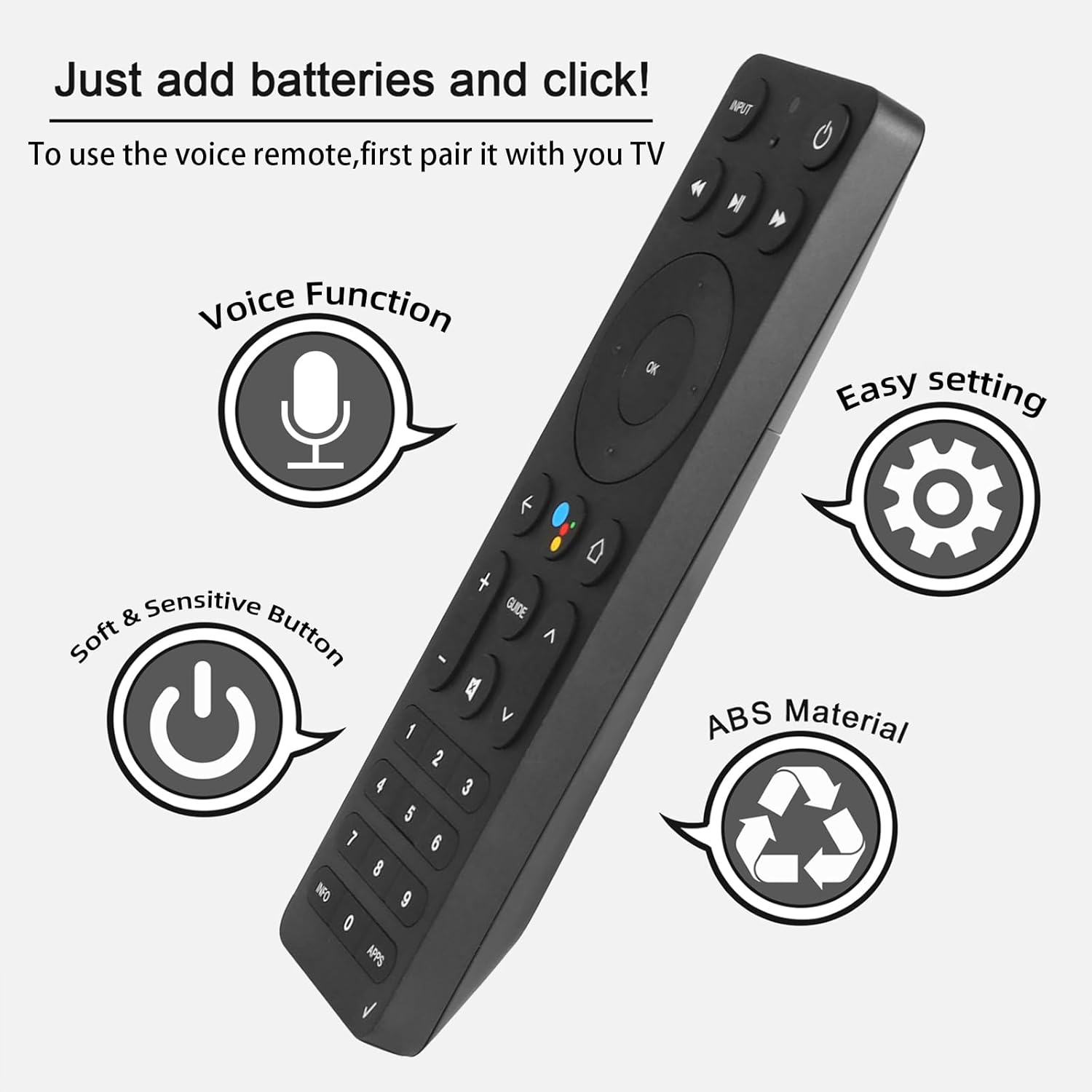
Figure 4.1: Key features and button layout of the remote control.
4.2 Intelligent Voice Control
The remote features an intelligent voice function, allowing you to control your TV Box with voice commands. Press the dedicated voice button (often represented by a microphone icon) and speak clearly into the remote.
Exampleo poloaiga:
- "Launch channels"
- "Lower the volume"
- "Play action movie"
If the voice function does not work correctly, follow these steps:
- Go to the home page of your TV Box.
- Press the "Settings" button on the remote control.
- Select "Remote Controls and Accessories" and then "Remote Controls."
- Select to add a new remote control and follow the on-screen steps to complete the setup.

Figure 4.2: Using intelligent voice search and control.

Figure 4.3: The remote offers a 0.2-second fast response and a 33-foot transmitting distance for accurate control.
5. Tausiga
To ensure the longevity and optimal performance of your remote control:
- Ia faamama le remote e ala i le solo i se ie vaivai ma mago. Aloese mai le faaaogaina o vailaau faamama po o mea e olo ai.
- Replace batteries promptly when the remote's responsiveness decreases. Always use fresh AAA batteries.
- Avoid exposing the remote to extreme temperatures, direct sunlight, or moisture.
- Aua le pa'ū le remote control pe tu'uina i ni pa'ō malolosi.
6. Faʻafitauli
If you encounter issues with your ASK-STI6220 remote control, please refer to the following common solutions:
- Le mamao e le tali mai:
- Ia mautinoa ua sa'o le fa'apipi'iina o maa ma e le'i fa'aumatia. Sui i ni maa AAA fou pe a mana'omia.
- Verify that the remote is properly paired with your Verizon Stream TV Box (refer to Section 3.2).
- Ia mautinoa e leai ni mea e faalavelave ai i le va o le remote control ma le TV box.
- Fa'afitauli fa'alua:
- Confirm that your original remote is disconnected (e.g., by removing its batteries) as only one Bluetooth remote can be paired at a time.
- If pairing fails, try turning the TV Box off and on again, then re-attempt the pairing process.
- Clear existing remote settings on your TV Box before trying to pair again.
- E le o galue le leo:
- Ensure the remote is successfully paired and the voice function is enabled on your TV Box.
- Follow the voice control setup steps outlined in Section 4.2.
- Tautala manino ma sa'o atu i le maikolofoni o le remote.
- Remote not compatible with my device:
- This remote is specifically designed for Verizon Stream TV Box voice remote control V2 ARRIS CCAM21LP1890T2, 2AGOFRC451A, RC451A, STI6220-D315, ASK-STI6220. It is not a universal remote. Please verify your device's model number and compare your original remote's buttons with the ASK-STI6220.

Figure 6.1: Common questions and answers regarding the remote's functionality and compatibility.
7. Fa'amatalaga
| Fa'aaliga | Fa'amatalaga |
|---|---|
| Fa'ailoga | CHUNGHOP |
| Numera Fa'ata'ita'i | ASK-STI6220 |
| Masini Fegalegaleai | Verizon Stream TV Box (specific models as listed in Section 2) |
| Max Numera o Masini Lagolago | 1 |
| Fa'apitoa Fa'apitoa | Ergonomic, Voice Control |
| Lanu | As Shown (typically black) |
| Ma'a Manaomia | 2 maa AAA |
| Mea mamafa | 3.2 aunese |
| Fuafuaga Mea | 8.19 x 3.54 x 0.94 inisi |
8. Fa'amaonia ma Lagolago
For any questions or concerns regarding your CHUNGHOP ASK-STI6220 Voice Remote Control, including pairing, setup, or functionality, please contact the seller directly. Refer to your purchase documentation for specific warranty details, as these may vary.
The manufacturer, CHUNGHOP, is committed to providing support for their products.