
Infinity NX 10
Infinity Smartwatch User Manual
Model: NX 10
Folasaga
Welcome to the user manual for your Infinity Smartwatch, Model NX 10. This device is designed to enhance your daily life with advanced fitness tracking, communication features, and smart notifications. Featuring a vibrant 1.43" AMOLED screen and robust IP68 water resistance, your smartwatch is built for both everyday use and active lifestyles. Please read this manual carefully to ensure proper operation and maintenance of your device.

Figure 1: Infinity Smartwatch NX 10. This image shows the smartwatch from an angled perspective, highlighting its round AMOLED display, black silicone strap, and two side buttons.
Seti
1. Unboxing ma Uluai Totogi
Upon unboxing, ensure all components are present: the Infinity Smartwatch NX 10 and the charging cable.
- Connect the magnetic charging cable to the charging points on the back of the smartwatch.
- Fa'apipi'i le pito USB o le uaea i totonu o se adapter eletise masani a le USB (e le o aofia ai) po'o se uafu USB a le komepiuta.
- The watch display will show a charging indicator. Fully charge the device before first use, which typically takes approximately 2 hours.

Figure 2: Smartwatch charging. The image illustrates the smartwatch being charged magnetically, with a green lightning bolt icon on the screen indicating charging status and a "400mAh Battery Capacity" label.
2. Fa'apipi'i App ma Fa'atasi
To unlock the full potential of your Infinity Smartwatch, download and install the companion application, Fit Cloud Pro, on your smartphone.
- Scan the QR code provided in the quick start guide (if available) or search for "Fit Cloud Pro" in your smartphone's app store (Google Play Store for Android, Apple App Store for iOS).
- Fa'apipi'i le talosaga.
- Open the Fit Cloud Pro app and follow the on-screen instructions to create an account or log in.
- Ia mautinoa ua mafai le Bluetooth i lau telefoni.
- In the app, navigate to the device pairing section and search for your smartwatch (e.g., "NX 10" or similar Bluetooth name).
- Select your smartwatch from the list to initiate pairing. Confirm the pairing request on both your phone and the smartwatch if prompted.
- Once paired, the app will synchronize data with your smartwatch, and you can customize settings.
Fa'atonuga o Galuega
1. Fa'asagaga Autu
- Pepa pa'i: Swipe left/right to navigate between main screens (e.g., activity, heart rate, weather). Swipe up/down to access quick settings or notifications. Tap to select an option.
- Itu Itu: The top button typically acts as a power button (long press) or a back/home button (short press). The bottom button may be customizable or provide quick access to sports modes.

Figure 3: 1.43" AMOLED Screen. This image highlights the vibrant display of the smartwatch, showing a detailed watch face with various data points like time, date, steps, and heart rate.
2. Making and Answering Calls
Your Infinity Smartwatch supports Bluetooth calling, allowing you to make and receive calls directly from your wrist when connected to your smartphone.
- Fai se Valaau: Access the dialer or contacts list on your smartwatch. You can dial a number directly or select a contact to call.
- Talia se Valaau: When a call comes in, the smartwatch will display the caller ID. Tap the green answer icon to accept the call or the red icon to decline.

Figure 4: Stay Connected On The Go. This image shows a user interacting with the smartwatch to make a call, illustrating the microphone, dialing, call records, and contacts features.
3. Malosiaga ma le Su'esu'eina o le Soifua Maloloina
The smartwatch is equipped with multiple sensors to monitor your health and fitness activities.
- Pedometer: Automatically tracks your steps, distance, and calories burned throughout the day.
- Loto Mataitu le mataituina: Provides real-time heart rate data. Access this feature from the main menu or set up continuous monitoring in the app.
- Mata'ituina o le toto: Offers blood pressure readings. For accurate results, ensure the watch is worn correctly and remain still during measurement. Note: This feature is for reference only and should not be used for medical diagnosis.
- Mata'ituina le moe: Tracks your sleep patterns, including deep sleep, light sleep, and awake times. View detailed analysis in the Fit Cloud Pro app.
- Faiga Ta'aloga: Supports over 100 sports modes, including running, cycling, swimming, and more. Select your desired activity to track specific metrics.

Figure 5: Track Every Move. This image displays the smartwatch tracking a swimming activity, with additional visuals of rock climbing and cycling, indicating its multi-sport tracking capabilities.

Figure 6: More than 110 sports modes. This image shows a variety of colorful icons representing different sports activities supported by the smartwatch, overlaid on a background of a person cycling.
4. Fa'asinomaga
Personalize your smartwatch experience through the Fit Cloud Pro app.
- Matamata Mata: Choose from a wide range of pre-installed watch faces or download new ones via the app. You can also create custom watch faces using your own photos.
- Fa'aaliga: Configure which app notifications you wish to receive on your smartwatch (e.g., calls, SMS, social media alerts).
- Fa'ailoga & Faamanatu: Set alarms, sedentary reminders, and hydration reminders through the app.
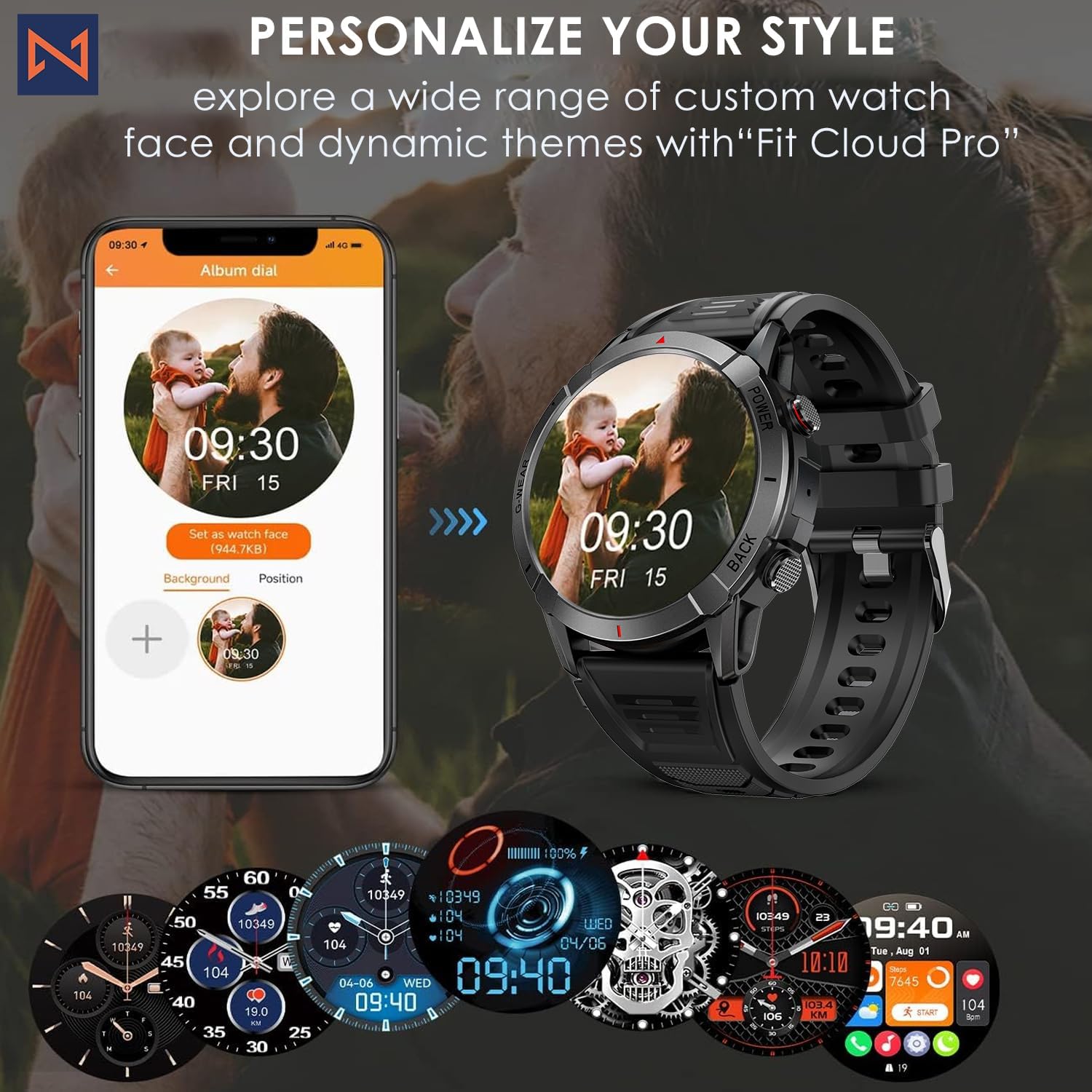
Figure 7: Personalize Your Style. This image demonstrates how to customize watch faces using the "Fit Cloud Pro" app, showing various digital and analog watch face options.
Tausiga
1. Fa'amamaina o lau Uati Poto
O le fa'amamāina masani e fesoasoani e fa'atumauina ai le foliga vaaia ma le aoga o lau masini.
- Solo le lau ma le tino i se ie vaivai e leai se liu.
- For stubborn smudges, dampFa'asusu teisi le ie i le vai. 'Alo'ese mai le fa'aaogaina o vaila'au malolosi po'o mea fa'a'olo'olo.
- Clean the charging contacts periodically to ensure proper connection.
2. Tete'e i le Vai (IP68)
Your Infinity Smartwatch is rated IP68, meaning it is resistant to dust and can withstand immersion in water up to 1.5 meters for up to 30 minutes.
- It is suitable for daily use, hand washing, and light rain.
- Avoid prolonged immersion, hot water, steam, or high-pressure water jets (e.g., showering, sauna, diving).
- If the watch gets wet, dry it thoroughly before charging or operating buttons.

Figure 8: Engineered for Adventure. This image highlights the smartwatch's durability features, including waterproof, dustproof, anti-magnetic, and shockproof capabilities, with corresponding icons.
3. Tausiga maa
- Ina ia faaumiumi le ola o le maa, aloese mai le vevela tele.
- Charge the watch regularly; avoid letting the battery completely drain for extended periods.
- Fa'aaoga na'o le uaea e fa'atauina ai.
Fa'afitauli
| Fa'afitauli | Fofo e ono mafai |
|---|---|
| E le kilia le matamata | Ia mautinoa ua atoa le fa'atumuina o le uati. Fa'afeso'ota'i i le fa'atumuina o le uati ma fa'atali mo ni nai minute a'o le'i taumafai e fa'aola. |
| E le mafai ona fetaui ma le telefonipoto |
|
| Fa'amatalaga fa'alesoifua maloloina le sa'o |
|
| E le'i maua fa'asilasilaga |
|
| Puupuu le ola maa |
|
Fa'amatalaga
| Fa'aaliga | Fa'amatalaga |
|---|---|
| Numera Fa'ata'ita'i | NX 10 |
| Fa'aaliga | 1.43" AMOLED Screen |
| Fa'aaliga I'uga | 466x466 HD |
| Malosiaga ma'a | 400mAh Lithium Polymer |
| Suavai Tetee | IP68 |
| Feso'ota'i | Bluetooth |
| Faiga Fa'atonu | Android (compatible with iOS) |
| Mea Fa'amau | 22mm Silicon Belt |
| Fa'aali Mea | Zinc Alloy |
| Mea mamafa | 1.76 aunese |
| Mafai e teu ai le manatua | 128 MB |
Fa'amaonia ma Lagolago
For warranty information and technical support, please refer to the documentation included with your purchase or visit the official Infinity webnofoaga.
Manufacturer: Infiniity
For further assistance, you may contact Infiniity customer service through the contact information provided on their official website or within the Fit Cloud Pro application.
Ask a question about this manual
Ask about setup, troubleshooting, compatibility, parts, safety, or missing instructions. Manuals+ will review the question and use this page’s manual context to help answer it.