
1. Folasaga
Thank you for choosing the OFNEX X19 Wireless Earbuds. This manual provides detailed instructions for setting up, operating, and maintaining your earbuds to ensure optimal performance and longevity. Please read this manual thoroughly before use.
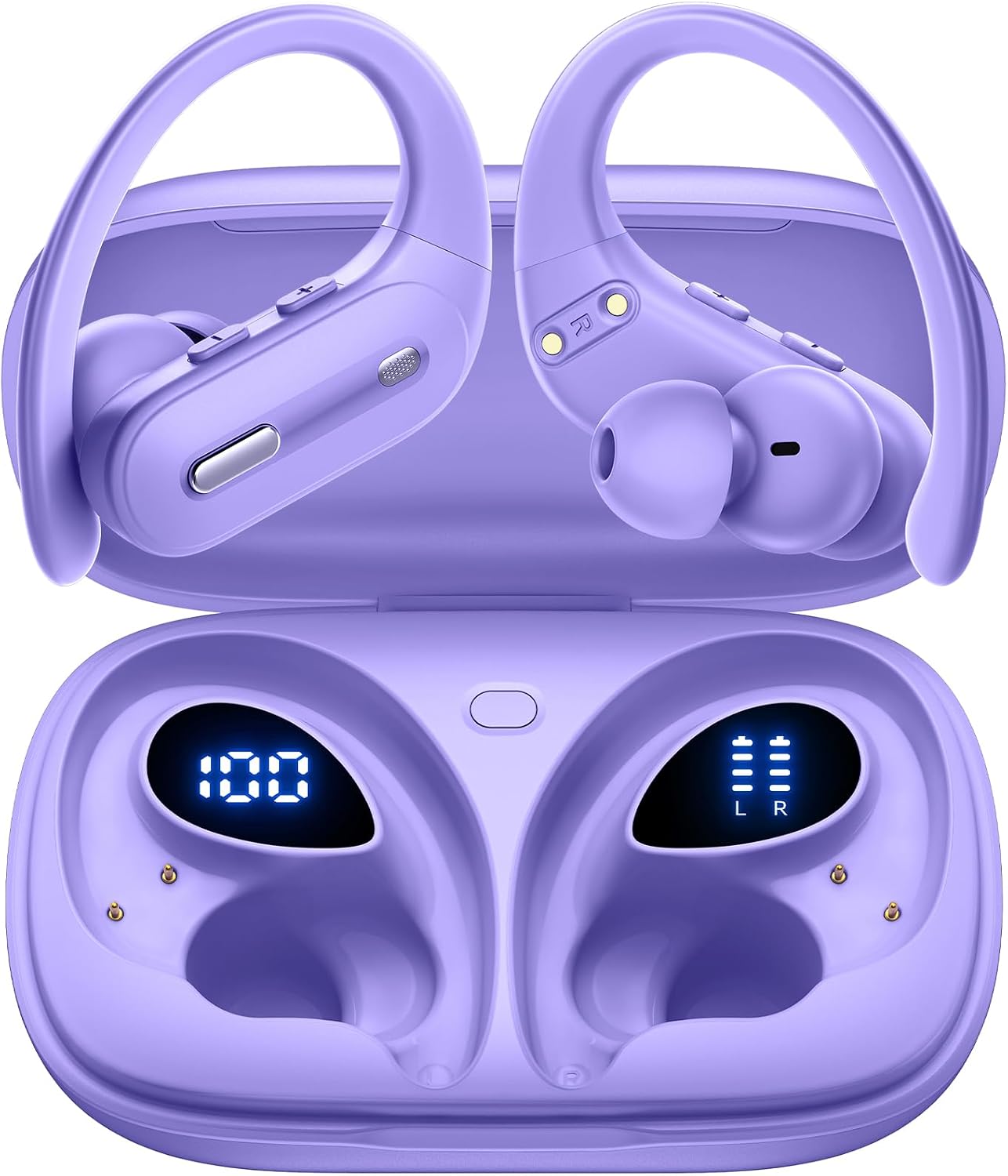
Image: OFNEX X19 Wireless Earbuds in their charging case, displaying battery levels.
2. Oloa Ua Ovaview
2.1 Fa'amaumauga o Mea
- OFNEX X19 Wireless Earbuds (Left and Right)
- Pusa Uea Uisa
- USB-C Uaea Fa'atau
- Talitaliga (mua'i fa'apipi'i)
- Eartips (XS, S, M, L sizes)
- Tusi Taiala
2.2 Vaega Autu
- Fa'aopoopo Taimi Ta'aloga: E oo atu i le 9 itula i le tasi lava le totogi, faatasi ai ma le aofaiga e 90 itula e faʻaaoga ai le pusa e totogi ai.
- Filifiliga e Totogi Lua: Recharge via USB-C cable or wirelessly with a Qi-certified charging pad (not included).
- Digital Power Display: Built-in dual LED display shows battery status for both the case and individual earbuds.
- Leo maualuga-faamaoni: Equipped with 14.2mm dual-chamber speaker drivers for crisp, balanced sound and deep bass.
- Valaau manino-Clear: Two built-in microphones enhance call quality, ideal for meetings and online classes.
- Saogalemu ma Fa'alelei le Fetaui: Ergonomic design with flexible, secure-fit ear hooks and four sizes of rubber ear tips (XS, S, M, L).
- IPX7 Suavai: Provides protection against water droplets and sweat, suitable for workouts and outdoor activities.
- Feso'ota'iga Maualuga: Bluetooth 5.3 technology ensures faster transfer speeds, stable connection, and wide compatibility.
- Fa'atonuga Fa'atonu: Independent multi-function and volume buttons on each earbud for music, calls, and voice assistant activation.
- One-Key Reset: Convenient reset button on the charging case to restore factory settings.

Ata: Ua umaview of the OFNEX X19 True Wireless Sports Headphones highlighting key features like 90H Playtime, One-key Reset, Dual Digital Display, Dual Volume Control, Wireless Charging, and Secure Earhooks.
3. Seti
3.1 Totogi Muamua
Before first use, remove any protective films from the earbuds and fully charge the charging case and earbuds. Ensure the charging points are clean and dry before placing them into the charging case.
- Tuu taligalu uma e lua i totonu o le pusa o lo'o fa'atumuina.
- Connect the USB-C charging cable to the charging port on the case and a power source, or place the case on a Qi-certified wireless charging pad.
- The dual LED power display on the case will show the charging status. A full charge typically takes approximately 2 hours.

Image: The OFNEX X19 charging case demonstrating both wireless and USB-C charging capabilities.

Image: The OFNEX X19 charging case with earbuds inside, showing the digital display for case capacity and individual earbud power.
3.2 Fa'atasi ma lau Meafaigaluega
- Tatala le pusa o lo'o molia. E otometi lava ona ola taliga ma ulu atu i le faiga fa'apa'aga.
- I luga o lau masini (smartphone, tablet, etc.), fa'agaoioi le Bluetooth ma su'e mo masini avanoa.
- Select "X19" from the list of devices to connect.
- Once connected, the earbuds will automatically pair with your device for future use when taken out of the case.

Image: The OFNEX X19 earbuds and case surrounded by various compatible devices, illustrating one-step pairing and wide compatibility.
3.3 Fa'apipi'i Fa'alogo
- Choose the correct size ear tips (XS, S, M, L) for a comfortable and secure fit.
- Place the earbud in your ear and adjust the flexible ear hook over your ear for stability.

Image: A person wearing the OFNEX X19 earbuds during a workout, highlighting the secure earhooks and the availability of four different eartip sizes (L, M, S, XS).
4. Fa'atonuga o Galuega
4.1 Pulea Autu
Each earbud features independent multi-function and volume buttons for easy control.
| Gaioiga | Earbud agavale | Taliga taumatau taliga |
|---|---|---|
| Ta'alo/Taofi | 1x Press Multi-function Button | 1x Press Multi-function Button |
| Su'ega Sosoo | 2x Press Multi-function Button | 2x Press Multi-function Button |
| Ala muamua | 3x Press Multi-function Button | 3x Press Multi-function Button |
| I luga le Volume | 1x Press Volume + Button | 1x Press Volume + Button |
| Volume i lalo | 1x Press Volume - Button | 1x Press Volume - Button |
| Tali/Fa'ai'u le Valaau | 1x Press Multi-function Button | 1x Press Multi-function Button |
| Teena Valaau | Press and Hold Multi-function Button | Press and Hold Multi-function Button |
| Fa'agaoioi le Leo Fesoasoani (Siri, Google Fesoasoani) | Press and Hold Multi-function Button (2 seconds) | Press and Hold Multi-function Button (2 seconds) |

Image: A detailed diagram illustrating the physical buttons on the OFNEX X19 earbuds for dual audio control, including play/pause, track skipping, volume adjustment, and call management.

Image: A woman using the OFNEX X19 earbud to activate a voice assistant, with icons for Siri, Google Assistant, and another assistant displayed.
4.2 Single and Dual Earbud Use
The OFNEX X19 earbuds support both single and dual earbud use. You can use either earbud independently or both together for a stereo experience.

Image: An illustration showing a man and woman wearing OFNEX X19 earbuds, demonstrating the flexibility to switch between single and dual earbud use.
5. Tausiga
5.1 Fa'amamāina
Regularly clean the earbuds and charging points to ensure proper function and charging. Use a soft, dry cloth. Do not use harsh chemicals or abrasive materials.
Lapata'iga: After using the earphones, please clean and dry the charging points before putting them into the charging case.
5.2 Suavai Tetee
The earbuds are IPX7 waterproof, meaning they are protected against temporary immersion in water (up to 1 meter for 30 minutes). However, the charging case is not waterproof. Ensure earbuds are completely dry before placing them back in the charging case.

Image: An OFNEX X19 earbud with water droplets, visually representing its IPX7 water resistance rating.
6. Faʻafitauli
6.1 Toe setiina o le taliga
If you experience pairing issues or other malfunctions, you can perform a one-key reset:
- Toe fa'afo'i taliga taliga uma e lua i totonu o le pusa o lo'o ta'ua.
- Press and hold the reset button located on the charging case for approximately 10 seconds until the LED indicators flash.
- The earbuds will reset to factory settings. Re-pair them with your device as described in Section 3.2.

Image: The OFNEX X19 charging case with a clear indication of the one-key reset button for easy operation.
6.2 Mataupu masani
- E le fetaui taliga taliga: Ensure both earbuds are charged, Bluetooth is enabled on your device, and they are within range. Try resetting the earbuds.
- Leai se leo mai le tasi taliga: Check battery levels for both earbuds. Try placing them back in the case and taking them out again. If issues persist, perform a reset.
- Le lelei leo: Ensure ear tips are properly sealed in your ear. Check for obstructions in the earbud speaker mesh.
7. Fa'amatalaga
| Fa'aaliga | Fa'amatalaga |
|---|---|
| Igoa Fa'ata'ita'iga | X19 |
| Tekinolosi Feso'ota'i | Uaealesi (Bluetooth 5.3) |
| Fa'aliliuga Bluetooth | 5.3 |
| Lau'ele'ele Bluetooth | 10 mita |
| Malosi o le maa (Earbuds) | E oʻo i le 9 Itula |
| Aofa'i Taimi Ta'aloga (ma Fa'ailoga) | E oʻo i le 90 Itula |
| Taimi Totogi | Pe tusa. 2 Itula |
| Tele Avetaavale leo | 14.2 Milimita |
| Suavai Tetee Level | IPX7 (Na'o taliga taliga) |
| Faiga Fa'alogo | Over Ear (with earhooks) |
| Metotia Pulea | Ki Fa'aletino |
| Mea | palasitika |
| Mea mamafa | 0.039 aunese (i le taliga taʻitasi) |
| Fua o Mea | 3.94 x 2.41 x 1.38 inisi (pusa e fa'atumu ai le telefoni) |
8. Fa'amaonia ma Lagolago
OFNEX offers a comprehensive warranty and customer support for your X19 Wireless Earbuds.
- Fa'amaonia i le olaga atoa: The product includes a lifetime warranty. Please refer to the warranty card included in your package or scan the QR code for activation.
- Toe Faafo'i fua i le 365 Aso: If you are not satisfied with your purchase, contact OFNEX's after-sale team for assistance with a replacement or a full refund.
- Faafesoota'i le Lagolago: For any questions or issues, please contact our customer service team. Refer to the contact information provided in your product packaging or on the official OFNEX webnofoaga.

Image: OFNEX customer service representatives ready to assist with product inquiries.
9. Fa'amatalaga Saogalemu
- Aua ne'i fa'aalia mea fa'alogologo po'o le pusa e fa'atumu ai le telefoni i le vevela tele.
- Aloese mai le pa'u po'o le fa'aogaina o le malosi tele i le oloa.
- Taofi ese mai tamaiti ma fagafao.
- Aua le taumafai e fa'a'ese'ese pe sui le oloa.
- Use only the provided charging cable or a Qi-certified wireless charger.
- Prolonged exposure to loud volume may cause hearing damage.
10. Vitio Oloa Aloaia
OFNEX X19 Earbuds Overview
Video: An official product video from OFNEX Direct showcasing the features and design of the X19 Wireless Earbuds, including their Bluetooth 5.3 connectivity and 90 hours of playtime.
OFNEX X19 Sports Earbuds Features
Video: An official product video from OFNEX Direct demonstrating the OFNEX X19 Earbuds, highlighting their suitability for sports and Bluetooth 5.3 capabilities.