
1. Folasaga
Fa'afetai mo le fa'atauasing the Cuifati HiFi MP3 Player. This compact and portable music player is designed for high-fidelity audio playback, offering a convenient way to enjoy your music on the go. This manual provides essential information for the proper setup, operation, and maintenance of your device.
2. Oloa Ua Ovaview
2.1 Vaega o masini
The Cuifati HiFi MP3 Player features a minimalist design with essential controls and ports for ease of use.
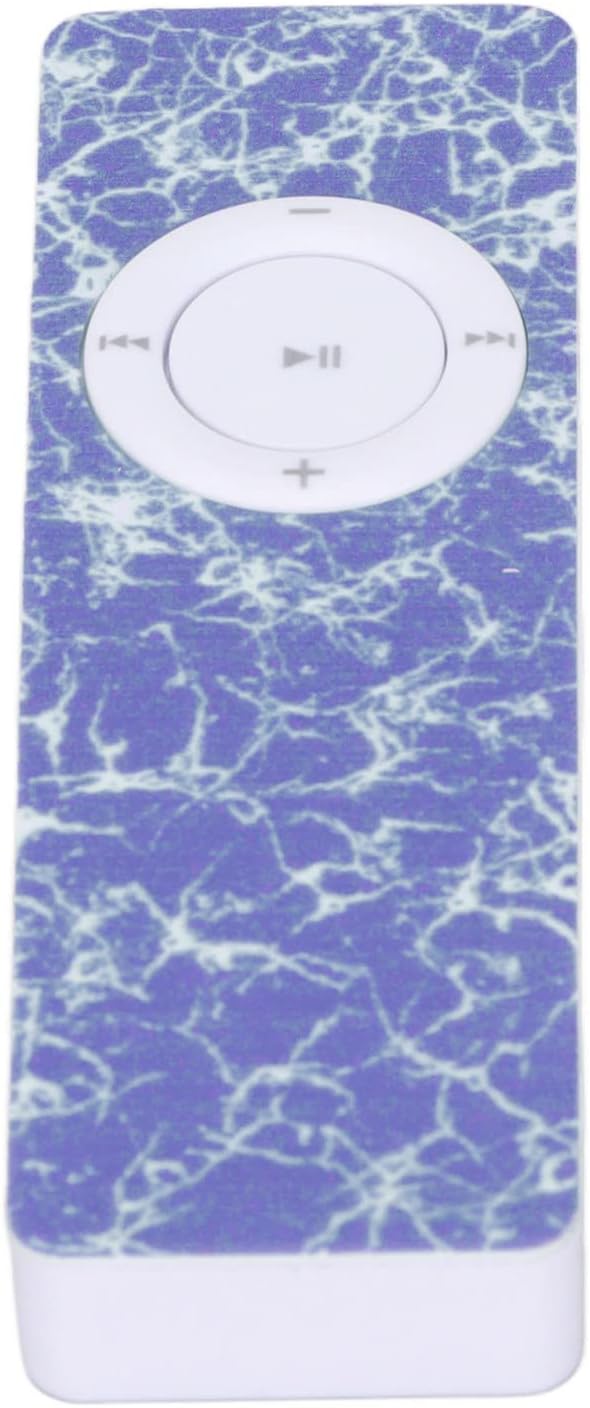
Ata 1: Luma view of the MP3 Player, highlighting the central control pad.
The device includes a central control pad for playback and volume adjustments. On its side, you will find the memory card slot and charging port, while the back features a power switch and a small speaker.

Ata 2: Itu view of the MP3 Player, illustrating the memory card slot and USB port.

Ata 3: Tua view of the MP3 Player, showing the power switch and speaker.
2.2 Ta'ese'ese ma Su'esu'ega Muamua
Upon unboxing, ensure all components are present and inspect the device for any physical damage. The package typically includes the MP3 player. Please note that a memory card is not included and must be purchased separately.
Video 1: This video demonstrates the physical appearance and USB connection of a similar MP3 player, providing a visual guide to its form factor and how to access the USB port.
3. Seti
3.1 Totogiina le Masini
Before first use, fully charge the MP3 player. Connect the device to a USB power source (e.g., computer USB port or USB wall adapter) using a compatible USB cable. The built-in 180mAh battery provides approximately 5 hours of playback on a full charge.
3.2 Fa'apipi'iina o se Kata Manatua
The MP3 player does not have internal storage for music files. A memory card (MicroSD, up to 64GB, not included) is required to store and play music. Insert the memory card into the designated slot on the side of the device until it clicks into place.
3.3 Feso'ota'i Fa'alogo
Plug your 3.5mm headphones into the headphone jack located on the device. The player does not have a built-in screen, so audio output is primarily through headphones or a connected Bluetooth device.
Video 2: This video illustrates how to connect headphones and charge a mini MP3 player, demonstrating the physical connections.
4. Fa'atonuga o Galuega
4.1 Malosi / Malosi
To power on the device, slide the 'on/off' switch located on the back of the player to the 'on' position. To power off, slide the switch to the 'off' position.
4.2 Fesiitaiga o Musika Files
Connect the MP3 player to your computer using a USB cable. The device will appear as a removable disk. Drag and drop your MP3 audio files directly onto the memory card. Ensure the memory card is formatted correctly (e.g., FAT32) for optimal compatibility.
4.3 Pulea Fa'avae o le Ta'alo
- Ta'alo/Taofi: Press the central button on the control pad.
- Su'ega Sosoo: Press the right arrow button.
- Ala na muamua atu: Press the left arrow button.
- I luga le Volume: Oomi le '+' faamau.
- Volume Lalo: Oomi le '-' faamau.
4.4 Shuffle Playback
The device supports shuffle playback for your music library. Refer to the video below for a demonstration of how to activate this feature.
Video 3: This video demonstrates how to enable shuffle playback on an MP3 player, showing the menu navigation for this setting.
4.5 Fa'atasiga Bluetooth
If your model supports Bluetooth, you can pair it with compatible Bluetooth speakers or headphones for wireless audio. Follow the instructions in the video to pair your device.
Video 4: This video demonstrates the process of pairing an MP3 player with Bluetooth speakers or headphones, showing the menu options for Bluetooth connectivity.
5. Tausiga
5.1 Fa'amamāina
Use a soft, dry cloth to clean the exterior of the MP3 player. Avoid using liquid cleaners or abrasive materials, as these can damage the device. Keep the ports free of dust and debris.
5.2 Teuina
Store the MP3 player in a cool, dry place away from direct sunlight and extreme temperatures. If storing for an extended period, ensure the battery is partially charged (around 50%) to prolong its lifespan.
5.3 Tausiga maa
To maximize battery life, avoid fully discharging the battery frequently. Charge the device regularly, even if it's not in constant use. The built-in lithium battery is not user-replaceable.
6. Faʻafitauli
6.1 E le Ki le Masini
- Ensure the battery is charged. Connect the player to a power source and allow it to charge for at least 30 minutes before attempting to power it on again.
- Verify the 'on/off' switch is in the 'on' position.
6.2 No Music Playback
- Memory Card Required: This MP3 player requires a memory card (MicroSD) to store music. It does not have built-in storage for media files. Ensure a memory card with music files is properly inserted.
- Check if the memory card is correctly inserted and contains compatible MP3 files.
- Ensure headphones are properly connected or Bluetooth is successfully paired.
- Fetuuna'i le maualuga o le leo.
6.3 Computer Does Not Recognize Device
- Taumafai se isi uafu USB i lau komepiuta.
- Fa'aoga se isi uaea USB.
- Ensure the device is powered on when connected to the computer.
7. Fa'amatalaga
| Ituaiga Mea | MP3 ta'alo |
| Fa'ailoga | Kuifati |
| Numera Fa'ata'ita'i | CUIFATIn7gdw43smz-13 |
| Mea | ABS |
| Malosiaga ma'a | 180mAh (tui totonu) |
| Ola ma'a | E tusa ma le 5 Itula |
| Lagolago Card Memory | Up to 64GB (MicroSD, not included) |
| Ituaiga Faasalalauga Lagolago | SD Card, SDHC, SDXC |
| Tulaga Lagolago | MP3 |
| Fa'aaliga Tekonolosi | Leai se fa'aaliga |
| Masini Fegalegaleai | Laptop, komepiuta patino |
| Fua Fa'atatau | 13.6 x 7.5 x 1.5 cm |
| mamafa | 20 g |
| Atunuu na Afua mai ai | Saina |
8. Fa'amaonia ma Lagolago
For warranty information and customer support, please refer to the documentation provided at the time of purchase or contact your retailer. The manufacturer, CUIFATI, is committed to providing quality products. For further assistance, please visit the official Cuifati store or contact their customer service.
Tufuga: CUIFATI
Fa'ailoga: Kuifati
Cuifati Store: Visit the Cuifati Store on Amazon