
1. Folasaga
This manual provides essential information for the proper use and maintenance of your Reflex Active Series 23 Smart Watch. Please read it thoroughly before using your device to ensure optimal performance and longevity.
The Reflex Active Series 23 Smart Watch is designed to integrate seamlessly into your daily life, offering features such as communication, health monitoring, and activity tracking. It features a black strap and a black brushed alloy case.
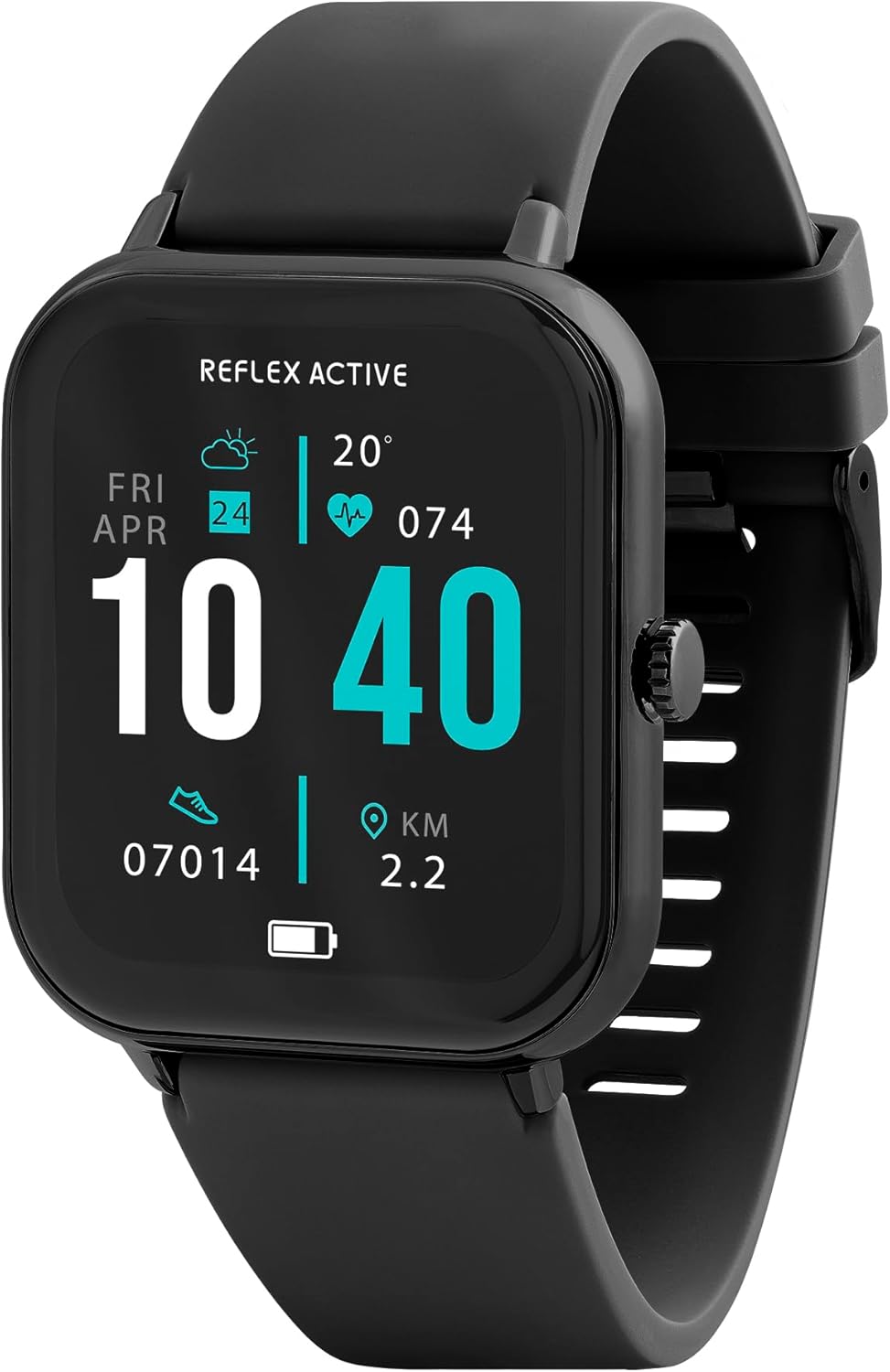
Image 1.1: Reflex Active Series 23 Smart Watch displaying key information.
2. Fa'amatalaga Saogalemu
- Fa'asalaga Fa'afoma'i: This device is not a medical device. Data provided by the watch, including heart rate, blood oxygen, and activity tracking, is for reference only and should not be used for medical diagnosis or treatment. Consult a medical professional for any health concerns.
- Saogalemu maa: Do not attempt to replace the battery yourself. Improper battery replacement can lead to overheating, fire, or explosion.
- Suavai Tetee: The device is IP68 water resistant. This means it is protected against immersion in water up to 1.5 meters for up to 30 minutes. It is suitable for everyday use and shallow-water activities but not for diving or high-pressure water activities. Avoid exposure to hot water, steam, or chemicals.
- Tulaga Lamatia: Taofi le masini ma ana mea faaopoopo mai le aapa atu i ai o tamaiti laiti.
- Saogalemu Avetaavale: Do not operate the watch or check notifications while driving or in situations that require full attention.
- Fa'aitagofie le Pa'u: If you experience skin irritation, redness, or discomfort, discontinue use and consult a doctor. Ensure the watch is clean and dry before wearing.
3. Seti
3.1. Unboxing ma Uluai Asiasiga
I le tatalaina o le afifi, faʻamautinoa o loʻo iai vaega uma:
- Reflex Active Series 23 Smart Watch
- USB Totogi Uaea
- Fa'atonuga Taiala (lenei pepa)
- Fa'amatalaga o le Fa'amaoniga e 2-Tausaga

Image 3.1: Package contents of the Reflex Active Smart Watch.
3.2. Totogiina le Smart Watch
Before first use, fully charge your smart watch. Connect the magnetic charging cable to the charging points on the back of the watch and plug the USB end into a compatible power adapter (not included) or a computer's USB port. The watch display will indicate charging status.
3.3. Fa'apipi'i App
To unlock the full functionality of your Reflex Active Series 23 Smart Watch, you need to install the free Reflex Active Red App on your smartphone. The app is compatible with both iOS and Android devices.
- Scan the QR code in the instruction guide or search for "Reflex Active Red App" in your device's app store.
- La'u mai ma fa'apipi'i le app.
- Follow the on-screen instructions to create an account and set up your profile.

Image 3.2: Reflex Active Red App download options.
3.4. Pairing Your Smart Watch
After installing the app, follow these steps to pair your watch with your smartphone:
- Ensure your watch is charged and powered on.
- Fa'amalo le Bluetooth i lau telefoni.
- Open the Reflex Active Red App.
- Alu i le vaega o le fa'apipi'iina o masini i totonu o le app.
- Select your Reflex Active Series 23 from the list of available devices.
- Fa'amaonia le talosaga fa'alua i lau uati ma lau telefoni.
4. Fa'agaoioia lau Uati Atamai
4.1. Fa'asagaga Autu
The Reflex Active Series 23 features a responsive touchscreen and a side button for navigation:
- Swipe i luga/lalo: Fa'asolo ile lisi ma fa'amatalaga.
- Swipe agavale/taumatau: Access quick-view widgets or different watch faces.
- Tap: Filifili se mea pe tatala se talosaga.
- Itu Itu: Press to return to the home screen or wake the display. Long press for power options.
4.2. Fesootaiga Fesootaiga
Tumau feso'ota'i sa'o mai lou tapulima.
- Faia ma Mauaina Valaau: Once paired, you can make and receive calls directly on your watch.
- Fa'aaliga Fe'au: Receive alerts for incoming messages from various apps.

Image 4.1: Receiving an incoming call on the smart watch.

Image 4.2: Smart watch displaying a wellness feature.
4.3. Health and Activity Tracking
The watch offers comprehensive tracking features:
- Mata'i Fua o le fatu: Fa'aauau le siaki o lou fatu.
- Laa Fa'asaga: Records your daily steps and distance.
- Su'ega moe: E mata'ituina ai au mamanu ma le lelei o lau moe.
- Siakiina o Kalori: Fuafua kalori na mu e faʻatatau i gaioiga.
- Su'ega Ta'amilosaga: Helps monitor menstrual cycles (via app).
- Siakiina o Gaoioiga e Tele: Supports various sports modes.
- Fa'amalositino manava: Ta'iala mo le manava mo le malolo.
- Fa'aliga Fa'asusu: Fa'amanatuga e inu vai.
- Faamanatu nofonofo: Lapata'i oe e gaoioi pe a uma ni vaitaimi e te le gaoioi ai.
- So'oga GPS: Utilizes your phone's GPS for accurate route tracking during outdoor activities.

Ata 4.3: Ua umaview of Reflex Active Smart Watch features.
4.4. Vaega Faaopoopo
- Pulea Musika: Control music playback on your smartphone directly from your watch.
- Pulea meapueata: Faaaoga lau uati e fai ma mea e pupuni ai le meapueata o lau telefonipoto.
- Personalised Photo Dials: Customize your watch face with your own photos via the app.
- Su'ega o le Mata'ituina: Use the app to find your watch if it's misplaced nearby.
- Fa'afouga o le tau: Maua fa'amatalaga tau i le taimi moni.
- moliuila: A simple flashlight function on the watch display.
4.5. General Product Video
The following video provides a general overview of Reflex Active smartwatch features, including calling, notifications, health tracking, and customization. While it may feature other series, the core functionalities are similar to your Series 23.
Vitio 4.1: Ua mae'a le lauteleview of Reflex Active Smart Watch features (Note: Features shown may vary slightly by model series).
5. Tausiga
5.1. Fa'amamaina o lau Uati Poto
To maintain the appearance and functionality of your watch:
- Wipe the screen and case with a soft, lint-free cloth.
- For the strap, use a damp cloth and mild soap if necessary, then rinse thoroughly and dry completely before wearing.
- Aloese mai le fa'aaogaina o vaila'au malolosi po'o mea fa'a'a'asa.
5.2. Tete'e i le Vai (IP68)
Your Reflex Active Series 23 Smart Watch is rated IP68 water resistant. This means it can withstand dust, dirt, and sand, and is resistant to submersion up to a maximum depth of 1.5m underwater for up to thirty minutes. It is suitable for everyday use, such as washing hands or light rain exposure. However, it is not recommended for swimming, showering, or prolonged water exposure, especially in hot water or with soap, as this can compromise the seals.
5.3. Tausiga maa
- Charge the watch regularly to prevent deep discharge.
- Avoid exposing the watch to extreme temperatures, which can degrade battery life.
- Fa'aaoga na'o le uaea e fa'atauina ai.
6. Faʻafitauli
If you encounter issues with your Reflex Active Series 23 Smart Watch, try the following solutions:
- Matamata aua le kilia: Ia fa'amautinoa ua tumu atoa le uati. Fa'afeso'ota'i i le uta mo le itiiti ifo i le 30 minute.
- Not pairing with smartphone:
- Ia mautinoa ua mafai le Bluetooth i lau telefoni.
- Make sure the watch is within range of your phone.
- Toe amata lau uati ma lau telefoni.
- Check if the Reflex Active Red App is updated to the latest version.
- If previously paired, try unpairing and re-pairing the device through your phone's Bluetooth settings and the app.
- Siakiina sese o gaoioiga:
- Ia mautinoa o lo'o ofuina lelei le uati i lou tapulima, pe tusa ma le tasi le lautele o le tamailima i luga a'e o le ivi o lou tapulima.
- Calibrate your stride length in the Reflex Active Red App if steps or distance are consistently off.
- Ensure your personal information (height, weight, age) is accurate in the app.
- Fa'asilasilaga e le o aliali mai:
- Check notification settings within the Reflex Active Red App to ensure desired apps are enabled.
- Verify that your phone's notification settings allow the Reflex Active Red App to send notifications.
- Ia mautinoa e feso'ota'i le uati ile Bluetooth.
- Ua le tali mai le mata: Try restarting the watch by long-pressing the side button until power options appear, then select restart. If unresponsive, allow the battery to fully drain and then recharge.
7. Fa'amatalaga
| Numera Fa'ata'ita'i | RA23-2170 |
| Fa'ailoga | Reflex Active |
| Mea Mea | Black Brushed Alloy |
| Mea Fa'amau | Silikoni uliuli |
| Suavai Tetee | IP68 |
| Ituaiga maa | 1 Lithium Polymer (aofia ai) |
| Fuafuaga Mea | 18.4 x 8.9 x 2.4 cm |
| Mea mamafa | 38 g |
| Fegalegaleaiga | iOS & Android (via Reflex Active Red App) |
8. Fa'amaonia ma Lagolago
Your Reflex Active Series 23 Smart Watch comes with a 2 tausaga fa'amaonia mai le aso na fa'atau ai, e aofia ai fa'aletonu o gaosiga. Fa'amolemole taofi lau fa'amaoniga o le fa'atau mo tagi fa'amaonia.
For further assistance, troubleshooting, or warranty inquiries, please contact the UK support team. Details can be found on the Reflex Active website or within the Reflex Active Red App.
Lagolago i luga ole laiga: Visit the official Reflex Active webnofoaga mo FAQs ma punaoa lagolago.
Polokalama Lagolago: The Reflex Active Red App often includes a support section or contact information.