
Folasaga
This manual provides essential information for the safe and effective operation, maintenance, and troubleshooting of your DEWALT DCD794 20V Cordless 1/2" Drill Driver. The DCD794 is a compact and lightweight tool designed for drilling and fastening applications, delivering up to 1,650 RPMs with a 1/2" ratcheting chuck and an integrated LED work light.

Ata: Luma view of the DEWALT DCD794 20V Cordless 1/2" Drill Driver.
Fa'amatalaga Saogalemu Lautele
Always observe basic safety precautions to reduce the risk of fire, electric shock, and personal injury. Keep your work area clean and well-lit. Do not operate power tools in explosive atmospheres, such as in the presence of flammable liquids, gases, or dust. Keep children and bystanders away while operating a power tool. Wear appropriate personal protective equipment, including eye protection, hearing protection, and gloves. Ensure the tool is switched off before making any adjustments, changing accessories, or storing it.
Ua Umaview
The DEWALT DCD794 Drill Driver is engineered for performance and durability. Key features include:
- 1/2" Ratcheting Chuck: Provides high bit retention for secure accessory gripping.
- Fesiitaiga 2-Saosaoa: Allows for versatile drilling and fastening applications.
- 15 Fa'atulagaga o le Clutch: Offers precise control for various torque requirements.
- Malamalama galue LED: E faʻamalamalamaina le vaega o galuega mo le faʻaleleia atili o le vaʻaia.
- Fuafuaga la'ititi ma mama: Enhances user comfort and maneuverability.
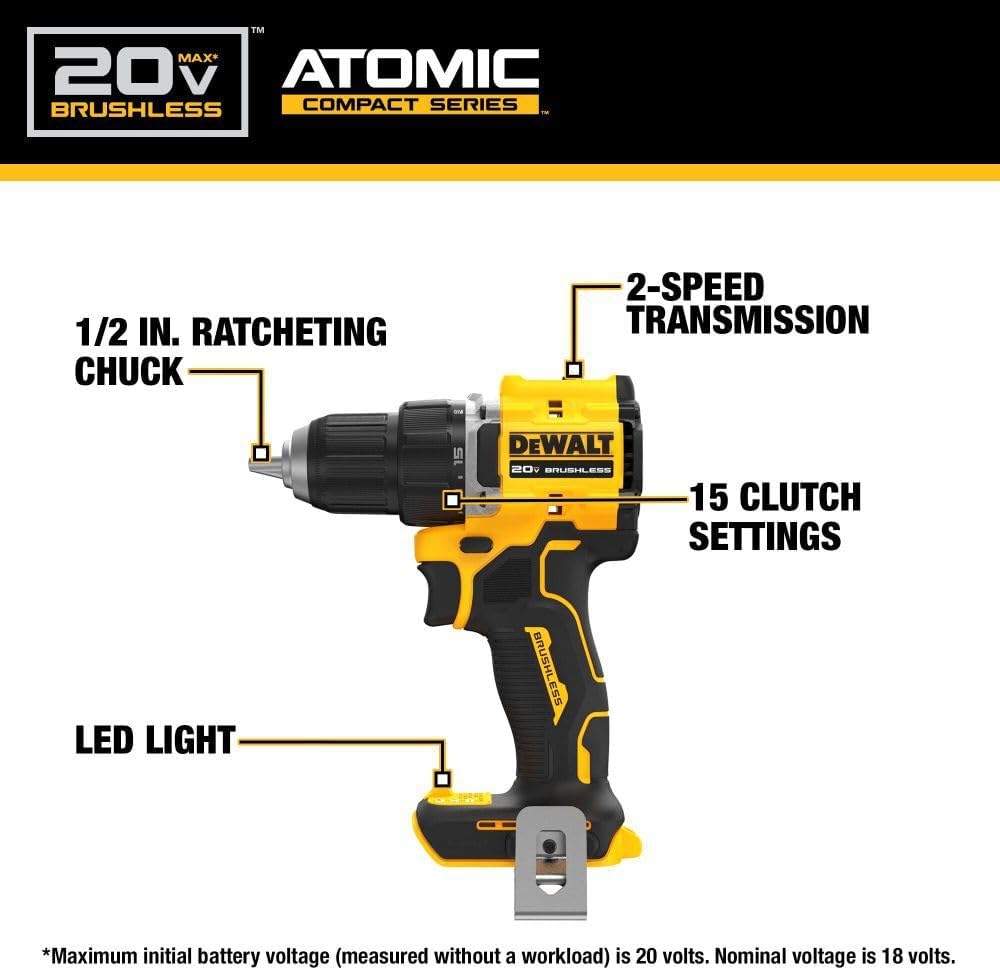
Image: Diagram highlighting the 1/2 inch ratcheting chuck, 2-speed transmission, 15 clutch settings, and LED light on the DEWALT DCD794 Drill Driver.
Seti
Masini Faʻapipiʻiina ma Aveʻese
- To install the battery, align the battery pack with the rails inside the tool's handle. Slide the pack firmly into the tool until it locks into place.
- To remove the battery, press the release button on the battery pack and pull the pack out of the handle.

Image: The DEWALT DCD794 Drill Driver with a 20V battery pack attached to the base.
Bit Fa'apipi'i ma Ave'esea
- To install a drill bit or driver accessory, grasp the rear half of the chuck and rotate the front half counter-clockwise until the chuck jaws open wide enough to accept the accessory.
- Insert the accessory fully into the chuck.
- Grasp the rear half of the chuck and rotate the front half clockwise until the accessory is firmly clamped.
- Ina ia aveese, toe fesuiai le faiga.
Fa'atonuga o Galuega
Filifiliga Saosaoa
The drill driver features a 2-speed transmission for optimal performance across different applications. Use the speed selector switch located on top of the tool:
- Tulaga 1 (Saosaoa Maulalo): For high torque applications, such as driving screws or drilling large diameter holes.
- Tulaga 2 (Saosaoa maualuga): For faster drilling with smaller bits.

Image: The DEWALT DCD794 Drill Driver being used to drill into wood, illustrating its 2-speed transmission capability.
Fa'atonuga
The adjustable clutch ring allows you to select the appropriate torque setting for your task. Rotate the ring to align the desired number with the indicator mark. Lower numbers are for driving small screws or into soft materials, while higher numbers are for driving larger screws or into harder materials. The drill symbol setting provides maximum torque for drilling applications.
Trigger Switch and LED Light
The variable speed trigger switch controls the tool's speed. Press the trigger to start the tool and vary the pressure to adjust the speed. The integrated LED work light activates when the trigger is pressed, illuminating the work surface. The light remains on for a short period after the trigger is released.
Tausiga
O le tausiga faifaipea e mautinoa ai le fa'atinoga lelei ma fa'alautele le ola o lau meafaigaluega.
- Fa'amamaina: Fa'aaogā se mea vaivai, oamp cloth to clean the exterior of the tool. Do not use harsh chemicals or abrasive cleaners. Keep the ventilation slots clear of dust and debris.
- Tausiga Chuck: Fa'amama i lea taimi ma lea taimi auvae o le chuck ina ia mautinoa le uu lelei.
- Tausiga maa: Teu maa i se nofoaga mālūlū ma matutu mamao ese mai le susulu o le la. Aua ne'i teuina maa i se tulaga ua alu ese mo se vaitaimi umi.
- Asiasiga: Regularly inspect the tool for any damaged parts, loose screws, or worn components. Have any damaged parts repaired by a qualified service technician.
Fa'afitauli
| Fa'afitauli | Mafuaaga e ono tupu | Fofo |
|---|---|---|
| E le amataina le meafaigaluega | E le'i totogia le ma'a po'o le fa'apipi'iina lelei | Fa'atumu atoa le maa; ia mautinoa ua fa'apipi'i lelei le maa. |
| Ma'imau le paoa i le taimi o le taotoga | Maa paʻu maualalo | Toe utu maa. |
| E se'e sina fasi i totonu | Chuck not tightened sufficiently or jaws are dirty | Fa'amaumau le fa'amau; mama auvae chuck. |
| Tete tele | Bent drill bit or accessory | Replace with a straight, undamaged accessory. |
Fa'amatalaga
| Fa'aaliga | Fa'amatalaga |
|---|---|
| Fa'ailoga | TAIMI |
| Numera Fa'ata'ita'i | DCD794B-NBX |
| Punavai Malosi | Malosi maa (20 Volts) |
| Ole Saosaoa Fa'asolo Tele | 1650 RPM |
| Tele le Fua o le Chuck | 0.5 Inisi |
| Tuli maualuga | 1.5 Newton mita |
| Malosi maualuga | 300 Watts |
| Ituaiga Mea | palasitika |
| Ituaiga Mea (L x W x H) | 6"L x 3"W x 8"L |
| Mea mamafa | 2.54 pauna |
Fa'amatalaga Fa'amaonia
DEWALT provides a limited warranty for its products. For specific details regarding the warranty period, coverage, and terms for your DCD794 Drill Driver, please refer to the warranty card included with your purchase or visit the official DEWALT webnofoaga. Taofi lau fa'amaoniga o le fa'atau mo tagi fa'amaonia.
Lagolago
Mo nisi fesoasoani, lagolago fa'apitoa, pe saili nofoaga fa'atagaina mo tautua, fa'amolemole asiasi i le ofisa aloaia a le DEWALT. web'upega tafaʻilagi pe faʻafesoʻotaʻi la latou tautua faʻatau. E mafai ona e mauaina nisi faʻamatalaga ma punaoa i le Faleoloa DEWALT ile Amazon or the main DEWALT corporate webnofoaga.