
Weiser 9GED92500-002
Weiser Powerbolt 3 Electronic Door Lock User Manual
Fa'ata'ita'iga: 9GED92500-002
Fa'ailoga: Weiser
1. Folasaga
Welcome to the user manual for your new Weiser Powerbolt 3 Electronic Door Lock. This keyless entry deadbolt offers a convenient and secure way to manage access to your home or property. Designed for ease of use and installation, the Powerbolt 3 provides reliable performance with features like customizable user codes, auto-locking, and enhanced security.
O mea taua e aofia ai:
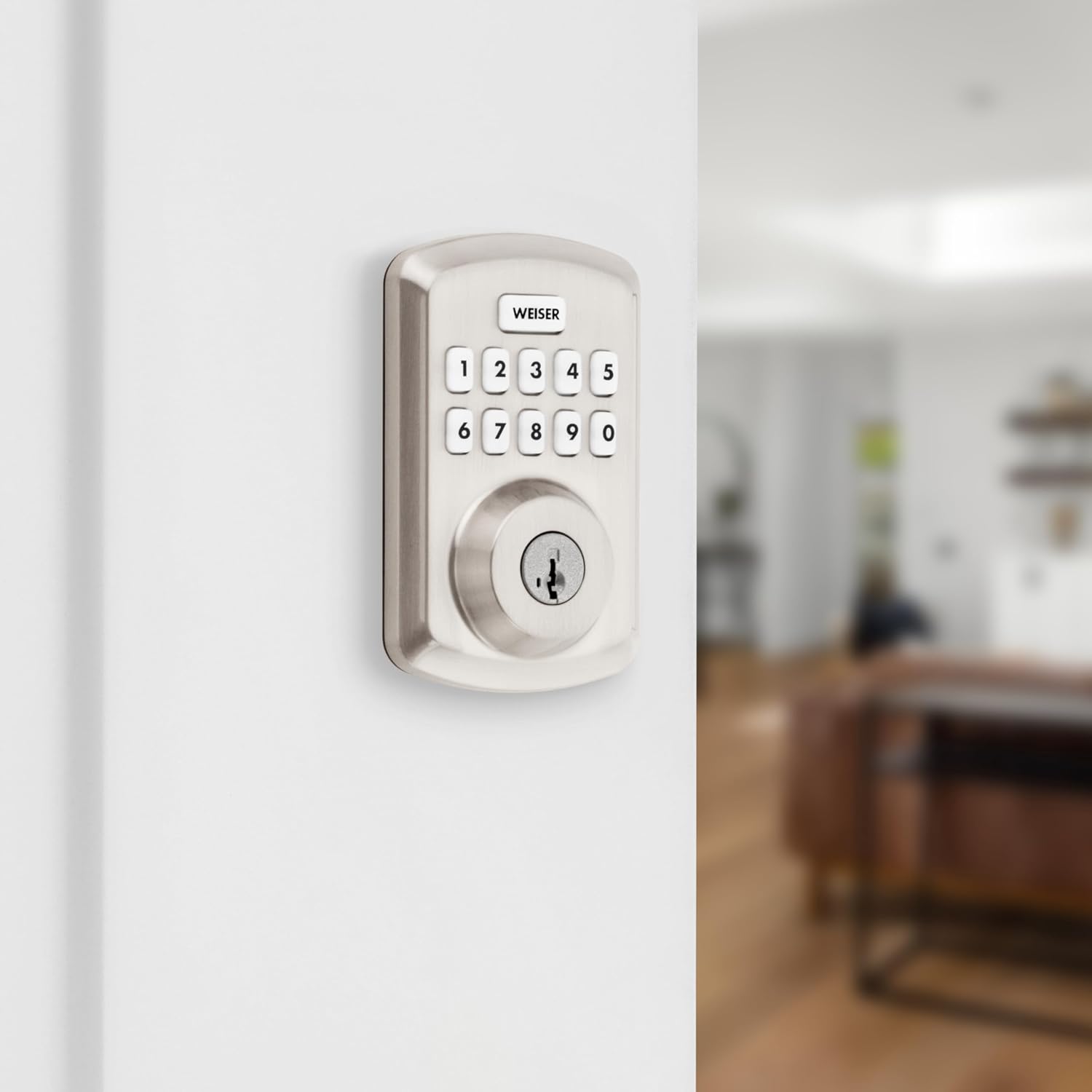
- Convenient keyless entry with a 10-button keypad.
- Ability to customize up to 25 user codes and 5 one-time user codes.
- Optional Auto-Lock feature with adjustable timings (30 seconds, 1, 3, 5, or 10 minutes).
- Vacation Mode to temporarily disable the keypad for enhanced security when away.
- SmartKey Technology for easy re-keying and advanced break-in protection.
- Easy installation requiring only a screwdriver, supported by the BILT App for 3D video and voice guidance.
2. Oloa Ua Ovaview
The Weiser Powerbolt 3 is an electronic deadbolt designed for various door types, offering a modern and secure access solution. Its sleek design integrates seamlessly with most home decors.

This image displays the complete Weiser Powerbolt 3 electronic deadbolt, showing both the exterior keypad unit with its 10-button layout and keyhole, and the interior unit with its thumb-turn and battery cover. Both components are finished in satin nickel.
The Powerbolt 3 is versatile and suitable for various applications, including:
- Front, back, or side doors
- Faitotoa faletaavale
- Shed or storage doors
- Office doors

This image illustrates various common applications for the Weiser Powerbolt 3, including an entry door, a shed door, a side door, and a garage door, highlighting its adaptability for different access points.
3. O a mea oi totonu o le Pusa
Aʻo leʻi amataina le faʻapipiʻiina, faʻamolemole faʻamaonia o loʻo iai uma vaega i lau afifi:
- Fonotaga Deadbolt fafo
- Lotoifale Deadbolt Fonotaga
- Fa'amau Fa'atonu
- Ipu taia
- Laupapa Fa'amau
- Fa'apipi'i Meafaigaluega (fa'ailoga)
- 2 Weiser Ki
- Meafaigaluega SmartKey
- Tu'u-i totonu Collar
- Installation Guide (Manual)

This image displays all the components included in the Weiser Powerbolt 3 package, laid out for easy identification. It shows the exterior and interior lock assemblies, keys, SmartKey tool, latch, strike plate, mounting plate, and various screws.
4. Seti ma Fa'apipi'i
The Weiser Powerbolt 3 is designed for simple installation, requiring only a screwdriver. For detailed, step-by-step 3D video and voice-guided instructions, it is highly recommended to use the BILT App.
4.1 Sauniuniga Faitotoa
Ia mautinoa o lou faitotoʻa e ausia tulaga nei:
- Cross Bore Hole Diameter: 1-1/2 inisi po'o le 2-1/8 inisi
- Mafiafia Faitotoa: 1-3/8 inches to 1-3/4 inches standard
- Fa'atonu Fa'amau tua: 2-3/8 inisi i le 2-3/4 inisi

This diagram provides detailed dimensions for the Weiser Powerbolt 3 exterior and interior units, along with an illustration of the adjustable latch backset, crucial for proper door preparation and installation.
4.2 Laasaga Fa'apipi'i (General Overview)
- Fa'amau le fa'amau i le pito o le faitoto'a.
- Fa'apipi'i le fa'apipi'i pito i fafo.
- Fa'apipi'i le ipu fa'apipi'i.
- Fa'apipi'i le fa'apotopotoga i totonu.
- Fa'apipi'i le ipu ta'i i luga o le fa'avaa o le faitoto'a.
- Insert 4 AA batteries (not included) into the interior assembly.
- Perform the door handing process to calibrate the lock to your door.
For detailed visual and audio guidance, download the BILT App on your smartphone or tablet.
5. Fa'atonuga o Galuega
5.1 Ulufale e leai se ki
Ina ia tatala le faitotoa e faaaoga ai le ki:
- Ulufale lau 4-8 numera fa'aoga code.
- The deadbolt will retract, and the door can be opened.
This image shows a person using the Weiser Powerbolt 3 keypad to gain keyless entry into a home, demonstrating the convenience and security of the system.
5.2 One-Touch Motorized Locking
To lock the door from the exterior, simply press the Lock button (the 'Weiser' button) on the keypad. The deadbolt will extend automatically. From the interior, turn the thumb-turn to lock the door.
5.3 Low Light Code Entry
The keypad features bright LED lights that illuminate the buttons, making it easy to enter your user code at night or in low-light conditions. Simply tap the keypad to activate the lights.

This image highlights the backlit keypad of the Weiser Powerbolt 3, showing how the illuminated buttons make it easy to enter codes even in dark environments, such as at night.
6. Fa'apolokalame Fa'ailoga Fa'aoga
The Powerbolt 3 allows for easy management of access codes. You can program up to 25 unique user codes for regular access and 5 one-time user codes for temporary access.
This image illustrates the easy code management feature of the Weiser Powerbolt 3, showing how up to 25 regular user codes and 5 one-time user codes can be programmed, with visual representations of different user types.
Refer to your detailed installation guide for specific steps on adding, deleting, or modifying user codes and the master code.
7. Avatu Fa'apitoa
7.1 Loka-Aunoa
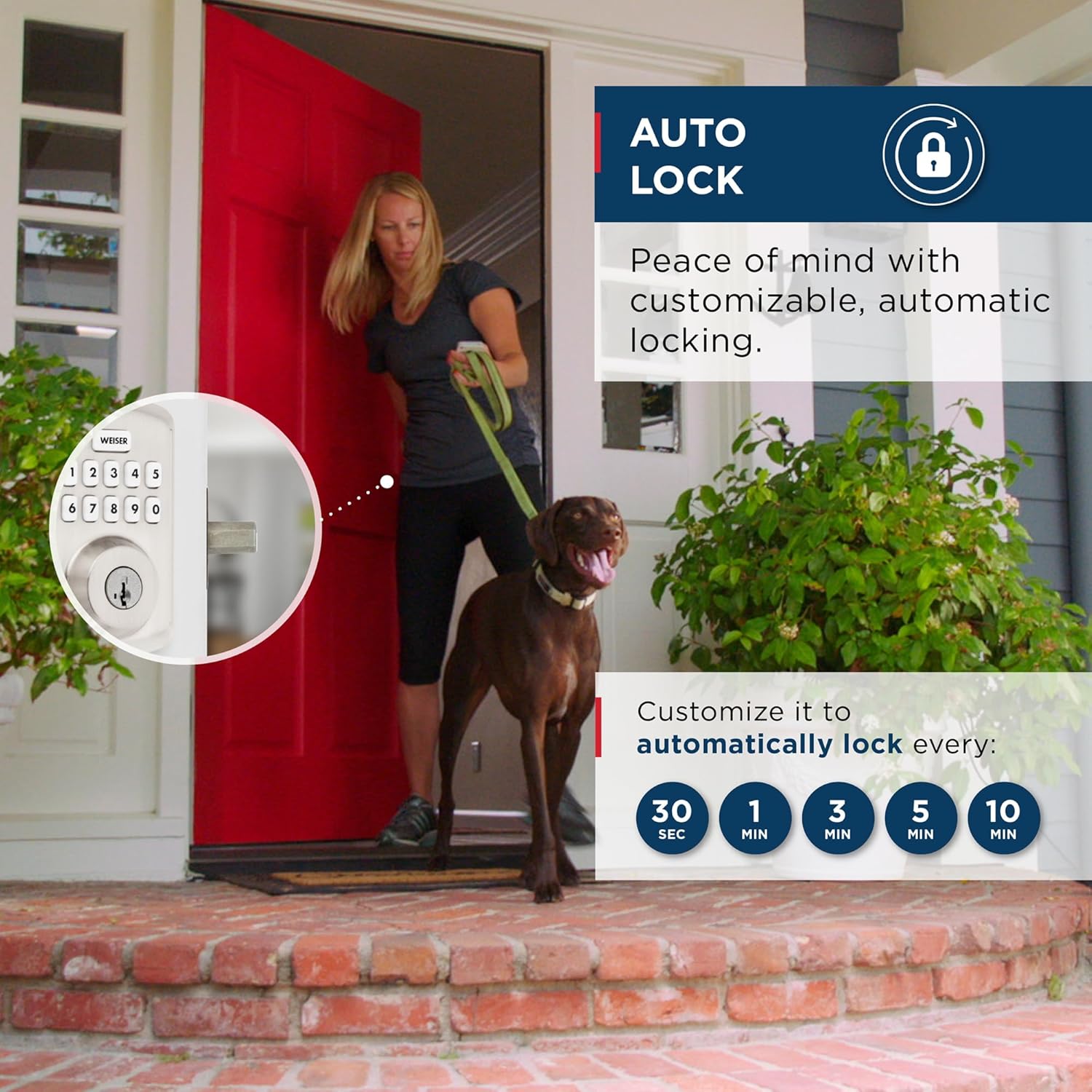
For added security and peace of mind, the Powerbolt 3 can be set to automatically lock after a specified delay. This feature ensures your door is always secured, even if you forget to lock it manually.
- Customizable auto-lock timings: 30 seconds, 1 minute, 3 minutes, 5 minutes, or 10 minutes.

This image demonstrates the auto-lock feature of the Weiser Powerbolt 3, showing a person leaving a house with a dog, and the lock automatically engaging after a customizable time delay, providing peace of mind.
7.2 Tulaga Aso malolo
Activate Vacation Mode to temporarily disable the keypad. This feature is ideal when you are away for an extended period, ensuring no one can operate your door lock via the keypad.

This image depicts a couple walking through an airport, symbolizing travel, while showcasing the Weiser Powerbolt 3's Vacation Mode feature, which temporarily disables the keypad for enhanced security when the user is away.
7.3 SmartKey Technology
Weiser's SmartKey Security™ provides advanced protection against common break-in techniques and allows you to re-key your lock yourself in seconds. This means you can easily re-key the lock to any Kwikset (KW1) key, making lost or unreturned keys obsolete.

This image illustrates the SmartKey Security™ technology, showing a cutaway view of the lock cylinder and highlighting its resistance to advanced break-in techniques like picking and bumping, along with the re-keying process.
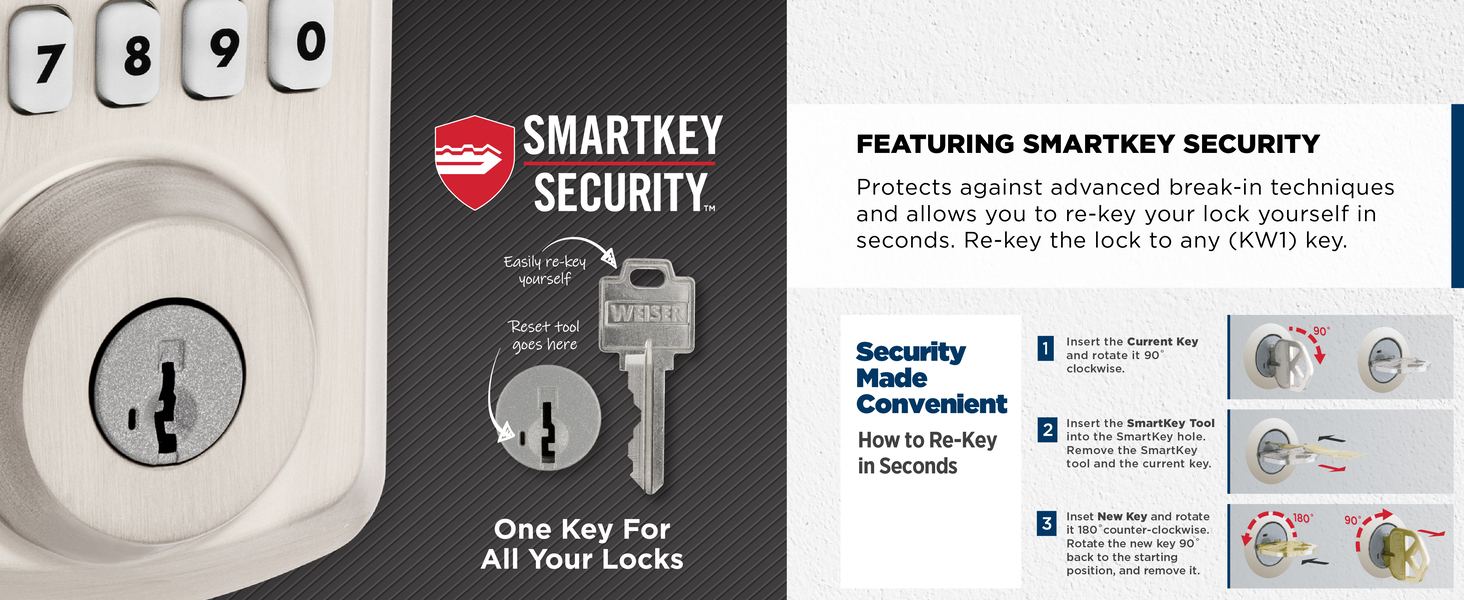
This image provides a step-by-step visual guide on how to re-key the Weiser Powerbolt 3 using the SmartKey tool, demonstrating the simplicity of the process for users to change their lock's keying themselves.
7.4 Lapataiga o le Fa'alavelave Fa'afuase'i
If three consecutive incorrect user code attempts are made, the lock will sound an alarm and disable the keypad for 1 minute to prevent tampering. This feature enhances security by deterring unauthorized access attempts.

This image illustrates the intrusion alert feature of the Weiser Powerbolt 3, showing the keypad flashing red and sounding an alarm after three incorrect user code attempts, indicating a security breach attempt.
8. Tausiga
The Weiser Powerbolt 3 is designed for low maintenance. The lock operates on 4 AA alkaline batteries (not included) and provides approximately 12 months of battery life under normal usage. When batteries are low, the lock will provide an audible and visual indicator. Replace all four batteries simultaneously when prompted.
Ina ia fa'amama le loka, fa'aaoga se mea vaivai, oamp ie. Aloese mai mea fa'amama fa'amama po'o so'o, aua e ono fa'aleagaina ai le fa'auma po'o mea fa'aeletoroni.
9. Faʻafitauli
If you encounter issues with your Weiser Powerbolt 3, please refer to the following common troubleshooting tips:
- Loka le tali mai: Siaki le maualuga o le maa ma sui pe a mana'omia. Ia mautinoa o lo'o nofo lelei le pusa maa.
- Keypad e le o mumu: Tap the keypad to activate the backlight. If it still doesn't light up, check batteries.
- Lock not locking/unlocking: Ensure the door is properly closed and aligned with the strike plate. Re-perform the door handing process if the lock was recently installed or if the door alignment has changed.
- E le o galue le code user: Verify the user code is correct. Ensure the lock is not in Vacation Mode or disabled due to multiple incorrect entries (Intrusion Alert).
- E pipi pea lava pea le loka: This may indicate low battery. Replace batteries immediately.
For more detailed troubleshooting steps or persistent issues, please consult the full installation guide or contact Weiser customer support.
10. Fa'amatalaga
| Fa'aaliga | Fa'amatalaga |
|---|---|
| Tufuga | Weiser |
| Numera Fa'ata'ita'i | 9GED92500-002 |
| Lanu | Satini Nikeli |
| Sitaili | Malosiaga 3 |
| Faauma | Fufulu |
| Mea | Uamea, Palasitika |
| Fua o Mea | 2.46 x 7.14 x 11.66cm; 907.18g |
| Mea mamafa | 907 g |
| Ituaiga Loka | Tapepa, Keypad |
| Fa'apitoa Fa'apitoa | Auto-Lock, BHMA/ANSI Grade 3, Motorized Locking, SmartKey Technology, Vacation Mode (Disable Keypad) |
| Punavai Malosi | 4 x AA maa (e le o aofia ai) |
| Ola ma'a | E tusa ma le 12 masina |
| Faitotoa Mafiafia Fegalegaleai | 1-3/8" to 1-3/4" standard |
| Cross Bore Hole Compatibility | 1-1/2" or 2-1/8" diameter |
| Atunuu na Afua mai ai | Saina |
11. Fa'amaonia ma Lagolago
11.1 Fa'amatalaga Fa'amaonia
The Weiser Powerbolt 3 comes with the following warranty coverage:
- 1-Year Limited Electronics Warranty: Covers defects in materials and workmanship of the electronic components.
- Lifetime Limited Mechanical & Finish Warranty: Covers defects in materials and workmanship of the mechanical components and the finish of the lock.
Please retain your proof of purchase for warranty claims. For full warranty details and conditions, refer to the documentation included with your product or visit the official Weiser webnofoaga.
11.2 Fesoasoani mo Tagata Fa'atau
For technical assistance, troubleshooting, or warranty inquiries, please contact Weiser customer support. You can find contact information on the official Weiser webnofoaga po'o totonu o lau afifiina o oloa.
Asiasi i le Faleoloa Weiser i luga o le Amazon mo nisi oloa ma fa'amatalaga.
Ask a question about this manual
Ask about setup, troubleshooting, compatibility, parts, safety, or missing instructions. Manuals+ will review the question and use this page’s manual context to help answer it.