
1. Folasaga
Thank you for choosing the Outwell Arctic Chill 50L Portable Refrigerator. This manual provides essential information for the safe and efficient operation, maintenance, and troubleshooting of your new appliance. Please read it thoroughly before first use and keep it for future reference.
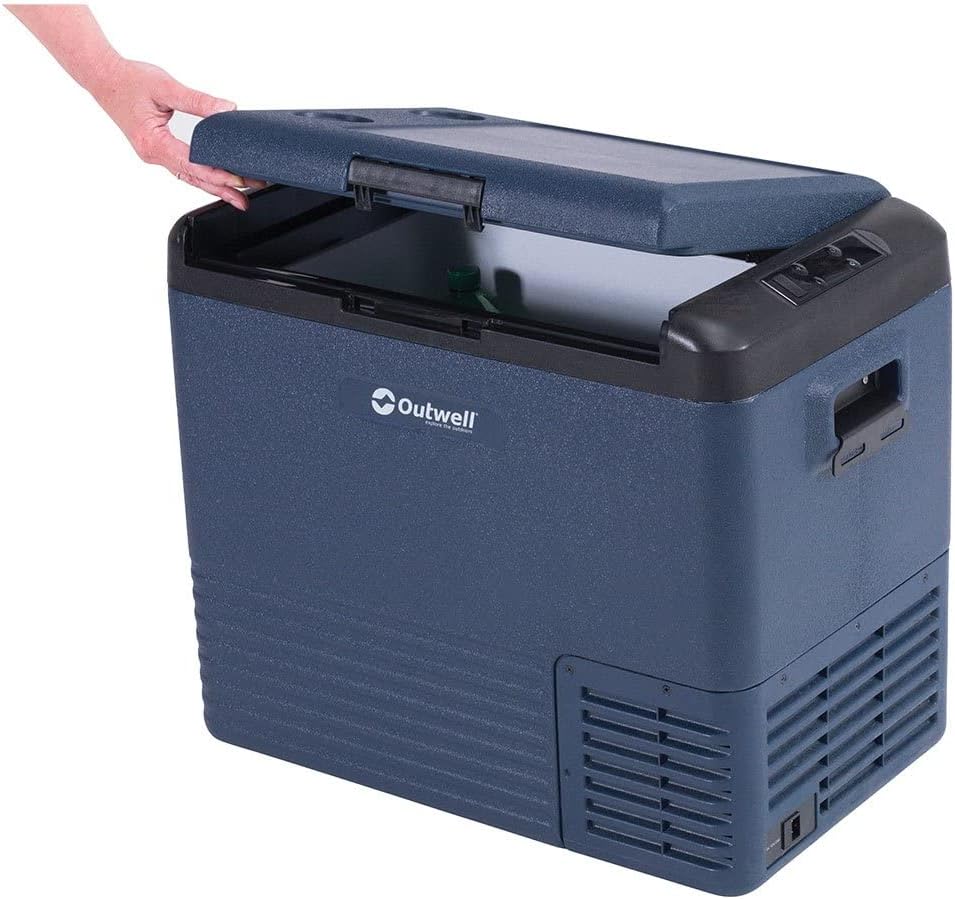
This image displays the Outwell Arctic Chill 50L portable refrigerator in a dark blue color, with its lid partially open, revealing the spacious interior suitable for storing food and beverages.
2. Faatonuga Saogalemu
- Ia mautinoa le sapalai eletise voltage fetaui ma le fa'ailoga fa'ailoga i luga o le masini.
- Do not operate the refrigerator if the power cord is damaged. Contact qualified service personnel.
- Taofi avanoa e sau ai le ea mai mea fa'alavelave.
- Aua le faʻaaogaina masini eletise i totonu o potu e teu ai meaai seʻi vagana o ituaiga ia e fautuaina e le gaosi oloa.
- Aloese mai le tu'u o le pusaaisa i le susulu sa'o o le la po'o latalata i puna vevela.
- O lenei masini e le'o fa'amoemoe mo le fa'aogaina e tagata (e aofia ai tamaiti) e fa'aitiitia le malosi o le tino, lagona po'o le mafaufau, po'o le leai o se poto masani ma le malamalama, se'i vagana ua tu'uina atu ia i latou le vaavaaiga poʻo le faʻatonuga e uiga i le faʻaaogaina o le masini e se tagata e nafa ma lo latou saogalemu.
- E tatau ona vaavaaia tamaiti ina ia mautinoa latou te le taaalo i le masini.
3. Mea i totonu o le afifi
Fa'amolemole siaki pe o iai uma mea ma o lo'o lelei:
- Outwell Arctic Chill 50L Portable Refrigerator Unit
- AC Power Adapter (230V)
- DC Power Cable (12V)
- Tusi Taiala

This image illustrates the power accessories included with the refrigerator, featuring an AC adapter for household outlets and a 12V DC cable for vehicle power sources, ensuring versatile connectivity.
4. Seti
4.1 Tatalaina
- Remove all packaging materials and inspect the refrigerator for any damage.
- Fa'amama totonu ma fafo ile fa'asalalaugaamp ie a'o le'i fa'aoga muamua.
- Place the refrigerator on a stable, level surface, ensuring adequate ventilation around all sides.
4.2 Feso'ota'i ile Malosi
The Arctic Chill 50L can be powered by either 12V DC (car/vehicle) or 230V AC (household mains).
- For 12V DC: Connect the DC power cable to the refrigerator's DC input port and then to your vehicle's 12V socket.
- For 230V AC: Connect the AC power adapter to the refrigerator's AC input port, then plug the adapter into a standard 230V wall outlet.
Ensure the power connection is secure before turning on the unit.
5. Fa'atonuga o Galuega
5.1 Pulea le Panelview

This close-up image highlights the digital control panel of the refrigerator, showing temperature display, battery indicator, and buttons for adjusting settings like ECO mode.
The control panel features a digital display and several buttons for operation:
- Ki Malosi: Liliu le iunite ON/OFF.
- Fa'amau Fetuuna'iga o le vevela (+/-): Increases or decreases the target temperature.
- Faiga Fa'amau: Cycles through cooling modes (e.g., ECO, MAX).
- Fa'aaliga: Shows current temperature, battery level, and selected mode.
5.2 Fa'atulagaina o le vevela
- Oomi le faamau Malosi e ki ai le pusaaisa.
- Use the '+' or '-' buttons to set your desired temperature. The display will show the target temperature briefly, then revert to the current internal temperature.
5.3 Faiga Fa'alili
- MAX faiga: E maua ai le malosi sili ona malulu mo le faʻaitiitia vave o le vevela.
- Faʻasao ECO: Optimizes power consumption for energy efficiency, suitable for maintaining temperature over longer periods.
Press the Mode button to switch between available cooling modes.
5.4 Smartphone App Connectivity
The Outwell Arctic Chill 50L may feature Bluetooth connectivity, allowing you to control and monitor the refrigerator via a dedicated smartphone app.
- Download the 'Outwell Arctic Cooler' app from your device's app store.
- Ia mautinoa ua mafai le Bluetooth i lau telefoni.
- Follow the in-app instructions to pair your refrigerator.

This image shows a user interacting with the Outwell Arctic Cooler mobile application on a smartphone, which allows for remote control and monitoring of the refrigerator's temperature and settings.
6. Tausiga
6.1 Fa'amamāina
- Ta'ese i taimi uma le paoa a'o le'i fa'amama.
- Fa'amama totonu ma fafo i luga ole fa'asalalaugaamp ie ma fufulu mama.
- Aua ne'i fa'aogaina ni mea fa'amama fa'amama po'o ni vaila'au malosi.
- Ia mautinoa ua mago atoa le masini a'o le'i toe fa'apipi'iina le eletise.
6.2 Teuina
When not in use for extended periods, ensure the refrigerator is clean, dry, and stored in a well-ventilated area. Leave the lid slightly ajar to prevent odors and mildew.
7. Faʻafitauli
| Fa'afitauli | Mafuaaga e ono tupu | Fofo |
|---|---|---|
| E le kilia le pusaaisa | Leai se eletise; Ua malepe le eletise; Fuse ua feula (taavale) | Check power connection; Try a different outlet/socket; Inspect power cord; Check vehicle fuse. |
| Le lava le mālūlū | Ventilation blocked; Door not sealed properly; Ambient temperature too high; Overloaded with warm items | Clear vents; Ensure lid is closed tightly; Move to a cooler location; Allow time for cooling. |
| Pisa le masani ai | Unite le tulaga; Fa'alavelave ili | Place on a level surface; Check for debris near the fan. |
8. Fa'amatalaga
| Fa'aaliga | Fa'amatalaga |
|---|---|
| Fa'ailoga | Outwell |
| Igoa Fa'ata'ita'iga | Arctic Chill 50L |
| Numera Fa'ata'ita'i | 590205 |
| Malosiaga | 50 lita |
| Malosiaga Ulufale | 12V DC / 230V AC |
| Lanu | Lanu efuefu |
| Meafaitino (Fafo) | Polyester |
| Mea Fa'agata | Polyvinyl klorida |
| Oloa mamafa | 2.7 kilokalama |
| Fa'apitoa Fa'apitoa | Faigofie ona fa'aoga |
9. Fa'amaonia ma Lagolago
For warranty information and technical support, please refer to the warranty card included with your product or visit the official Outwell webnofoaga. Taofi lau fa'amaoniga o le fa'atau mo so'o se tagi fa'amaonia.