
1. Folasaga
Welcome to the BestQool Red Light Therapy Belt (Redot M) user manual. This document provides essential information for the safe and effective operation, maintenance, and troubleshooting of your device. The BestQool Redot M is designed to deliver red light (660nm) and near-infrared light (850nm) therapy, utilizing 220 dual-chip LEDs to support various wellness applications.
Fa'amolemole faitau mae'ae'a lenei tusi lesona a'o le'i fa'aoga muamua ma taofi mo le fa'asinoga i le lumana'i.
2. Fa'amatalaga Saogalemu
- Fa'afeso'ota'i se Tomai Fa'alesoifua maloloina: It is recommended to consult with a doctor or healthcare provider before using this device, especially if you have pre-existing medical conditions, are pregnant, or are taking medications.
- Puipuia Mata: While the light emitted is generally safe, avoid direct eye exposure to the LEDs.
- Su'ega ma'ale'ale Pa'u: Before regular use, perform a light sensitivity test as described in Section 5.5.
- Tempera: The device may generate warmth during operation. Limit use to under 20 minutes on the highest setting to avoid discomfort or potential burns.
- E lē o se Meafaigaluega Faafoma'i: O faʻamatalaga e uiga i meaʻai faaopoopo e leʻi iloiloina e le FDA ma e le o faʻamoemoe e faʻamaonia, togafitia, fofo, pe puipuia soʻo se faʻamaʻi poʻo se tulaga faʻalesoifua maloloina.
- Tamaiti ma Fagafao: Keep out of reach of children. Use on pets only under veterinary guidance.
- Meafaigaluega ua Fa'aleagaina: Do not use the device if the power cord, adapter, or the belt itself appears damaged.
3. Oloa Ua Ovaview
The BestQool Red Light Therapy Belt (Redot M) is a flexible, wearable pad designed for targeted light therapy. It features 220 high-efficiency dual-chip LEDs, emitting both 660nm red light and 850nm near-infrared light.
3.1 Vaega
- Red Light Therapy Pad (Redot M)
- No'u Fa'atonu
- Controller with Display
- Fetuunaiga Malosi
- Uaea Malosi

Image 3.1: The BestQool Red Light Therapy Belt (Redot M) with its integrated controller.

Image 3.2: Visual representation of the therapy pad, straps, controller, adapter, and power cord.
4. Seti
- Tatala: Aveese ma le faaeteete vaega uma mai le afifiina.
- Fesoʻotaʻi le Mana: Connect the power cord to the controller, then plug the power adapter into a standard electrical outlet (AC 85-265V).
- Tu'u le fusi: Place the therapy belt on the desired body area. The flexible design allows it to conform to various body contours such as the back, waist, abdomen, or limbs.
- Puipuia ma fusi: Use the adjustable straps to comfortably secure the belt in place. Ensure it is snug but not overly tight to allow for proper circulation.

Ata 4.1: Esoample of the therapy belt being worn around the waist.
5. Fa'atonuga o Galuega
5.1 Malosi / Malosi
Press the power button on the controller to turn the device on or off. The display will illuminate when the device is active.
5.2 Faiga Fa'afoma'i
The device offers two primary modes:
- Steady-On Mode: All red and near-infrared lights remain continuously illuminated. This mode is suitable for general relaxation and daily use.
- Pulsing Mode: The lights pulse at a specific frequency. This mode is adjustable between 10Hz and 40Hz.
- 10Hz Pulse Mode: Gentle pulses for superficial tissues, calming inflammation, and promoting skin renewal.
- 40Hz Pulse Mode: Reaches deeper tissues, boosts cell energy, and supports pain relief and healing.
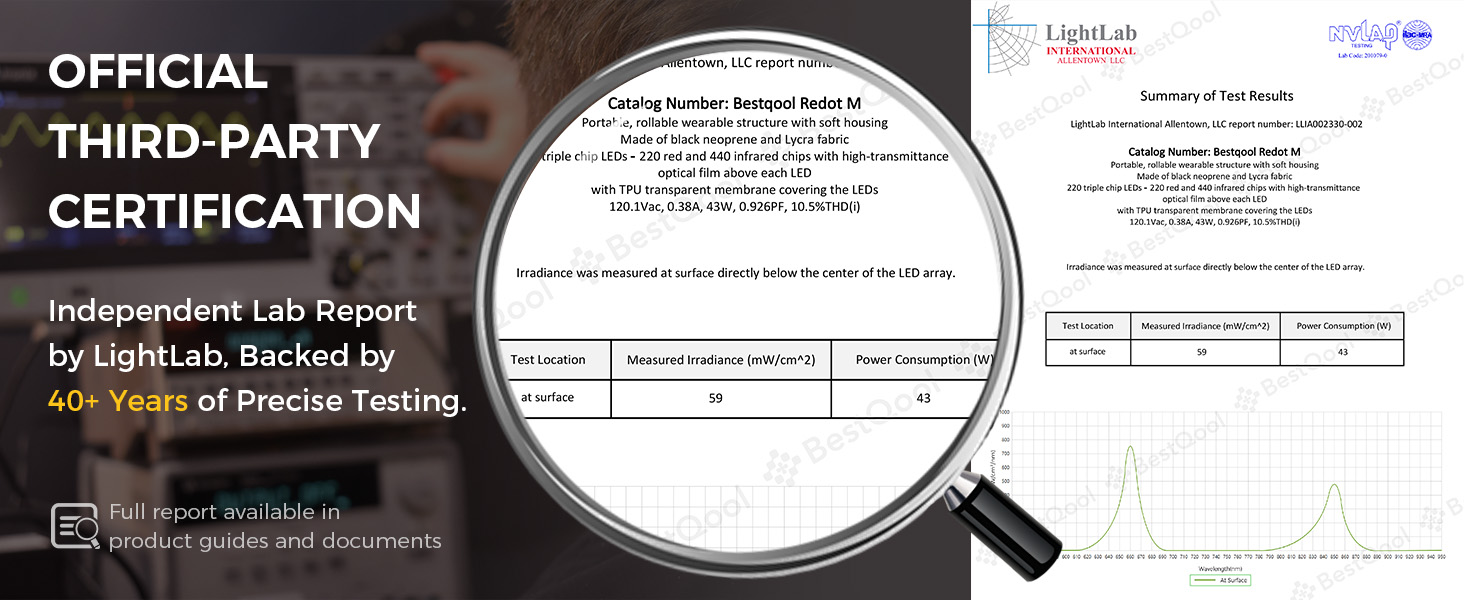
Image 5.1: Explanation of the three available therapy modes: Constant, 10Hz Pulse, and 40Hz Pulse.
5.3 Tulaga Malosi
The device features 5 power intensity levels (L1-L5) to customize your therapy experience. Adjust the intensity using the controller buttons. Higher levels provide greater light output.

Image 5.2: Intensity levels and their associated power values.
5.4 Fa'atulagaina o le Taimi
The controller allows you to set a session duration. Refer to the controller's specific buttons for adjusting the timer. The device will automatically shut off once the set time has elapsed.
5.5 Application Guidelines
For optimal results, use the therapy belt on bare skin. Clothing can block the red light, significantly reducing its effectiveness.

Image 5.3: Illustration demonstrating the importance of direct skin contact for effective light penetration.
Recommended session durations and intensities vary based on the desired application:

Image 5.4: Recommended light intensity, duration, and pulse mode for different applications.
For best results, use the device at least 4 times a week for a minimum of 4 weeks.
5.6 Su'ega Malamalama Malamalama
Perform this test before your first full session to assess your skin's reaction to the light therapy:
- Place the belt on a small area of your arm.
- Turn on the device to a low intensity (e.g., L1) for 5-10 minutes.
- Remove the belt and wait 30 minutes.
- If no discomfort, redness, or adverse reaction occurs, you may proceed with regular use.

Image 5.5: Step-by-step guide for conducting a light sensitivity test.
6. Tausia ma Tausiga
- Fa'amamaina: Disconnect the device from power before cleaning. Wipe the surface of the belt with a soft, damp ie. Aua ne'i fa'aogaina vaila'au malolosi po'o ni mea fa'amama. Ia mautinoa ua mago atoa le masini a'o le'i teuina po'o le isi fa'aoga.
- Teuina: Store the device in a cool, dry place away from direct sunlight. Roll or fold the belt gently to avoid creasing or damaging the internal components.
- Taulimaina: Avoid bending the belt sharply or placing heavy objects on it. Do not submerge the device in water.
7. Faʻafitauli
If you encounter issues with your BestQool Red Light Therapy Belt, please refer to the following common solutions:
- E le o ki le masini:
- Ensure the power adapter is securely plugged into both the wall outlet and the controller.
- Fa'amautinoa o lo'o fa'aogaina le pusa puipui.
- Molī e le o mumu:
- Check if the device is powered on and the timer is set.
- Confirm that the intensity level is not set to zero (if applicable).
- Unusual Odor or Noise:
- Immediately discontinue use and unplug the device. Contact customer support.
If the problem persists or you experience any other issues, please contact BestQool customer support for assistance.
8. Fa'amatalaga
| Fa'aaliga | Fa'amatalaga |
|---|---|
| Numera Fa'ata'ita'i | Redot M |
| Fua o Mea | 21.9 x 13.6 x 0.35 inisi |
| mamafa | 1.08 pauna |
| Fa'aaogāga Malosiaga | 43W |
| Umi o galu | 660nm (Muli Mumu), 850nm (Latalata-Infrared Light) |
| Faitauina LED | 220 LEDs (Dual Chip) |
| Malosiaga Ulufale | AC 85-265V |
| Tulaga Malosi | 5 Tulaga |
| Tulaga | Steady-On, Pulsing (10Hz, 40Hz) |
9. Fa'amaonia ma Lagolago
BestQool offers a 30-day testing period for the Red Light Therapy Belt. If you are not satisfied with your purchase within this period, please contact customer service for assistance.
For any questions, technical support, or warranty claims, please reach out to BestQool customer service. Our friendly customer service team is available to help you.
Fa'amatalaga Fa'afeso'ota'i:
- WhatsApp (Text+Pics): +1 3195123212
- Refer to the product packaging or BestQool official website for additional contact methods.