
1. Folasaga
Welcome to the user manual for your new Avtex W195TS Smart TV. This television is specifically designed for mobile living, offering versatile power options (12V, 24V, and 240V) and a range of smart features, including Wi-Fi, Bluetooth, and an integrated Freesat satellite decoder. This manual provides essential information for setting up, operating, maintaining, and troubleshooting your device to ensure optimal performance and enjoyment.
2. Fa'amatalaga Saogalemu
Fa'amolemole faitau ma le fa'aeteete fa'atonuga uma mo le saogalemu a'o le'i fa'aaogaina le televise. Taofi lenei tusi lesona mo le fa'aaogaina i le lumana'i.
- Paoa sapalai: Ia mautinoa le voltage is used (12V, 24V DC or 240V AC). Do not overload power outlets.
- Savili: Aua le poloka avanoa e savili ai. Fa'ataga ia lava se avanoa fa'ata'amilo i le TV mo le sa'o lelei o le ea.
- Suavai ma Susū: Aua le tu'u le TV ile timu po'o le susu. Aua le tu'u mea e tumu i vai i luga o le TV.
- Fa'amamaina: Aveese le TV ae le'i fufulu. Fa'aaogā se ie mālū ma mago. Aua ne'i fa'aogaina ni vai fa'amama po'o ni mea e fa'amama aerosol.
- Tu'uga: Place the TV on a stable, flat surface or mount securely to a wall/bracket. Avoid direct sunlight or heat sources.
- Au'aunaga: Aua le taumafai e tautuaina oe lava ia oloa. Faʻasino uma auaunaga i tagata agavaʻa tautua.
3. Mea i totonu o le afifi
Before setup, please check that all items are present in the box:
- Avtex W195TS TV atamai
- Pulea Mamao ma maa
- 12V/24V DC Uaea Malosiaga
- 240V AC Power Adapter
- Tu'u laulau (pe a talafeagai)
- Tusi Lesona a le Tagata (lenei pepa)
4. Oloa Ua Ovaview
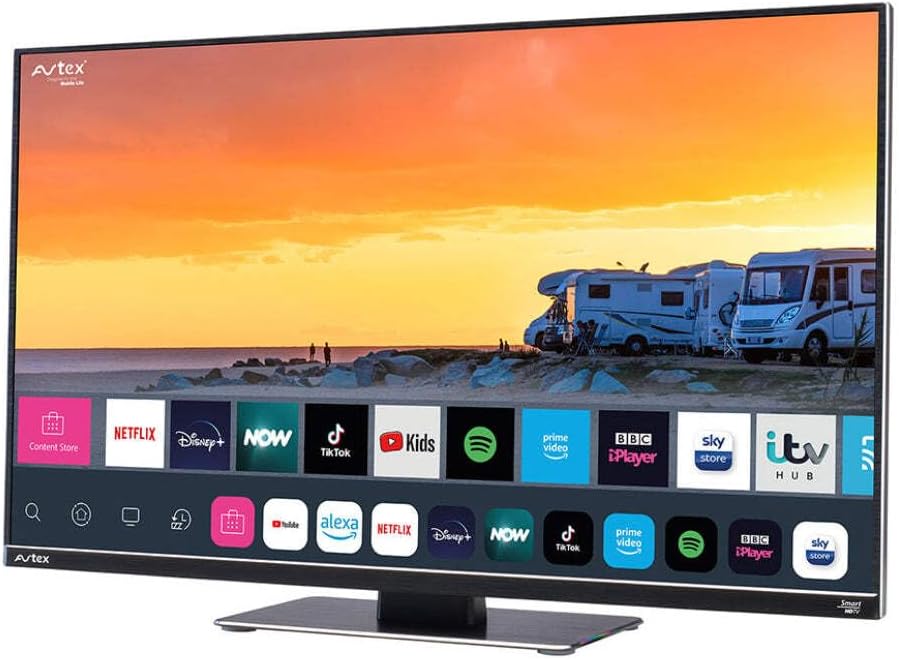
Figure 4.1: Avtex W195TS Smart TV Front View
This image shows the Avtex W195TS Smart TV from a slight angle, highlighting its slim design and the vibrant display. The screen shows a user interface with icons for popular streaming services like Netflix, Disney+, Now, TikTok, Kids, Spotify, Prime Video, BBC iPlayer, Sky Store, and ITV Hub. The background on the screen depicts a scenic view of motorhomes parked near a beach at sunset. The Avtex logo is visible on the top left and bottom left of the TV frame.
4.1. Uafu ma Feso'ota'iga
- HDMI Taulaga: For connecting external devices like Blu-ray players, game consoles, or set-top boxes.
- Taulaga USB (2): For media playback from USB drives or connecting USB accessories.
- Antenna Ulufale: For connecting a terrestrial TV antenna.
- Satelite Ulufale: For connecting a satellite dish for Freesat or other satellite services.
- DC Malosiaga Ulufale: For 12V/24V DC power connection.
- AC Mana sao: For 240V AC power connection via adapter.
- Taulaga Ethernet: Mo feso'ota'iga feso'ota'iga uaea.
- Fa'alogo leo: Mo le fa'afeso'ota'i fa'alogo leo i fafo po'o mea fa'alogo.
5. Seti
5.1. Fa'apipi'i o le Tu'u (Filifili)
- Tuu ma le faaeteete le TV e faafeagai i lalo i luga o se mea malu ma mama e puipuia ai le faaleagaina o lau.
- Fa'asa'o le tulaga ma pu fa'apipi'i i le pito i lalo ole TV.
- Fa'amautu le tulaga e fa'aaoga ai sikulima ua saunia.
5.2. So'oga Malosi
The Avtex W195TS supports multiple power inputs:
- 12V/24V DC: Connect the supplied 12V/24V DC power cable to the DC input on the TV and to your vehicle's 12V or 24V power outlet.
- 240V AC: Connect the supplied 240V AC power adapter to the AC input on the TV, then plug the adapter into a standard 240V AC wall socket.
Fa'aaliga: Do not connect both DC and AC power simultaneously.
5.3. Antenna/Satellite Connection
- Terrestrial TV: Connect your aerial cable to the 'ANTENNA IN' port.
- Satellite TV (Freesat): Connect your satellite dish cable to the 'SATELLITE IN' port.
5.4. Uluai Malosiaga ma Fa'atonu Taimi Muamua
- Connect the TV to power and press the power button on the remote control or TV.
- The First-Time Setup Wizard will appear. Follow the on-screen prompts to select your language, country, and time zone.
- Perform an automatic channel scan for both terrestrial and satellite channels.
- Fa'afeso'ota'i lau feso'ota'iga Wi-Fi e ala i le filifilia o lou igoa feso'ota'iga ma tu'u le fa'aupuga.
6. Faʻagaioiga
6.1. Galuega Fa'atonu mamao
Familiarize yourself with the remote control buttons for easy navigation and control of your TV's features.
- Ki Malosi: Ki'i/tape le TV.
- Faʻavae Faamau: Selects input sources (HDMI, USB, TV, Satellite).
- Volume +/-: Fa'atonu le maualuga o le leo.
- Ala +/-: Suia ala TV.
- Fa'atauga Fa'amau (I luga/I lalo/Agavale/Taumatau/Ua lelei): Mo le fa'atonuga o le lisi ma le filifiliga.
- Smart Hub/Home Button: Avanoa i le fa'aoga Smart TV.
- App Buttons: Dedicated buttons for popular streaming apps (if available).
6.2. Ata TV Atamai
Your Avtex W195TS is equipped with smart TV capabilities:
- App Store: Download and install various applications for streaming, news, and entertainment.
- Au'aunaga Fa'asalalau: Access pre-installed or downloaded apps like Netflix, Disney+, Prime Video, BBC iPlayer, etc. (subscription may be required).
- Web Su'esu'e: Su'e sa'o le initaneti i lau TV.
- Fa'ata Ata: Connect your smartphone or tablet to display content on the TV screen (compatibility may vary).
6.3. Feso'ota'iga Bluetooth
Pair Bluetooth devices such as headphones or external speakers for enhanced audio experience.
- Alu i le lisi o faʻatulagaga o le TV.
- Select 'Bluetooth' or 'Connected Devices'.
- Enable Bluetooth and put your device into pairing mode.
- Filifili lau masini mai le lisi e fa'apipi'i.
6.4. Media Playback via USB
Insert a USB drive into one of the USB ports to view photos, play videos, or listen to music.
- The TV will usually prompt you to open the media player.
- Fa'asaga i lau files fa'aaogaina le remote control.
7. Tausiga
7.1. Fa'amamaina o le TV
- Mata: Solo lemu le lau i se ie vaivai e leai se liu. Mo fa'ailoga ma'a'a, fai sina oampi totonu o le ie i le vai poʻo se vaifofo faʻamama faʻapitoa (aua le faʻafefe saʻo i luga o le lau).
- Casing: Fa'aaogā se ie mālū ma mago e solo ai le TV iasing. Aloese mai mea fa'amama fa'amama po'o so'o.
7.2. Fa'afouga polokalame
Periodically check for software updates to ensure your TV has the latest features and bug fixes. Updates can usually be found in the TV's settings menu under 'System' or 'Software Update'.
8. Faʻafitauli
If you encounter issues with your Avtex W195TS, refer to the following common problems and solutions:
| Fa'afitauli | Mafuaaga e ono tupu | Fofo |
|---|---|---|
| Leai se Malosi | Power cable not connected; no power from outlet. | Check power cable connection; test outlet with another device; ensure correct voltagu (12V / 24V / 240V). |
| Leai se Ata, ae o lo'o iai le leo | Incorrect input source selected; faulty cable. | Press the 'Source' button on the remote to select the correct input; check HDMI/antenna cables. |
| Leai se leo, ae o lo'o iai le Ata | Gūgū le leotele pe maualalo tele; mataupu fa'alogo leo fafo. | Unmute volume or increase level; check connections to external audio devices. |
| Le mafai ona Feso'ota'i ile Wi-Fi | Sese upu faataga; mataupu o le router; Tele mamao tele mai le router. | Re-enter Wi-Fi password; restart router; move TV closer to router or use an extender. |
| Pulea mamao e le o galue | Maa ua mate; fa'alavelave; fa'afitauli i le feso'ota'iga. | Replace batteries; remove obstructions; re-pair remote if it's a Bluetooth remote. |
9. Fa'amatalaga
| Fa'aaliga | Fa'amatalaga |
|---|---|
| Fa'ailoga | Avtex |
| Numera Fa'ata'ita'i | AVTEX W195TS |
| Tele lau | 19.5 Inisi |
| I'ugafono | 1080p (Aotele HD) |
| Ituaiga Fa'atatau | 16:9 |
| Tekinolosi Feso'ota'i | Bluetooth, HDMI, Wi-Fi |
| Aofa'i Taulaga USB | 2 |
| Voltage | 12 Volts, 24 Volts, 240 Volts |
| Mea mamafa | 2.5 kilokalama |
| Tausaga Fa'ata'ita'i | 2018 |
10. Fa'amaonia ma Lagolago
Your Avtex W195TS Smart TV comes with a manufacturer's warranty. Please refer to the warranty card included in your product packaging for specific terms and conditions, including warranty period and coverage details. Keep your proof of purchase for warranty claims.
For technical support, troubleshooting assistance beyond this manual, or warranty inquiries, please contact Avtex customer service through their official website or the contact information provided with your product. When contacting support, please have your model number (AVTEX W195TS) and serial number ready.