
1. Folasaga
This manual provides detailed instructions for the safe installation, operation, and maintenance of your Lucci Air Peregrine 56-inch White Ceiling Fan with Remote, Model 21328001. The Peregrine fan features a modern design with three blades, energy-efficient direct current (DC) technology, six speeds, and high airflow. It is rated for both indoor and outdoor use in covered areas. The fan includes a 6-inch warm white GX53 light kit with 3-step dimming functionality and comes with a remote control and wall mount bracket.

Ata 1.1: Luma view of the Lucci Air Peregrine 56-inch White Ceiling Fan.
2. Fa'amatalaga Saogalemu
Please read all instructions carefully before beginning installation and retain this manual for future reference. Improper installation or use can lead to electric shock, fire, or personal injury.
- Saogalemu Faaeletise: Ensure the power supply is disconnected at the circuit breaker before installation or maintenance. All electrical wiring must be performed by a qualified electrician and comply with local codes and regulations.
- Fa'amauina: The ceiling fan must be mounted to a structurally sound ceiling joist or outlet box capable of supporting the fan's weight (15.92 lbs).
- Fa'amama lau: Maintain a minimum clearance of 7 feet from the floor to the fan blades and 18 inches from the fan blades to any walls or obstructions.
- Pusa moli: Use only the specified GX53 12W 3000K bulb. Do not exceed the maximum wattage.
- Fa'aoga i fafo: This fan is rated for indoor and outdoor use in covered areas. Do not expose to direct water spray.
- Pulea Mamao: Keep the remote control away from water and extreme temperatures. Replace batteries as needed.
3. Mea i totonu o le afifi
Verify that all components are present and undamaged before proceeding with installation. If any parts are missing or damaged, contact customer support.
- Ceiling Fan Motor Housing with Downrod
- Laupepa (3)
- Pulea Mamao
- Wall Mount Bracket for Remote
- GX53 12W 3000K Light Kit (pre-installed or separate)
- Optional Metal Cap (for non-light use)
- Fa'apipi'i Meafaigaluega
- Tusi Taiala

Ata 3.1: Ua umaview of the remote control and its features, including 6 fan speeds, reverse switch, light on/off/dimming, fan on/off, and wall mount holster. A CP2032 battery is included.
4. Seti & Fa'apipi'i
Professional installation is recommended for this ceiling fan. Ensure all power is disconnected at the main circuit breaker before beginning installation.
- Saunia le nofoaga e fa'apipi'i ai: Securely attach the mounting bracket to a suitable ceiling joist or fan-rated outlet box. Ensure the structure can support the fan's weight.
- Assemble Downrod and Motor: Attach the downrod to the fan motor housing. Carefully feed the electrical wires through the downrod.
- Fonotaga Fa'atauga Fa'amau: Lift the fan assembly and hang it from the mounting bracket.
- Feso'ota'iga eletise: Connect the fan's electrical wires to the household wiring according to the wiring diagram provided in the separate installation guide (not included in this manual). Ensure all connections are secure.
- Fa'apipi'i Lau: Securely attach the three fan blades to the motor housing using the provided screws.
- Install Light Kit (Optional): If using the light, install the GX53 12W 3000K bulb into the light kit socket. Attach the light kit to the bottom of the fan motor housing. If not using the light, install the optional metal cap.
- Puipui malu: Slide the canopy up to the ceiling and secure it to the mounting bracket, covering all wiring.
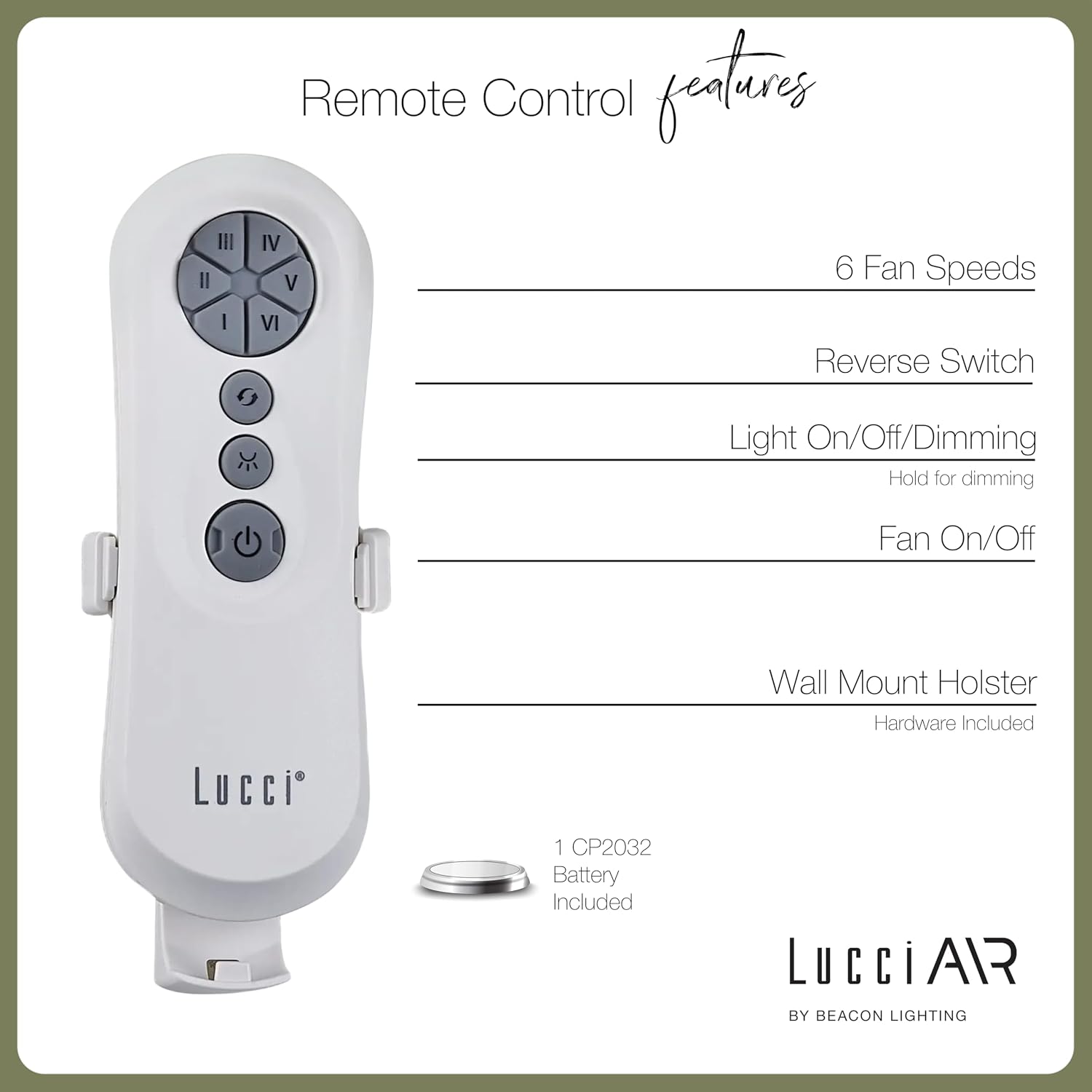
Image 4.1: Dimensional diagram of the Lucci Air Peregrine 56-inch Ceiling Fan, showing overall height, width, and blade length measurements.

Ata 4.2: Lalo view of the Lucci Air Peregrine fan, highlighting the integrated light kit.
5. Galuega
The Lucci Air Peregrine fan is operated using the included remote control. Ensure the remote has a working CP2032 battery installed.
5.1 Galuega Pulea Mamao
- Fan On / Off: Press the power button (ⓘ) to turn the fan on or off.
- Saosaoa ili: Use buttons I, II, III, IV, V, VI to select one of the six available fan speeds. I is the lowest speed, VI is the highest.
- Su'i Su'e: Press the reverse button (↻) to change the direction of the fan blades. This function is typically used to switch between summer (downward airflow) and winter (upward airflow) modes. Note: Some models may have a manual switch on the motor housing for this function.
- Malamalama Ki/Pe/Pule: Press the light button (☀) to turn the light on or off. Hold the light button to dim or brighten the light through its 3-step dimming range.
5.2 Faiga Taumalulu/Tamafanafana
The fan features a manual switch on the motor housing to change between winter and summer modes. For summer operation, the blades should rotate counter-clockwise to push air downwards, creating a cooling breeze. For winter operation, the blades should rotate clockwise to draw cool air up, circulating warm air trapped near the ceiling. Adjust the switch accordingly.
6. Tausiga
O le tausiga masani e mautinoa ai le lelei o le fa'atinoga ma fa'aumiumi ai le umi e ola ai lau ili fa'alo.
- Fa'amamaina: Pefu lau ili ma fale afi i lea taimi ma lea taimi i se mea vaivai, oamp ie. Aua ne'i fa'aogaina ni mea e fa'amamā ai mea po'o ni so'o, aua e mafai ona fa'aleagaina ai le fa'auma.
- Malōlō o le lau: Check all blade screws annually to ensure they are tight. Loose blades can cause wobbling and noise.
- Suiga Malamalama: Disconnect power before replacing the GX53 light bulb. Allow the bulb to cool completely before handling.
- Ma'a Mamao: Replace the CP2032 battery in the remote control when its range decreases or it stops responding.
7. Faʻafitauli
Va'ai le laulau o lo'o i lalo mo fa'afitauli masani ma a latou fofo.
| Fa'afitauli | Mafuaaga e ono tupu | Fofo |
|---|---|---|
| E le amata le ili | Leai se mana i le ili So'oga uaea matala Remote control battery dead | Siaki le va'ava'a Verify all wire connections are secure (power off) Sui ma'a fa'atonu mamao |
| ili ili | Fa'a sikulima matatala O lau e le paleni Fa'amau fa'amau matala | Fa'amau fa'amau uma lau Ensure blades are installed correctly and balanced Verify mounting bracket is securely fastened |
| E le aoga le malamalama | Light bulb faulty Loose wire connection to light kit | Sui matauila Check light kit wiring (power off) |
| E le o galue le pule mamao | Ma'a mate Le mamao e le fetaui (pe a talafeagai) | Sui maa Refer to separate remote pairing instructions (if provided with fan) |
8. Fa'amatalaga
Key technical details for the Lucci Air Peregrine 56-inch White Ceiling Fan (Model 21328001).
| Fa'aaliga | Fa'amatalaga |
|---|---|
| Igoa Fa'ata'ita'iga | Peregrine |
| Numera Fa'ata'ita'i | 21328001 |
| Fa'ailoga | Lucci Air |
| Lanu | Lanu pa'epa'e |
| Fuafuaga ili | Fan taualuga |
| Punavai Malosi | DC (Ave sa'o) |
| Fua o Mea | 56"D x 56"W x 15"L |
| Numera o Lau | 3 |
| Umi ole Lau | 31.1 Inisi |
| Avanoa o le Ea | 6363 Kupita Futu ile minute (CFM) |
| Numera o Saosaoa | 6 |
| Fa'aaogāina le Malosi (Vave) | 38W |
| Voltage | 120Vac, 60Hz |
| Fa'aaofia Kit Light | 1x GX53 12W 3000K bulb, 1100 Lumens, 3-step dimmable |
| Metotia Pulea | Pulea Mamao |
| Fa'aoga i totonu/I fafo | Indoor, Outdoor (covered areas) |
| Mea mamafa | 15.92 pauna |
| UPC | 811769032344 |
9. Tuutuuga & Lagolago
The Lucci Air Peregrine 56-inch White Ceiling Fan comes with a fa'atapula'a le fa'amaonia o le olaga atoa. For warranty claims, technical support, or replacement parts, please contact Lucci Air customer service. Keep your proof of purchase for warranty validation.
Mo nisi fesoasoani, fa'amolemole asiasi ile Lucci Air Store on Amazon or contact your retailer.


