
Infinity KAPPA693C
Infinity KAPPA693C Component Speaker System User Manual
Model: KAPPA693C (INFSPKKA693CAM)
Folasaga
The Infinity Kappa Series component speaker system is engineered to deliver exceptional car audio performance. Featuring Plus One fiberglass woofers for powerful bass and high-resolution edge-driven textile dome tweeters for clear highs, this system provides a superior listening experience in virtually any vehicle. This manual provides essential information for installation, operation, and maintenance of your KAPPA693C speaker system.
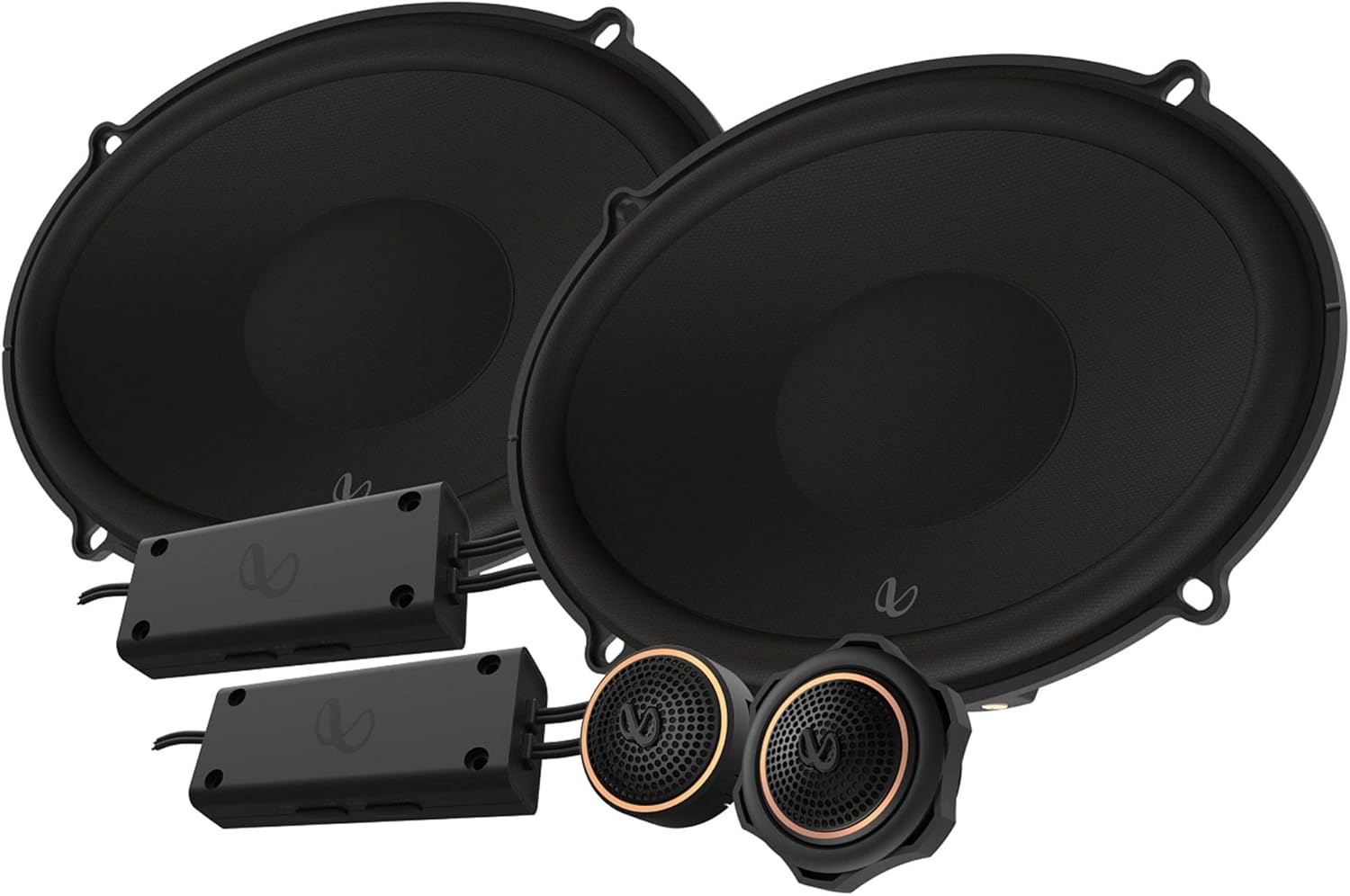
Figure 1: Infinity KAPPA693C Component Speaker System components.
O a mea i totonu o le Pusa
Fa'amaonia o vaega uma o lo'o lisi atu i lalo o lo'o iai i lau afifi:
- 2x Sipika (Woofers)
- 2x Spacers
- 2x Foam gaskets
- 2x Crossovers
- 2x Tweeters
- 2x Faʻataʻiloina fualaʻau-faʻapipiʻi mea faʻaoga
- 2x Palasitika lokaina nati
- 2x Luga-mauga ipu
- 2x Starfish tweeter faʻaputuga
- 22x Siu
- 16x Vitio kiliva
- 1x Allen ulu sina (2.5mm)
- Faʻailoga o le logo 2x Infinity
- 2x Faʻailoga pipiʻi
- 1x Owner’s manual (this document)
Fa'amatalaga
| Fa'aaliga | Fa'amatalaga |
|---|---|
| Ituaiga Fofoga Fetalai | 6" x 9" (168mm x 240mm) Two-way Component System |
| Puleaina o le Malosi | 145W RMS, 435W Tulaga |
| Maaleale (@ 2.83V) | 94dB |
| Tali Faatele | 35Hz – 40kHz |
| Fa'alavelave | 3.0 ohms |
| Fuafu Taele | 15.24 cm (6 inisi) |
| Tweeter Diamita | 1.91 cm (0.75 inisi) |
| Mamafa Matua | 5.06 kilokalama (10.93 pauna) |
| Numera Fa'ata'ita'i | INFSPKKA693CAM |
| UPC | 050667376987 |
Vaega Autu
- Plus One Fiberglass Woofers: Lighter and stiffer cones provide increased low-frequency output and higher efficiency for robust bass.
- Edge-Driven Silk Dome Tweeters: Equipped with oversized voice coils for smooth highs and impressive thermal power handling up to 40kHz.
- Adjustable Tweeter Output: A push-button on the angled tweeter allows for 0dB or -3dB output level control to optimize system linearity based on installation.
- Compact Crossovers: Designed for easy integration, with 2-way and 3-way selections to accommodate optional midrange upgrades.


Ata 2: Auiliiliga views of the woofer, tweeters, and crossovers.
Seti ma Fa'apipi'i
Professional installation is recommended for optimal performance and to prevent damage to your vehicle's electrical system. Always disconnect the vehicle's battery before beginning any electrical work.
1. Fuafuaina o le Fa'apipi'i
- Filifiliga nofoaga: Choose suitable locations for the woofers, tweeters, and crossovers within your vehicle. Ensure adequate clearance and proper acoustic placement.
- Ata uaea: Refer to the detailed wiring diagram provided in the physical owner's manual for correct connections between your head unit, amplifier (if used), crossovers, woofers, and tweeters.
- Meafaigaluega Manaomia: Gather necessary tools including screwdrivers, wire strippers, crimpers, drill, and appropriate safety gear.
2. Fa'apipi'iina o Woofers
- Aveese ma le fa'aeteete sipika o lo'o iai pe saunia le nofoaga e fa'apipi'i ai.
- Use the provided spacers and foam gaskets as needed to ensure a secure and sealed fit.
- Secure the woofers using the supplied screws and speed clips.

Ata 3: Itu view of the woofer, illustrating mounting depth considerations.
3. Fa'apipi'iina o Tweeters
- Choose between flush-mount, surface-mount, or starfish tweeter mounts based on your vehicle's interior and desired sound dispersion.
- Install the tweeters securely using the appropriate adapters and nuts.
- Adjust the tweeter output level (0dB or -3dB) using the push-button on the tweeter to match your listening preference and vehicle acoustics.
4. Installing Crossovers
- Mount the compact crossovers in a dry, accessible location, away from excessive heat or moisture.
- Connect the input from your amplifier/head unit to the crossover, and then connect the woofer and tweeter outputs from the crossover to their respective speakers.
- Ia mautinoa o feso'ota'iga uma o lo'o fa'amautu ma fa'amama lelei e puipuia ai le ta'avale pupuu.
Fa'atonuga o Galuega
Once installed, operate your Infinity KAPPA693C system as follows:
- Malosiaga Muamua: After installation, reconnect the vehicle's battery. Turn on your car audio system at a low volume.
- Fetuunaiga le Volume: Gradually increase the volume to a comfortable listening level. Avoid excessively high volumes that can cause distortion or damage to the speakers.
- Fa'atonu leo: Adjust your head unit's equalizer and sound settings to optimize the audio output for your vehicle's acoustics and personal preference. Experiment with bass, treble, and balance controls.
- Tulaga o le Tweeter: If you notice the highs are too bright or too subtle, re-adjust the tweeter output level on the tweeters (0dB or -3dB) as needed.
Tausiga
To ensure the longevity and optimal performance of your Infinity KAPPA693C speakers, follow these maintenance guidelines:
- Fa'amamaina: Use a soft, dry cloth to gently wipe down the speaker grilles and surrounds. Avoid using harsh chemicals or abrasive cleaners.
- Puipuiga o le Siosiomaga: While designed for automotive use, avoid exposing the speakers to extreme moisture or direct sunlight for prolonged periods, which can degrade materials over time.
- Asiasiga masani: Siaki fa'avaitaimi feso'ota'iga sipika mo le mau ma fa'amautinoa e leai ni uaea e masaesae pe fa'aalia.
- Aloese mai le Pulea: Do not continuously play audio at distortion levels, as this can cause permanent damage to the speaker components.
Fa'afitauli
If you experience issues with your speaker system, consult the following common troubleshooting steps:
| Fa'afitauli | Mafuaaga e ono tupu | Fofo |
|---|---|---|
| Leai se leo mai failauga | Tatala pe le sa'o feso'ota'iga uaea. Amplifier/head unit not powered on or faulty. Speaker wires shorted. | Check all wiring connections at the head unit, amplifier, crossovers, and speakers. Ensure proper polarity. Verify power to your audio system components. Asia'i uaea sipika mo mea leaga po'o pupuu. |
| Leo Misē | Volume maualuga tele. AmpMaualuga tele naua le seti o le lifier gain. Fa'asagaga fa'asaga sese. Ua faaleagaina le sipika. | Fa'aitiitia le leo. Fetuuna'i ampfa'amauina fa'amauina. Verify crossover connections and settings. Siaki sipika mo ni fa'aleagaina faaletino. |
| Tasi le Fofoga Fetalai e le o galue | Loose connection to that specific speaker or crossover. Damaged speaker or crossover. | Check connections for the affected speaker. Swap the speaker with a known working one to isolate the issue. |
| Lack of Bass | Incorrect woofer wiring polarity. Le lava ampmalosi fa'aola. Poor speaker seal in mounting location. | Verify woofer wiring polarity. Ia mautinoa amplifier provides adequate power. Check for air leaks around the speaker mounting. |
If the problem persists after trying these steps, contact Infinity customer support or a qualified car audio technician.
Fa'amaonia ma Lagolago
Fa'amatalaga Fa'amaonia: This product comes with a Limited Warranty provided by Infinity. Please refer to the physical owner's manual included in your package for specific terms, conditions, and duration of the warranty. Retain your proof of purchase for warranty claims.
Lagolago tagata fa'atau: For technical assistance, installation questions, or warranty service, please visit the official Infinity website or contact their customer support line. Contact information can typically be found in your physical manual or on the manufacturer's webnofoaga.
E mafai foi ona e asiasi i le Infinity Store on Amazon mo nisi fa'amatalaga o oloa ma punaoa lagolago.
Ask a question about this manual
Ask about setup, troubleshooting, compatibility, parts, safety, or missing instructions. Manuals+ will review the question and use this page’s manual context to help answer it.