
Folasaga
Fa'afetai mo le fa'atauasing the Whirlpool 1.1 cu. ft. (30L) Microwave Oven, Model WM-1811B. This manual provides essential information for the safe and efficient operation, maintenance, and troubleshooting of your new appliance. Please read these instructions thoroughly before use and retain them for future reference.
Fa'atonuga Taua mo le Saogalemu
Pe a fa'aogaina mea tau eletise, e tatau ona mulimulita'i puipuiga fa'avae, e aofia ai mea nei:
- Faitau fa'atonuga uma a'o le'i fa'aogaina le masini.
- Aua le fa'againa le ogaumu pe a leaga le faitoto'a po'o fa'amaufa'ailoga o le faitoto'a.
- Aua ne'i fa'avevela vai po'o isi mea'ai i totonu o pusa fa'amaufa'ailoga ona e ono pa.
- Fa'atagaina tamaiti e fa'aaoga le ogaumu e aunoa ma se va'ava'aia pe afai ua uma ona tu'uina atu fa'atonuga talafeagai.
- Aua le faʻaaogaina vailaʻau leaga poʻo ausa i lenei masini.
- Do not use this microwave for commercial purposes. It is designed for household use only.
- Ia mautinoa i taimi uma ua sa'o le tulaga o le turntable ma le roller ring a'o le'i fa'aaogaina.
WARNING: To reduce the risk of fire, electric shock, injury to persons or exposure to excessive microwave energy:
- Aua ne'i taumafai e fa'agaoioi le ogaumu lenei ma tatala le faitoto'a.
- Aua nei tu'u so'o se mea i le va o le ogaumu pito i luma fa'asaga ma le faitoto'a pe fa'ataga fo'i le palapala po'o mea mama e fa'aputu i luga o fa'amaufa'ailoga.
- Aua le fa'againa le ogaumu pe a leaga.
O mea o lo'o i totonu
Fa'amautinoa o lo'o iai uma vaega ma e le'i fa'aleagaina:
- Whirlpool Microwave Oven Model WM-1811B
- Laufa'i tioata
- Mama faasee
- Tusi Taiala (Lenei pepa)
- Fa'amatalaga Fa'amaonia
Seti ma Fa'apipi'i
- Tatalaina: Remove all packaging materials from inside and outside the microwave oven. Check for any damage such as dents or a misaligned door. Do not operate the oven if it is damaged.
- Tu'uga: Place the microwave on a flat, stable surface that can support its weight and the heaviest food item likely to be cooked in it. Ensure adequate ventilation by leaving at least 10 cm (4 inches) of space at the back, 20 cm (8 inches) at the top, and 5 cm (2 inches) on the sides. Do not block any ventilation openings.
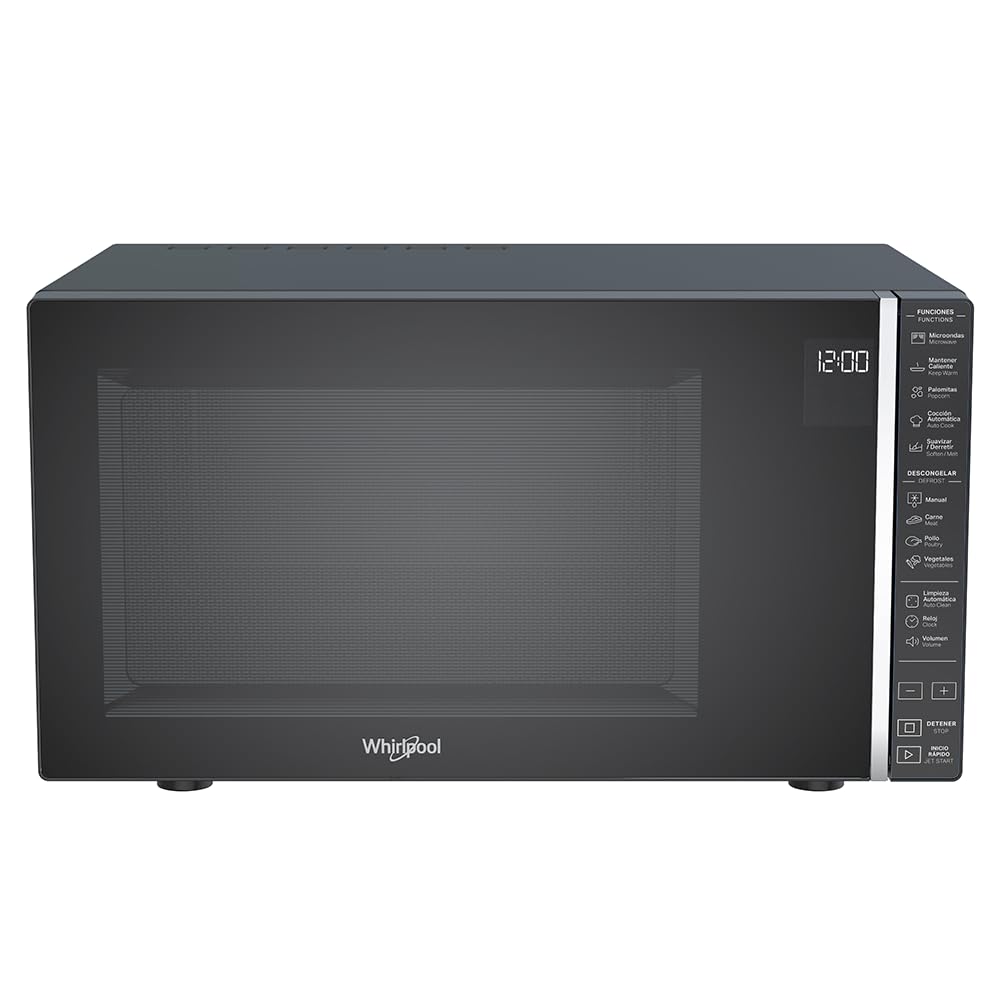
Ata 1: Luma view of the Whirlpool WM-1811B Microwave Oven. Ensure proper clearance around the unit for ventilation.
- Faʻapipiʻiina le Turntable:
- Tuu le mama fa'ase'e i le ogatotonu o le fola o le ogaumu.
- Tuu le laulau fa'ata'amilomilo tioata i luga o le mama fa'ata'avalevale, ia mautinoa o lo'o nofo lelei i le ogatotonu.

Ata 2: totonu view of the microwave with the door open, showing the glass turntable and roller ring in place.
- So'oga Malosi: Plug the microwave oven into a properly grounded electrical outlet. Do not use extension cords or adapters.
Fa'atonuga o Galuega
Your Whirlpool WM-1811B microwave oven features a touch control panel and an LCD display for easy operation. It offers 7 power levels and 25 pre-programmed functions, including specialized options like Keep Warm and Automatic Cleaning.

Ata 3: Auiliiliga view of the touch control panel and LCD display.
Faatulaga le Uati
- Oomi le faamau "Uati".
- Use the number pads to enter the current time.
- Toe oomi le faamau "Uati" e faamaonia ai.
Kuka Microwave
- Tuu mea'ai i totonu o se koneteina saogalemu i luga o le ipu tioata.
- Tapuni lelei le faitotoa o le ogaumu.
- Ulufale i le taimi e kuka ai le taimi e manaʻomia e faʻaaoga ai numera numera.
- Press the "Power Level" button repeatedly to select the desired power level (1-7). The default is usually P100 (full power).
- Oomi le "Amata" e amata ai le kuka.
Quick Start / Jet Start
For quick heating at full power, simply press the "Jet Start" button. Each press adds 30 seconds of cooking time at 100% power.
Automatic Cooking Programs (25 Pre-programmed Functions)
The microwave features 25 pre-programmed functions for various food types, ensuring optimal cooking results. Refer to the icons on the control panel for specific programs such as Popcorn, Pizza, Potato, Beverage, Reheat, etc.
- Tuu meaai i totonu o le ogaumu.
- Press the "Automatic Cooking" button or the specific program icon (e.g., "Popcorn").
- Select the desired quantity or weight if prompted (e.g., for popcorn, select bag size).
- Oomi le "Amata" e amata ai.
Defrosting (Manual and Automatic)
The microwave offers both manual and automatic defrosting options for meat, poultry, and vegetables.
- Fa'a'ele'elea ma le Manu'a:
- Oomi le faamau "Defrost".
- Enter the desired defrosting time.
- Oomi le "Amata".
- Fa'a'aisa Otometi:
- Press the specific defrost program icon (e.g., "Meat", "Poultry", "Vegetables").
- Ulufale i le mamafa o meaʻai.
- Press "Start". The oven will automatically calculate the defrosting time and power level.
Taofi le Mafanafana Galuega
This specialized function helps maintain the temperature of cooked food without further cooking. Press the "Keep Warm" button and then "Start".

Ata 4: Esoample of food being heated inside the microwave oven.
Tausia ma Fa'amamā
O le fa'amama ma le tausiga faifaipea o le a mautinoa ai le umi o le ola ma le fa'atinoga lelei o lau umu microwave.
Fa'amamaina i fafo
- Solo le pito i fafo ma fa'asalalaugaamp ie ma fufulu mama.
- 'Alo'ese mea fa'amama fa'amama po'o pa'u salu.
Fa'amama totonu
- Fa'amamaina lautele: Solo le lua totonu ile adamp cloth after each use. For stubborn food splatters, place a bowl of water with lemon slices inside and microwave for 2-3 minutes to loosen residue, then wipe clean.
- La'au Fa'ata'amilo ma le Mama Fa'ase'e: These can be removed and washed in warm soapy water or in the dishwasher. Ensure they are dry before placing them back in the oven.
- Galuega Fa'amamāina Otometi: Your microwave features an auto-clean function. Consult the control panel for the specific icon and follow the on-screen instructions. This function typically uses steam to loosen food particles for easier wiping.
Door and Seal Cleaning
Keep the door seals and adjacent parts clean. Use a mild soap and water solution. Never use abrasive sprays or pads.
Fa'afitauli
Before contacting customer service, try the following solutions for common issues:
| Fa'afitauli | Mafuaaga e ono tupu | Fofo |
|---|---|---|
| E le amataina le ogaumu. | E le'i so'o le uaea eletise; E lei tapunia lelei le faitotoa; Ua feula le fuse po o le motusia o le matagaluega ua motu. | Plug in power cord; Close door securely; Check household fuse or reset circuit breaker. |
| Mea'ai e le fa'amafanafanaina. | Sese le setiina o le taimi e kuka ai/le malosi; E le'i tapuni lelei le faitoto'a. | Adjust cooking time/power level; Ensure door is fully closed. |
| E le o taamilomilo. | Turntable or roller ring not correctly positioned; Obstruction under turntable. | Reposition turntable and roller ring; Remove any obstructions. |
| Pio e le masani ai i le taimi o le taotoga. | Ua pa'i le pusa mea'ai i puipui o le ogaumu; e le o fa'atotonugalemu le laulau fa'ata'amilomilo. | Ensure container is not touching walls; Center turntable. |
Fa'amatalaga
| Fa'ailoga | Whirlpool |
| Numera Fa'ata'ita'i | WM1811B |
| Malosiaga | 1.1 Kupita Futu (30 Litres) |
| Lanu | Lanu uliuli |
| Fua (D x W x H) | 40cm x 53.9cm x 30cm (15.75 in x 21.22 in x 11.81 in) |
| mamafa | 17.7 Kilokalama (39 lbs) |
| Uatage | 1000 Watts |
| Malosiaga Levels | 7 |
| Polokalama | 25 (Pre-programmed functions) |
| Ituaiga Pulea | Touch Control / Touch Screen |
| Fa'apitoa Fa'apitoa | Automatic Cleaning, Keep Warm Function, Timer Function |
| Mea | Plastic (Exterior and Interior) |
| Ituaiga Fa'apipi'i | Faʻatauga |
| GTIN | 07501545633287 |
| Atunuu na Afua mai ai | Mesiko |

Figure 5: Dimensional diagram of the microwave oven (Depth: 40 cm, Width: 53.9 cm, Height: 30 cm).
Fa'amaonia ma Lagolago
Your Whirlpool WM-1811B Microwave Oven comes with a 12 masina le fa'amaonia o le gaosiga. O lenei tusi saisai e aofia ai fa'aletonu i meafaitino ma galuega i lalo ole fa'aoga masani.
For warranty claims, technical support, or service inquiries, please contact Whirlpool customer service directly. Refer to the warranty card included in your package for specific contact details and terms.
Please have your model number (WM-1811B) and proof of purchase ready when contacting support.