
1. Folasaga
This manual provides comprehensive instructions for the installation, operation, and maintenance of the SINOTIMER TM919B 30A Programmable Electronic Timer Switch. This device is designed to automatically control the ON/OFF switching of various electrical appliances based on user-defined daily or weekly programs. Please read this manual carefully before installation and use to ensure proper function and safety.
2. Fa'amatalaga Saogalemu
WARNING: Risk of electric shock. Installation should only be performed by a qualified electrician or trained personnel.
- Always disconnect power at the circuit breaker before installing or servicing the timer switch.
- Ia fa'amautinoa o lo'o fa'amautu uma feso'ota'iga uaea ma usita'ia tulafono fa'aeletise a le atunu'u.
- Aua ne'i sili atu i le fua faatatau maualuga o le avega e 30A.
- This device is intended for indoor use only. Avoid exposure to moisture or extreme temperatures.
- Aua le taumafai e tatala pe toe faaleleia le iunite oe lava. Faafesoota'i tagata faigaluega agavaa.
3. Oloa Ua Ovaview
The SINOTIMER TM919B is a digital timer switch featuring a large LCD display, multiple programming options, and a manual override function. It is designed for DIN rail mounting.
3.1. Vaega ma Pulea
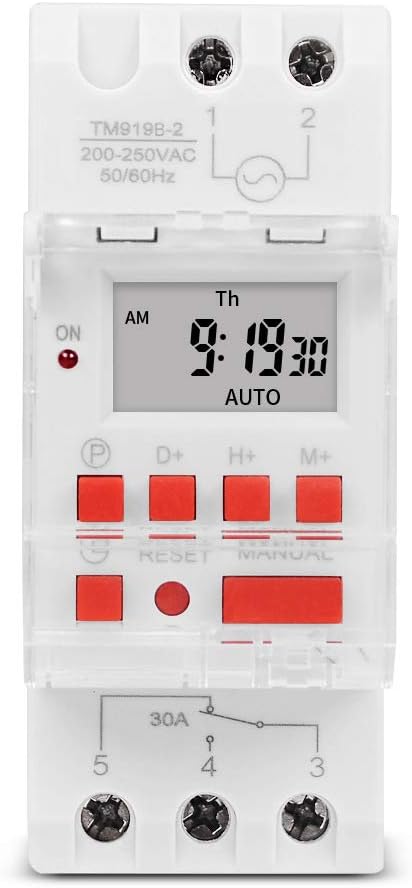
Ata 1: Luma view of the TM919B timer switch, showing the LCD display, control buttons, and terminal connections.

Ata 2: Fa'afagoto view of the TM919B with the transparent protective cover open, revealing the programming buttons (P, D+, H+, M+, RESET, MANUAL).
- Fa'aaliga LCD: Shows current time, day, and program status.
- Fa'amau P (Polokalama): Enters/exits program setting mode.
- Fa'amau D+ (Aso): Adjusts day of the week in setting modes.
- Fa'amau H+ (Itula): Adjusts hour in setting modes.
- Fa'amau M+ (Minute): Adjusts minute in setting modes.
- Toe FA'A'I Fa'amau: Clears all settings and resets the timer to factory defaults.
- MANUAL Button: Toggles between ON, AUTO, and OFF modes.
- So'oga fa'amau: For power input and load output.
4. Fa'amatalaga
| Fa'aaliga | Fa'amatalaga |
|---|---|
| Fa'ata'ita'iga | TM919B |
| Voltage | 220V (AC200-250V) |
| Fa'atele | 50/60Hz |
| Avanoa Max | 30A (Avega Tetee) |
| Polokalama | 16 ON/OFF programs per day/week |
| Vaeluaga maualalo | 1 minute |
| Lagolago ma'a | Built-in rechargeable battery (for memory retention) |
| Fa'amauina | 35mm DIN Rail |
| Fua | Va'ai ile Ata 3 |

Ata 3: Detailed dimensions of the TM919B timer switch, showing height, width, and depth measurements.
5. Seti ma Fa'apipi'i
Follow these steps for safe and correct installation of your timer switch.
5.1. Fa'amauina
- Ensure power is disconnected at the main circuit breaker.
- Mount the TM919B onto a standard 35mm DIN rail. The device features a clip mechanism on the back for secure attachment.
- Press the orange clip at the bottom of the unit to release it from the DIN rail if removal is necessary.

Ata 4: Itu view of the TM919B, highlighting the orange DIN rail mounting clip.

Ata 5: Tua view of the TM919B, illustrating the DIN rail mounting mechanism.
5.2. Mauga ata
Refer to the diagram below for correct wiring connections. Ensure all connections are tight and insulated.

Ata 6: Itu view of the TM919B showing the wiring diagram printed on the casing. Terminals 1 and 2 are for power input (L and N). Terminals 3, 4, and 5 are for load output (Common, Normally Open, Normally Closed).
- Nofoaga Fa'ai'u 1 ma le 2: Power Input (L - Live, N - Neutral). Connect your 220V AC supply here.
- Terminal 3: Common (COM) for the output relay.
- Terminal 4: Normally Open (NO) output. The load will be powered when the timer is ON.
- Terminal 5: Normally Closed (NC) output. The load will be powered when the timer is OFF.
For typical applications where the load is switched ON by the timer, connect the load between Terminal 3 (COM) and Terminal 4 (NO).
6. Fa'atonuga o Galuega
6.1. Initial Setup and Reset
- After connecting power, the display may be blank or show random characters. Press the TOE FAI button with a pointed object (e.g., a pen tip) to clear all memory and reset the timer. The display will show "0:00" and "MO".
- Allow the internal battery to charge for at least 30 minutes before programming for optimal performance and memory retention during power outages.
6.2. Setiina o le Taimi ma le Aso o loʻo iai nei
- Oomi ma uu le D+ button to set the current day of the week (MO, TU, WE, TH, FR, SA, SU).
- Oomi ma uu le H+ button to set the current hour (0-23).
- Oomi ma uu le M+ button to set the current minute (0-59).
- Release the buttons when the correct time and day are displayed. The timer will automatically save the settings.
6.3. Programming ON/OFF Cycles
The TM919B supports up to 16 ON/OFF programs. Each program consists of an ON time and an OFF time.
- Oomi le P button once. The display will show "1 ON". This is for the first ON program.
- Fa'aoga D+ to select the day(s) for this program. Options include:
- MO TU WE TH FR SA SU (Every day)
- MO (Monday only)
- TU (Tuesday only)
- ...
- Aso Fa'alevaiaso (Aso Fa'alegaluega)
- SA SU (Weekends)
- MO TU WE (Mon-Wed)
- TH FR SA (Thu-Sat)
- MO WE FR (Mon, Wed, Fri)
- TU TH SA (Tue, Thu, Sat)
- MO TU WE TH FR SA (Mon-Sat)
- Fa'aoga H+ ma M+ to set the desired ON hour and minute.
- Oomi le P button again. The display will show "1 OFF". This is for the first OFF program.
- Fa'aoga D+, H+, ma M+ to set the desired OFF day, hour, and minute. Ensure the OFF time is after the ON time for the same program.
- Repeat steps 1-5 for additional ON/OFF programs (up to 16). If you don't need all 16 programs, simply press P to cycle through unused programs until you return to the current time display.
- To exit programming mode and save settings, press the clock button (usually labeled with a clock icon, or simply wait for 30 seconds without input).
6.4. Fa'asolo Tusia
Oomi le MANUAL faamau e sui ai auala fa'agaoioiga:
- IA: The timer output is continuously ON, ignoring all programs.
- AUTE: The timer operates according to the programmed ON/OFF cycles. This is the standard operating mode.
- ESE: The timer output is continuously OFF, ignoring all programs.
Ia mautinoa ua seti le taimi i le AUTO for programmed operation.
7. Tausiga
- The TM919B is designed for maintenance-free operation.
- Fa'amamā le pito i fafo i se ie vaivai ma mago. Aua le fa'aaogaina ni mea fa'amamā po'o ni vaila'au fa'amama.
- Ensure the internal battery is charged by keeping the unit powered for at least 24 hours initially, and periodically thereafter, to maintain time and program memory during power outages.
8. Faʻafitauli
| Fa'afitauli | Mafuaaga e ono tupu | Fofo |
|---|---|---|
| E avanoa le fa'aaliga. | No power supply; internal battery discharged. | Check power connections. Allow unit to charge for 30 minutes. |
| Timer not switching load. | Incorrect wiring; timer in MANUAL ON/OFF mode; incorrect program settings. | Verify wiring (refer to Figure 6). Ensure timer is in AUTO mode. Check program times and days. |
| Programs are lost after power outage. | Internal battery not fully charged or faulty. | Ensure unit is powered for at least 24 hours to fully charge the battery. If problem persists, contact support. |
| Ua le tali mai ki. | Unit frozen; temporary glitch. | Oomi le TOE FAI faamau. |
9. Fa'amaonia ma Lagolago
SINOTIMER products are manufactured to high-quality standards. For warranty information or technical support, please refer to the documentation provided with your purchase or visit the official SINOTIMER webnofoaga. Taofi lau lisiti fa'atau e fai ma fa'amaoniga o le fa'atau.
For further assistance, you may contact SINOTIMER customer service through their official channels.