
1. Oloa Ua Ovaview
The LoraTap Smart WiFi Garage Door Opener is designed to upgrade your existing garage door opener system, enabling smart control via remote access, voice commands, and scheduled operations. This module connects directly to your 2.4G Wi-Fi network and is compatible with Android and iOS devices through the Smart Life application. It integrates with voice assistants like Amazon Alexa and Google Home for hands-free control.
The system also provides security and monitoring features, including real-time notifications for garage door status (open/closed) and reminders to ensure the door is securely closed.
2. Siaki Fesootaiga
Before installation, it is crucial to verify the compatibility of your existing garage door opener with the LoraTap Smart WiFi module. Follow these steps to perform a compatibility test:
- Locate the wall button terminals on your garage door opener. These are typically where the wires from your wall-mounted control button connect.
- Using a pair of pliers or a short piece of wire, momentarily short-circuit the two wall button terminals.
- Observe the garage door. If the garage door opens or closes when the terminals are short-circuited, your opener is compatible with the LoraTap Smart WiFi Garage Door Opener.

Figure 2.1: Compatibility Test. Use pliers to short-circuit the wall button terminals. If the door responds, it is compatible.
3. Mea i totonu o le afifi
Ia mautinoa o loʻo iai uma vaega aʻo leʻi amataina le faʻapipiʻiina:
- 1 x LoraTap Smart Garage Door Opener Module
- 2 x Door Sensors
- 1 x Sensor Cable
- 8 x Siu
- 1 x Signal Control Cable
- 1 x Faʻapipiʻiina Faʻamau
- 2 x Kipi Uaea
- 1 x Lisi Fa'apipi'i Itu Fa'alua
4. Seti ma Fa'apipi'i
Follow these steps for proper installation of your LoraTap Smart WiFi Garage Door Opener:
4.1. Mounting the Smart Module
- Choose a suitable location near your garage door opener and a power outlet.
- Mount the LoraTap Smart Module using screws or double-sided adhesive tape. Ensure it is within range of your 2.4G Wi-Fi network.
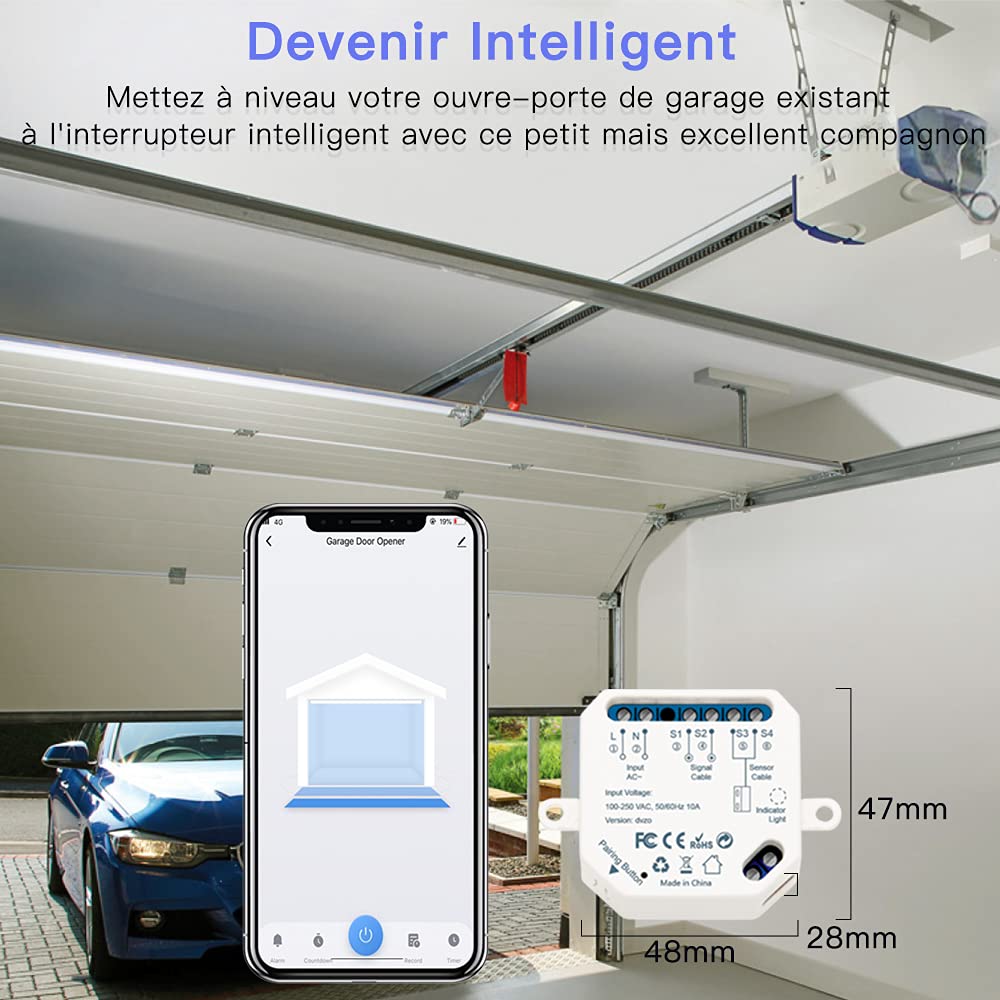
Figure 4.1: Smart Module Overview. The module integrates with your existing opener for smart control.
4.2. Connecting the Signal Control Cable
- Connect the signal control cable from the LoraTap Smart Module to the wall button terminals on your garage door opener. Refer to the compatibility test section (Section 2) for terminal identification.
- Ia mautinoa se sootaga saogalemu.
4.3. Installing the Door Sensors
- Find a correct location on your garage door to mount the two sensors. They should be mounted on the garage door and the adjacent wall/frame.
- When the garage door is closed, the distance between the two sensors must be less than 30 mm (approximately 1.2 inches).
- When the garage door is open, the two sensors must be clearly separated.
- Use the included screws, double-sided adhesive tape, or mounting bracket to secure the sensors.
- Connect the sensor cable from the sensors to the LoraTap Smart Module.

Figure 4.2: Installation Diagram. Illustrates connections for power, main controller, wall button, and door sensors, with sensor placement details.
4.4. Powering On and App Pairing
- Plug the LoraTap Smart Module into a power outlet.
- La'u mai le Ola Atamai or Tuya Smart app from your device's app store (Android/iOS).
- Follow the in-app instructions to add the device and connect it to your 2.4G Wi-Fi network.
5. Fa'atonuga o Galuega
5.1. Pulea mamao e ala ile App
Once paired, you can control your garage door from anywhere using the Smart Life or Tuya Smart app:
- Open the app and select your garage door opener device.
- Tap the designated button to open or close the garage door.
- The app will display the current status of your garage door (open or closed).

Figure 5.1: Remote Control. Control your garage door from anywhere using the Smart Life app.
5.2. Pulea leo
Integrate your LoraTap Smart WiFi Garage Door Opener with Amazon Alexa or Google Home for voice-activated control:
- Ensure your Alexa or Google Home device is set up and linked to your Smart Life/Tuya Smart account.
- Fa'aaoga poloaiga e pei o:
- "Alexa, open the garage door."
- "Hey Google, close the garage door."

Figure 5.2: Voice Control. Use Amazon Alexa or Google Home for hands-free operation.
5.3. Security and Monitoring
The Smart Life app provides enhanced security features:
- Real-time Status: View the current open/closed status of your garage door at any time.
- Fa'amaumauga o Gaoioiga: The app records all opening and closing events for easy monitoring.
- Fa'aaliga: Set up various notification modes, including:
- Garage door open/close status alerts.
- Scheduled notifications to remind you to close the door at specific times (e.g., at night).
- Overtime notifications if the door remains open for an extended period.

Figure 5.3: Security Alerts. Receive notifications for garage door status and activity.
6. Tausiga
The LoraTap Smart WiFi Garage Door Opener requires minimal maintenance. To ensure optimal performance:
- Sensor Alignment: Periodically check that the two door sensors remain properly aligned and that the gap between them is less than 30mm when the door is closed. Misalignment can lead to inaccurate status readings.
- Mama: Keep the sensors and the smart module free from dust and debris. Use a soft, dry cloth for cleaning.
- So'oga Wi-Fi: Ensure your Wi-Fi router is functioning correctly and provides a stable 2.4G signal to the smart module.
- Fa'afouga App: Regularly update the Smart Life or Tuya Smart app to benefit from the latest features and security enhancements.
7. Faʻafitauli
If you encounter issues with your LoraTap Smart WiFi Garage Door Opener, refer to the following troubleshooting guide:
| Fa'afitauli | Mafuaaga e ono tupu | Fofo |
|---|---|---|
| E le feso'ota'i le masini i le Wi-Fi. | Incorrect Wi-Fi password; 5G Wi-Fi network; weak signal. | Ensure correct 2.4G Wi-Fi password. Confirm router is broadcasting 2.4G. Move device closer to router. |
| Garage door not responding to app/voice commands. | Module not powered; signal cable loose; compatibility issue; app offline. | Check power to module. Verify signal cable connection to opener. Re-run compatibility test. Check app status and internet connection. |
| Incorrect garage door status in app. | Sensors misaligned or obstructed; sensor cable loose. | Check sensor alignment and ensure gap is correct when closed. Inspect sensor cable for damage or loose connections. |
| E le o galue poloaiga leo. | Alexa/Google Home not linked to Smart Life; incorrect device name. | Verify Smart Life account is linked in Alexa/Google Home app. Ensure device name is recognizable. |
8. Fa'amatalaga
| Fa'ailoga | LoraTap |
| Numera Fa'ata'ita'i (ASIN) | B08FCBCT3N |
| Tufuga | LoraTapuk |
| Fuafuaga Mea | 18 x 11.3 x 3.8 cm; 310 kalama |
| Lanu | Pa'epa'e po'o Efuefu |
| Mea | Copper Brass |
| Suiga Ituaiga | 1-auala |
| Electrical Outlet Type | Mauga i luga |
| Suiga Faiga | Fa'ata'avale |
| Tusipasi | CE |
| Ma'a e aofia ai | Leai |
| Ma'a Manaomia | Leai |
| Muamua Aso Avanoa | Aokuso 6, 2020 |
| Atunuu na Afua mai ai | Saina |
| Ituaiga Pule | Fesoasoani Fesoasoani leo |
| Ituaiga Fa'amau | Mauga i luga |
| Numera o Mea | 2 |
| Numera o Iunite | 1.0 Aofaiga |
9. Fa'amaonia ma Lagolago
The LoraTap Smart WiFi Garage Door Opener comes with a 24-masina saisai mai le aso na fa'atau ai. O lenei tusi saisai e aofia ai fa'aletonu i meafaitino ma galuega i lalo ole fa'aoga masani.
For technical support, warranty claims, or any questions regarding the product, please contact LoraTap customer service through their official website or the contact information provided with your purchase. Please have your model number (B08FCBCT3N) and proof of purchase ready when contacting support.
LoraTap products are certified in accordance with European standards, ensuring quality and safety.