
1. Folasaga
Fa'afetai mo le fa'atauasing the Moukey MAMP1 220W Bluetooth Dual Channel Power Amplifi. Lenei amplifier is designed to provide powerful and versatile audio amplification for various applications, including karaoke, home theater systems, and general audio playback. It features multiple input options, Bluetooth 5.0 connectivity, and intuitive controls for an enhanced audio experience. Please read this manual thoroughly before use to ensure proper operation and to maximize the product's performance.
2. Faatonuga Saogalemu
To prevent electric shock, fire, or damage to the unit, please observe the following safety precautions:
- Aua ne'i tu'u le vaega lea i le timu po'o le susu.
- Aua le tatalaina le iasing. E leai ni vaega e mafai ona fa'aaogaina i totonu. Fa'asino uma auaunaga i tagata faigaluega agavaa.
- Ia mautinoa le sapalai eletise voltage fetaui ma mana'oga o lo'o fa'amaoti mai ile iunite.
- Place the unit on a stable, flat surface with adequate ventilation. Do not block ventilation openings.
- Keep the unit away from heat sources, direct sunlight, and excessive dust.
- Disconnect the power plug from the outlet if the unit will not be used for an extended period.
- Aua le faʻagaioia le vaega i lima susu.
3. Mea i totonu o le afifi
Fa'amautinoa o lo'o iai mea uma i totonu o le afifi:
- Moukey MAMP1 Mana AmpLifier Unit
- Pulea Mamao
- FM Antenna
- Tusi Taiala (Lenei pepa)
4. Oloa Ua Ovaview
4.1 Front Panel Controls and Functions
The front panel provides access to all primary controls and input ports for easy operation.

Image: Detailed diagram of the Moukey MAMP1 front panel, highlighting each control and port with corresponding numbers.
- Ki malosiaga: Ki'i pe tape le iunite.
- USB / SD Slot: Mo le taina leo files from USB drives (max 32GB) or SD cards (max 16GB).
- Faiga Fa'amau: E fesuia'i auala e ulufale ai (Bluetooth, USB, SD, AUX, FM).
- BT faamau: Directly switches to Bluetooth mode.
- Prev Button: Faase'e i le ala/nofoaga muamua.
- Ta'alo/Tolo ki: Ta'alo pe taofi le toe fa'alogo leo.
- Fa'amau Sosoo: Faase'e i le isi ala/nofoaga o leitio.
- Faaali atu TAITAIINA: Shows current mode, track information, or frequency.
- Folder / Track: Navigates through folders or tracks on USB/SD.
- Matai Volume Knob: Fetuuna'i le aofa'iga o le voluma fa'aulufale.
- Ulu o le Headphone: 3.5mm output for monitor headphones.
- Microphone 1 Input: 6.35mm jack for microphone connection.
- Microphone 2 Input: 6.35mm jack for a second microphone connection.
- Kipo leo leo: Adjusts the volume of connected microphones.
- Echo Knob: Controls the echo effect for microphones.
- Kipi Bass: Fetuuna'i le leo maualalo.
- Fa'amau fa'amau: Fetuuna'i le leo fa'asalalau maualuga.
- Paleni Kipo: Fetuuna'i le paleni o le alalaupapa agavale/taumatau.
- AUX Input Jack: 3.5mm input mo masini leo fafo.
- Filifili mea e fai: Rotary switch to select between CD, AUX, DVD, and MP3/W inputs.
4.2 Feso'ota'iga Laulau i tua
The rear panel houses the main audio input and output connections.

Ata: Tua view of the Moukey MAMP1 amplifier, showing all input and output ports.

Image: Detailed diagram of the Moukey MAMP1 rear panel, highlighting each connection point.
- Audio Input for DVD (RCA): Connect DVD players or other audio sources.
- Audio Input for CD (RCA): Connect CD players or other audio sources.
- Line Out Jack (RCA): For connecting to another amplifi pe puʻeina masini.
- FM Antenna Jack: Connect the included FM antenna for radio reception.
- Speaker Output Jacks: Connect passive speakers (4-16 Ohm impedance).
- Mana uaea sao: Fa'afeso'ota'i le uaea eletise AC.
5. Seti
5.1 Tulaga
Tuu le amplifier on a flat, stable surface. Ensure there is sufficient space around the unit for proper ventilation to prevent overheating.
5.2 So'oga Malosi
Connect the power cable to the Power Cable Input on the rear panel of the amplifier, then plug the other end into a suitable AC power outlet (115V AC).
5.3 Feso'ota'iga a le Fofoga Fetalai
O le MAMP1 amplifier supports two sets of passive speakers with an impedance of 4-16 Ohms. Use appropriate speaker wire to connect your speakers to the Speaker Output Jacks on the rear panel.

Image: Diagram illustrating how to connect speakers to the amplifier's binding posts.
- Rotate and loosen the speaker knob on the binding post.
- Insert the bare wire (remove approximately 10mm of insulation) into the hole. Ensure correct polarity (+ to + and - to -).
- Tighten the knobs to secure the wires firmly.
5.4 Input Device Connection
Connect your audio sources (CD player, DVD player, tuner, etc.) to the corresponding RCA Audio Input jacks on the rear panel. For microphones, use the 6.35mm jacks on the front panel. For 3.5mm AUX devices, use the front panel AUX Input Jack.
6. Fa'atonuga o Galuega
6.1 Malosi / Malosi
Oomi le Suiga Malosi on the front panel to turn the amplifier on or off. The LED display will illuminate when the unit is powered on.
6.2 Filifiliga o mea e fai
Fa'aaoga le Fa'amau Fa'ailoga on the front panel or the remote control to cycle through available input sources (Bluetooth, USB, SD, AUX, FM). Alternatively, use the Filifili sao knob on the front panel for RCA inputs (CD, AUX, DVD, MP3/W).
6.3 Pulea le Volume
- Matai Volume: Liliu le Matai Volume Knob to adjust the overall output level of the ampola
- Tele masini faaleotele leo: Fa'aaoga le Leo leo leo leo to control the volume of connected microphones independently.
6.4 Pulea leo
Adjust the audio characteristics using the Faʻamau Bass ma Kipi Tolu to suit your preference. The Paleni Knob allows adjustment of the left and right channel output levels.

Image: Close-up of the Moukey MAMP1 showing the Bass and Treble adjustment knobs.
6.5 Echo Control
Liliu le Echo Knob to add or reduce the echo effect on the microphone inputs, suitable for karaoke applications.
6.6 Fa'atasiga Bluetooth
E fa'afeso'ota'i se masini Bluetooth:
- Oomi le BT Faamau or cycle through modes until "BLUE" appears on the LED display.
- Enable Bluetooth on your smartphone, tablet, or computer.
- Saili mo "Moukey MAMP1" in your device's Bluetooth settings and select it to pair.
- Once paired, you can stream audio wirelessly. Playback will temporarily pause during phone calls to protect privacy.
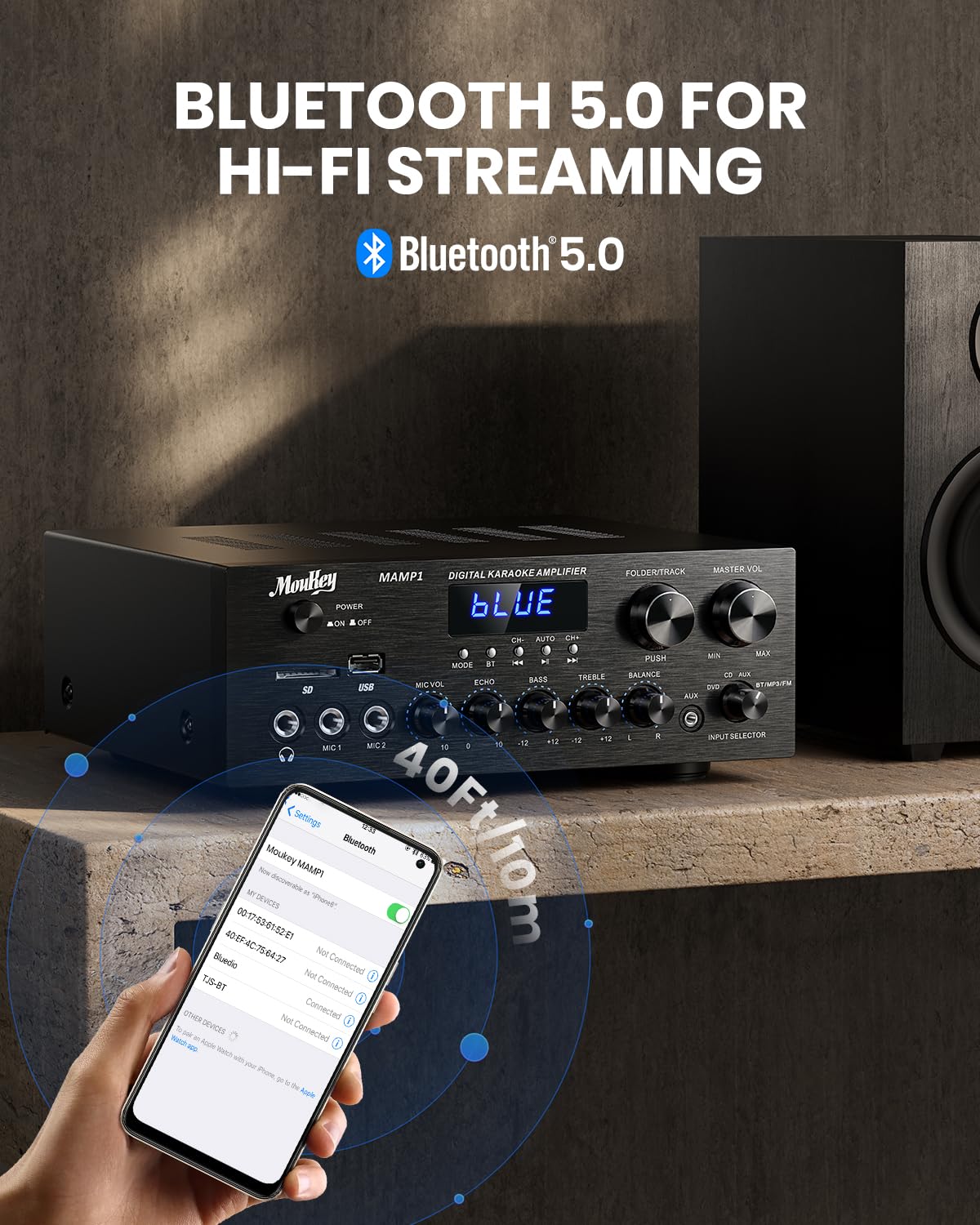
Image: The Moukey MAMP1 amplifier displaying "BLUE" on its screen, indicating Bluetooth mode, with a smartphone showing pairing options.
6.7 USB/SD Playback
Insert a USB drive (max 32GB) or SD card (max 16GB) into the respective slot on the front panel. The amplifier will automatically switch to USB/SD mode and begin playback. Use the Muamua, Ta'alo/Taofi, Sosoo ai, ma Folder/Track faamau e pulea ai le toe faia.
Leitio 6.8 FM
Ensure the FM antenna is connected to the rear panel. Select FM mode using the Fa'amau Fa'ailoga. Fa'aaoga le Muamua ma Sosoo ai buttons to tune to radio stations. The LED display will show the current frequency.
7. Tausiga
To maintain the performance and appearance of your ampola:
- Fa'amamaina: Fa'aaogā se ie mālū ma mago e solo ai fafo o le iunite. Aua ne'i fa'aogaina ni vai fa'amamā po'o ni vaila'au fa'asa.
- Savili: Ia mautinoa o avanoa e savili ai e mama mai pefu ma otaota.
- Teuina: Afai e teuina le iunite mo se taimi umi, vavae ese mai le eletise ma teu i se nofoaga malulu ma mago.
8. Faʻafitauli
If you encounter issues with your Moukey MAMP1 amplifier, refer to the following table for common problems and solutions:
| Fa'afitauli | Mafuaaga e ono tupu | Fofo |
|---|---|---|
| Leai se mana | Uaea eletise e le o feso'ota'i; Fa'aletonu le paoa; Pepe le paoa. | Ensure power cable is securely connected. Try a different power outlet. Press the power switch to ON. |
| Leai se fa'alogo leo | Incorrect input selected; Volume too low; Speakers not connected; Speaker wires loose; Mute function active. | Select the correct input source. Increase Master Volume. Check speaker connections and polarity. Ensure mute is off. |
| Le feso'ota'i le Bluetooth | Amplifier not in Bluetooth mode; Device too far; Device already paired to another unit. | Ia mautinoa amplifier is in Bluetooth mode ("BLUE" on display). Move device closer to amplifier. Disconnect from other devices. |
| Ua le aoga le masini faaleotele leo | Microphone not connected; Mic volume too low; Echo knob set to minimum. | Connect microphone securely. Increase Microphone Volume. Adjust Echo knob. |
| Fa'afitauli i le toe ta'aloina o le USB/SD | Le lagolagoina file format; USB drive/SD card corrupted; Capacity exceeded. | Ia mautinoa leo files are in supported formats (e.g., MP3). Try a different USB drive/SD card. Check capacity limits (USB max 32G, SD max 16G). |
Afai e fa'aauau pea le fa'afitauli pe a uma ona taumafai i nei fofo, fa'amolemole fa'afeso'ota'i le lagolago a tagata fa'atau.
9. Fa'amatalaga
| Fa'aaliga | Fa'amatalaga |
|---|---|
| Fa'ailoga | Moukey |
| Fa'ata'ita'iga | MAMP1 |
| Malosiaga o Galuega | 220 Watts |
| Auala | 2 |
| Voltage | 115 Volta (AC) |
| Fa'alavelave o le Fofoga Fetalai | 4-16 Ohms |
| Fa'aliliuga Bluetooth | 5.0 |
| Lau'ele'ele Bluetooth | Over 12 meters (40 feet) |
| USB / SD Card Lagolago | USB: Max 32GB, SD: Max 16GB |
| Fua (L x W x H) | 25cm x 21.3cm x 9.5cm (pe tusa 10in x 8in x 4in) |
| UPC | 715802779039 |
| Atunuu na Afua mai ai | Saina |

Image: The Moukey MAMP1 amplifier with its dimensions labeled.
10. Fa'amaonia ma Lagolago
This Moukey MAMP1 Mana Ampliifier e sau ma a 1 tausaga fa'amaonia mai le aso na fa'atau ai. O lenei fa'amaonia e aofia ai fa'aletonu o gaosiga ma le fa'aogaina i lalo ole fa'aoga masani.
O le warranty e le aofia ai:
- Damage caused by accident, abuse, misuse, flood, fire, or other natural causes.
- Fa'aleagaina e mafua mai i se suiga po'o se toe fa'aleleia e aunoa ma se fa'atagaina.
- Damage caused by improper installation or connection.
- Cosmetic damage, such as scratches, dents, and broken plastic on ports.
For warranty claims or technical support, please contact the retailer where you purchased the product or visit the official Moukey website for contact information. Please have your purchase receipt and product model number (MAMP1) ready when contacting support.


