
1. Folasaga ma le Fa'asoloview
The Escort EDM 1111A is a versatile digital multimeter designed for accurate measurement of various electrical parameters. This device is essential for electricians, technicians, and hobbyists for testing circuits, components, and power sources. It features a clear digital display and a rotary dial for selecting different measurement functions.

The Escort EDM 1111A Digital Multimeter with red and black test leads connected, ready for use.
O galuega autū e aofia ai:
- DC Voltage (DCV) measurement
- AC Voltage (ACV) measurement
- DC Current (DCA) measurement
- AC Current (ACA) measurement
- Fuaina o le tetee (Ω).
- Capacitance (CX) measurement
- Diode and Transistor (hFE) testing
2. Seti
2.1 Fa'apipi'i ma'a
The Escort EDM 1111A requires a DC 9V 006P battery for operation. To install or replace the battery:
- Ia mautinoa ua tape le multimeter.
- Su'e le vaega o le maa i tua o le iunite.
- Carefully slide open or unscrew the battery cover.
- Insert a new 9V 006P battery, observing the correct polarity (+/-).
- Toe sui lelei le ufiufi o le maa.

O tua view of the Escort EDM 1111A Digital Multimeter, showing the battery compartment cover and the product label.
2.2 Feso'ota'i Su'ega Ta'ita'i
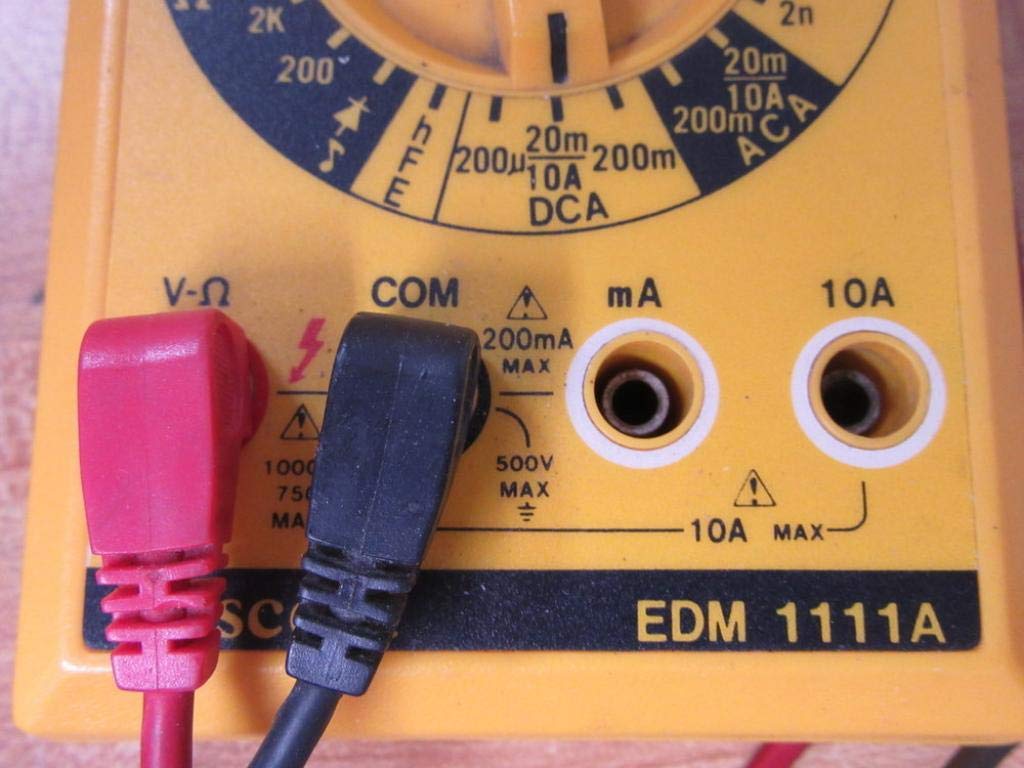
The multimeter comes with two test leads, typically one red (positive) and one black (negative/common). Proper connection is crucial for accurate and safe measurements.
- Mo le tele o voltage, resistance, and low current measurements, connect the black lead to the 'COM' (Common) jack.
- Connect the red lead to the 'V-Ω-mA' jack for voltage, resistance, and milliampfua o le taimi nei.
- For high current measurements (up to 10A), connect the red lead to the '10A' jack. Always ensure the correct jack is used to prevent damage to the meter or circuit.

A closer look at the input jacks (V-Ω, COM, mA, 10A) and the lower portion of the rotary dial, indicating current measurement ranges.

The red and black test probes (leads) used with the Escort EDM 1111A Digital Multimeter, featuring pointed tips for electrical contact.
3. Fa'atonuga o Galuega
Before taking any measurements, ensure the test leads are correctly connected and the rotary dial is set to the appropriate function and range.

Auiliili view of the rotary selector dial on the Escort EDM 1111A Digital Multimeter, displaying various measurement functions such as DCV, ACV, Ω, DCA, ACA, and CX.
3.1 Fuaina DC Voltagu (DCV)
- Set the rotary dial to the desired DCV range (e.g., 200m, 2, 20, 200, 1000). Choose a range higher than the expected voltage.
- Connect the red lead to the positive (+) side of the circuit and the black lead to the negative (-) side.
- Faitau le voltage taua i luga o le faʻaaliga.
3.2 Fuaina AC Voltagu (ACV)
- Set the rotary dial to the desired ACV range (e.g., 200m, 2, 20, 200, 750). Choose a range higher than the expected voltage.
- Fa'afeso'ota'i uaea fa'ata'ita'i i luga o le AC voltagetage source. Polarity does not matter for AC voltage.
- Faitau le voltage taua i luga o le faʻaaliga.
3.3 Fuaina o le Tete'e (Ω)
- Ia mautinoa ua tape le eletise o le matagaluega po'o le vaega a'o le'i fuaina le tete'ega.
- Set the rotary dial to the desired Ω range (e.g., 200, 2K, 20K, 200K, 2M, 20M, 200M).
- Fa'afeso'ota'i ta'ita'i su'ega i luga o le vaega e fuaina.
- Faitau le teteʻe taua i luga o le faʻaaliga.
3.4 Fuaina o le Tafega DC (DCA)
- Ia fa'amautinoa ua fa'amama le eletise.
- Set the rotary dial to the desired DCA range (e.g., 200µ, 2m, 20m, 200m, 10A).
- Taua: For currents up to 200mA, use the 'V-Ω-mA' jack for the red lead. For currents up to 10A, use the '10A' jack.
- Break the circuit and connect the multimeter in series with the load. The current must flow through the multimeter.
- Re-energize the circuit and read the current value.
3.5 Fuaina o le Tafega o le AC (ACA)
- Ia fa'amautinoa ua fa'amama le eletise.
- Set the rotary dial to the desired ACA range (e.g., 200µ, 2m, 20m, 200m, 10A).
- Taua: For currents up to 200mA, use the 'V-Ω-mA' jack for the red lead. For currents up to 10A, use the '10A' jack.
- Motusia le matagaluega ma fa'afeso'ota'i le multimeter i se faasologa ma le avega.
- Re-energize the circuit and read the current value.
3.6 Measuring Capacitance (CX)
- Ia mautinoa ua uma ona fa'asa'oloto atoa le capacitor a'o le'i faia le su'ega.
- Set the rotary dial to the CX range (e.g., 2n, 20n, 200n, 2µ, 20µ).
- Fa'afeso'ota'i uaea su'ega i luga o pito o le capacitor.
- Faitau le tau capacitance i luga o le faaaliga.
3.7 Diode and Transistor (hFE) Testing
Refer to the specific markings on the dial for diode and transistor testing functions. Typically, diode test mode allows checking the forward voltage drop of a diode, and hFE mode is used for measuring the DC current gain of transistors.
4. Tausiga
4.1 Suiga maa
Replace the 9V 006P battery when the low battery indicator appears on the display or if the multimeter fails to power on. Follow the instructions in Section 2.1.
4.2 Fa'amamāina
To clean the multimeter, use a soft, damp cloth. Do not use abrasive cleaners or solvents, as they may damage the casing or display. Ensure the device is turned off and disconnected from any circuits before cleaning.
4.3 Teuina
When not in use for extended periods, store the multimeter in a cool, dry place, away from direct sunlight and extreme temperatures. Consider removing the battery to prevent leakage, which could damage the internal components.
5. Faʻafitauli
| Fa'afitauli | Mafuaaga e ono tupu | Fofo |
|---|---|---|
| Leai se fa'aaliga po'o se fa'aaliga faanenefu | Ma'a maualalo pe mate | Replace the 9V 006P battery. |
| Fa'amatalaga sese | Incorrect range selected Poor lead connection Damaged test leads Incorrect input jack used | Filifili le laina talafeagai. Ensure leads are firmly connected. Inspect and replace damaged leads. Verify leads are in the correct V-Ω-mA or 10A jack. |
| "OL" (Ova le uta) fa'aalia | Measurement exceeds selected range | Su'e i se tulaga maualuga. |
| Leai se pip fa'aauau | Continuity function not selected Tatala matagaluega | Ensure dial is on continuity/diode test. Check the circuit for breaks. |
6. Fa'amatalaga
| Parameter | Taua |
|---|---|
| Fa'ata'ita'iga | EDM 1111A |
| Fua o Mea (L x W x H) | 8 x 4 x 2 inisi |
| Mea mamafa | 1.84 pauna |
| Punavai Malosi | DC 9V 006P Battery |
| Ituaiga Fua | mita tele |
| Tufuga | faafeao |
| Aso Muamua Maua | Novema 21, 2019 |
| DC Voltagu Tulaga | 200mV, 2V, 20V, 200V, 1000V |
| AC Voltagu Tulaga | 200mV, 2V, 20V, 200V, 750V |
| DC Va'aiga o iai nei | 200µA, 2mA, 20mA, 200mA, 10A |
| AC Current Ranges | 200µA, 2mA, 20mA, 200mA, 10A |
| Tulaga tetee | 200Ω, 2KΩ, 20KΩ, 200KΩ, 2MΩ, 20MΩ, 200MΩ |
| Capacitance Ranges | 2nF, 20nF, 200nF, 2µF, 20µF |
7. Fa'amatalaga Fa'amaonia
For specific warranty details regarding your Escort EDM 1111A Digital Multimeter, please refer to the documentation provided at the time of purchase or contact the manufacturer directly. Warranty terms typically cover defects in materials and workmanship under normal use.
8. Lagolago Tagata Fa'atau
If you encounter any issues or have questions not covered in this manual, please contact Escort customer support. Have your product model number (EDM 1111A) and serial number (if applicable, found on the back label) ready when contacting support for faster assistance.
The product label on the back of the Escort EDM 1111A, indicating 'DIGITAL MULTIMETER DC 9V 006P BATTERY', serial number, and 'MADE IN TAIWAN R.O.C.'.