
Folasaga
This manual provides instructions for the VINABTY MKJ36998126 Replacement Remote Control. This remote is designed as a direct replacement for various LG TV models, including the 32LV2400, 42LV4400, 47LV4400, and 55LV4400 series. It is pre-programmed and requires no additional setup beyond battery installation.
The remote control offers a comfortable, ergonomic design and provides full functionality for your compatible LG television, allowing you to control power, volume, channels, input, and other essential TV functions.
Seti
1. Fa'apipi'i ma'a
The VINABTY MKJ36998126 remote control requires two (2) AAA batteries (not included) for operation. Follow these steps to install the batteries:
- Su'e le vaega o le maa i tua o le masini mamao.
- Oomi i lalo le faamau ma fa'ase'e le ufiufi o le maa i lalo e tatala ai.
- Fa'aofiofi maa AAA se lua, ia mautinoa le fetaui lelei (+) ma le leaga (-) ma fa'ailoga i totonu o le vaega.
- Toe fa'afo'i le tapuni o le maa i lona tulaga seia oomi lelei.
Fa'aaliga: Ia sui pea maa e lua i le taimi e tasi i ni maa fou. Aua le fa'afefiloi maa tuai ma maa fou, po'o ituaiga eseese o maa.
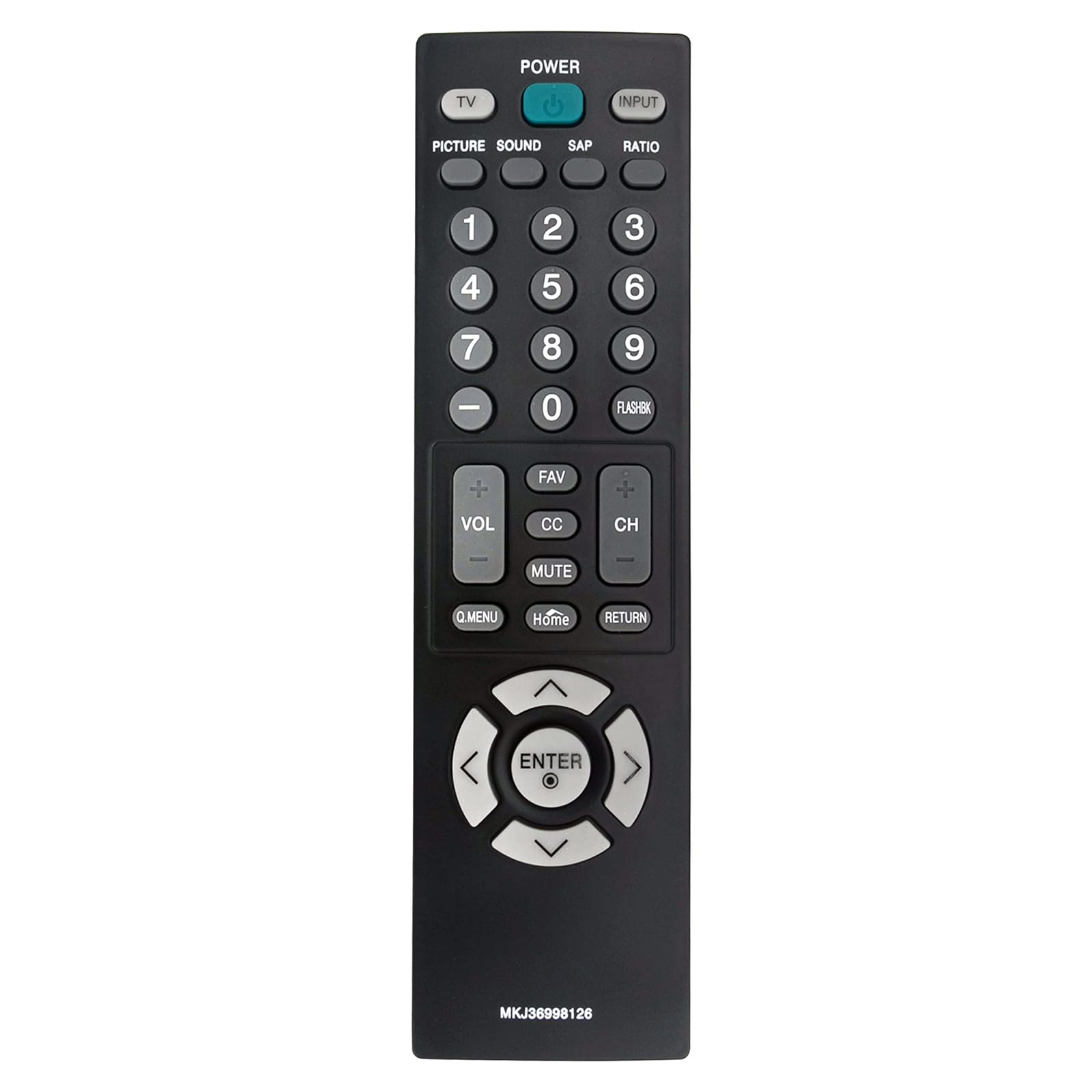
Ata: Luma view of the VINJABTY MKJ36998126 remote control, showing the button layout. The battery compartment is on the reverse side.
2. Fa'aaogaina Muamua
This remote control is pre-programmed for compatible LG TV models. Once batteries are installed, it is ready for immediate use. No additional programming or pairing is required.
Fa'atonuga o Galuega
The VINABTY MKJ36998126 remote control provides intuitive access to your LG TV's functions. Below is a general overview of the main buttons and their functions:

Ata: Fa'amatalaga pito i luma view of the VINABTY MKJ36998126 remote control, highlighting the various buttons and their labels for easy identification.
- MANA: Ki pe tape le TV.
- TV: Suia i le TV mode.
- Faʻaofi: Filifili le mea e fa'aoga ai (HDMI, AV, Vaega, ma isi).
- ATA: Fetuunai tulaga o ata.
- LEO: Fetuuna'i tulaga o le leo.
- SAP: Selects Secondary Audio Program (if available).
- FUAFUAGA: Changes the screen aspect ratio.
- Numera faamau (0-9): Directly selects channels or enters numerical values.
- FLASHBK: Recalls the previously viewed alavai.
- VOL (+/-): Faʻateleina pe faʻaititia le leo.
- CH (+/-): Suia le ala i luga pe lalo.
- FAV: Avanoa auala e fiafia iai.
- CC: Toggles Closed Captions on or off.
- FILEMU: Gūgū pe fa'atala le leo o le TV.
- Q.MENU: Accesses the Quick Menu for common settings.
- Aiga: Returns to the TV's home screen or main menu.
- Toe fo'i: Toe foʻi i le laupepa poʻo le lisi muamua.
- Fa'asologa o le Navigation (Lua, Lalo, Agavale, Taumatau, Ulufale): Fa'asaga i menus ma fa'amaonia filifiliga.

Image: The VINABTY MKJ36998126 remote control shown next to a compatible LG television, illustrating its intended use.
Tausiga
Suiga maa
When the remote control's performance degrades or it stops responding, it is likely time to replace the batteries. Follow the battery installation steps outlined in the 'Setup' section.
Fa'amamaina
Ina ia fa'amama le masini mamao, fa'aaoga se ie vaivai ma mago. Mo palapala malo, fai sina oampfufulu le ie i le vai po'o se vaila'au fa'amamā mālū e le a'afia ai. Aua le fa'aogaina ni vaila'au malolosi pe fa'afufu le remote i le vai.
Teuga
Store the remote control in a dry place, away from direct sunlight and extreme temperatures. If the remote will not be used for an extended period, it is recommended to remove the batteries to prevent leakage.
Fa'afitauli
- Le mamao e le tali mai:
- Ensure batteries are correctly installed with the correct polarity.
- Sui maa tuai i maa AAA fou.
- Siaki mo ni mea o faalavelaveina i le va o le mea fa'afoe mamao ma le masini fa'alogo infrared a le TV.
- Ensure you are within the maximum operating range (approximately 33 feet) and pointing the remote directly at the TV.
- O fa'amau patino e le o galue:
- Clean the remote control, especially around the affected buttons, to remove any debris that might be causing sticking.
- If cleaning does not resolve the issue, the button may be worn or damaged.
- TV not listed as compatible:
- This remote is specifically designed for the listed LG TV models. If your TV model is not listed, full compatibility cannot be guaranteed.
Fa'amatalaga
| Fa'aaliga | Fa'amatalaga |
|---|---|
| Fa'ailoga | VINABTY |
| Igoa Fa'ata'ita'iga | MKJ36998126 |
| Masini Fegalegaleai | LG Television (32LV2400, 42LV4400, 47LV4400, 55LV4400 series) |
| Tekinolosi Feso'ota'i | Infrared |
| Numera o Maa Manaomia | 2 |
| Ituaiga maa | AAA (Alkaline recommended) |
| Avanoa aupito maualuga | 33 Futu |
| Aofa'i o le Fa'amau | 30 |
| Ituaiga Mea (L x W x H) | 5"L x 1.9"W x 0.5"L |
| Fa'apitoa Fa'apitoa | Ergonomic |

Image: The VINABTY MKJ36998126 remote control with its length (7.28 inches) and width (1.97 inches) clearly marked.
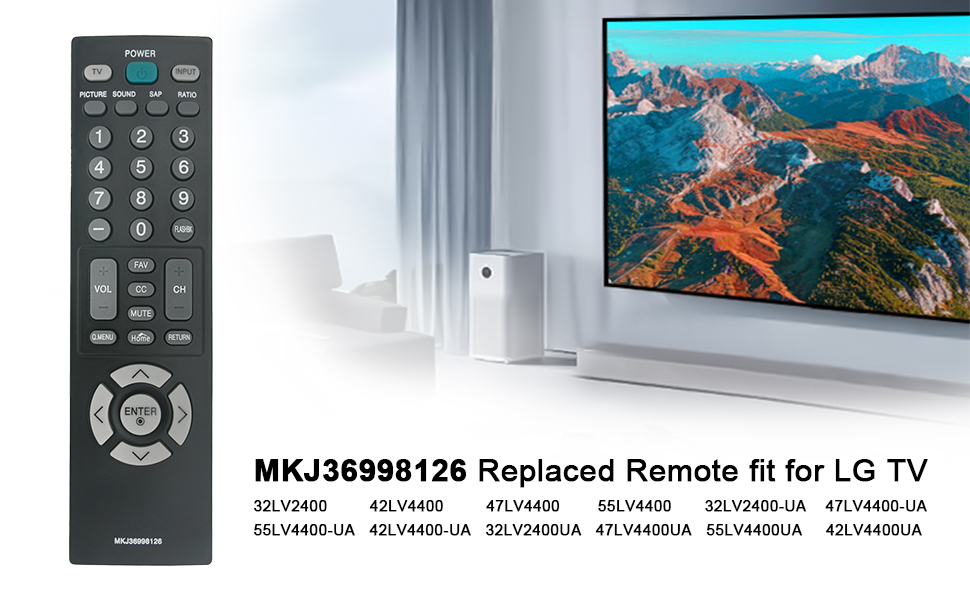
Image: The VINABTY MKJ36998126 remote control displayed alongside a list of compatible LG TV models, including 32LV2400, 42LV4400, 47LV4400, and 55LV4400 series.
Fa'amatalaga Fa'amaonia
Specific warranty details for the VINABTY MKJ36998126 remote control may vary. Please refer to the retailer's return policy or contact the manufacturer directly for comprehensive warranty information.
Lagolago
For further assistance, troubleshooting, or inquiries regarding your VINABTY MKJ36998126 remote control, please contact your point of purchase or the product manufacturer. Ensure you have your product model number (MKJ36998126) available when seeking support.