
Folasaga
Thank you for choosing the MIFA A3 Soundbox Bluetooth Portable Speaker. This manual provides essential information for the safe and efficient use of your device. Please read it thoroughly before operating the speaker and retain it for future reference.
Fa'amatalaga Saogalemu
- Aua le fa'aalia le failauga i le vevela tele, sa'o o le la, po'o le maualuga o le susū.
- Aloese mai le pa'u pe tu'u le failauga i ni aafiaga malolosi.
- Do not disassemble or attempt to repair the speaker yourself. Contact qualified service personnel.
- Keep the speaker away from water and liquids, despite its waterproof rating, to prevent damage to charging ports or internal components.
- Faaaoga na'o le uaea ma le adapter e fa'atumu ai le komepiuta ua fa'atonuina.
O mea o lo'o i totonu
Fa'amolemole siaki le afifi mo mea nei:
- MIFA A3 Bluetooth Portable Speaker
- USB Totogi Uaea
- Uaea leo AUX
- Tusi Lesona a le Tagata (lenei pepa)
Ua Umaview
The MIFA A3 speaker features intuitive touch controls and multiple connectivity options. Familiarize yourself with the speaker's layout:
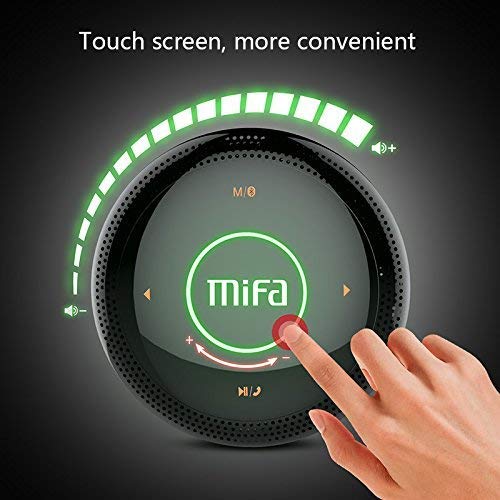
Ata 1: Luga view of the MIFA A3 speaker, highlighting the touch-sensitive control panel. The panel displays volume indicators, play/pause, and track navigation buttons. A central 'Mifa' logo is also visible.
- Pa'i Pulea Vaega: Located on the top surface for volume adjustment, playback control, and mode selection.
- Microphone: Mo le telefoni e leai ni lima.
- Taulaga e Totogi: Uafu Micro USB mo le fa'atumuina.
- Ulufale AUX: 3.5mm audio jack for wired connection.
- Laiti Laiti Card SD: For playing music directly from a memory card.
Seti
1. Totogiina o le Fofoga Fetalai
Before first use, fully charge the speaker. Connect the provided USB charging cable to the speaker's charging port and the other end to a USB power adapter (not included) or a computer's USB port.
- O le moli faailoilo mo le fa'atumuina o le a moli a'o fa'atumuina.
- The indicator will turn off or change color once fully charged.
- A full charge provides approximately 8 hours of continuous playtime.
2. Malosi / Malosi
- I le Malosiaga: Press and hold the Power button (usually integrated into the touch panel or a dedicated button) for 2-3 seconds until you hear an audible prompt or see an indicator light.
- Tape le Malosi: Press and hold the Power button again for 2-3 seconds.
Fa'atonuga o Galuega
1. Paʻaga Bluetooth
- Ensure the speaker is powered on and in Bluetooth pairing mode (indicated by a flashing blue light or audible prompt).
- I luga o lau masini (smartphone, tablet, PC), fa'agaoioi le Bluetooth ma saili mo masini avanoa.
- Select "MIFA A3" from the list of devices.
- Once paired, the speaker will provide an audible confirmation, and the indicator light will become solid blue.
- The speaker will automatically connect to the last-paired device when powered on, if that device's Bluetooth is active and within range.
2. Feso'ota'iga AUX
For devices without Bluetooth, use the provided 3.5mm AUX audio cable:
- Connect one end of the AUX cable to the speaker's AUX input port.
- Fa'afeso'ota'i le isi pito i le so'o leo o lau masini fa'alogo.
- E otometi lava ona sui le failauga ile AUX mode.
3. Micro SD Card Playback
Insert a Micro SD card (up to 32GB, FAT32 format) with music files into the designated slot. The speaker will automatically detect the card and begin playback.
4. Touch Control Operations
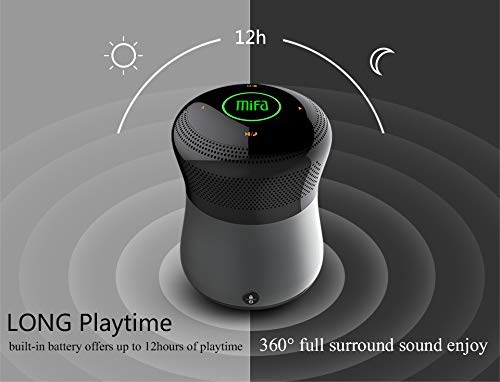
Ata 2: The MIFA A3 speaker shown with an overlay indicating "LONG Playtime" (up to 12 hours) and "360° full surround sound enjoy." This image emphasizes the speaker's battery life and audio dispersion.
- Pulea le Volume: Slide your finger clockwise on the touch panel to increase volume, counter-clockwise to decrease.
- Ta'alo/Taofi: Tap the central Play/Pause icon.
- Su'ega Sosoo: Tap the "Next" arrow icon.
- Ala na muamua atu: Tap the "Previous" arrow icon.
- Suiga Faiga: Tap the "M/O" icon to cycle between Bluetooth, AUX, and Micro SD card modes.
- Loka faamau: Press the lock icon to prevent accidental touch inputs.
5. Call Handling (Bluetooth Mode)
- Tali Valaau: Tap the Play/Pause icon when a call comes in.
- Fa'ai'u le Valaau: Tap the Play/Pause icon again.
- Te'ena Valaau: Press and hold the Play/Pause icon for 2 seconds.
Tausiga
- Fa'amama le sipika i se ie vaivai ma mago. Aua ne'i fa'aogaina ni mea e fa'amama fa'amama po'o ni so'o.
- Teu le sipika i se nofoaga malulu ma mago pe a le faʻaaogaina mo se taimi umi.
- Charge the battery at least once every three months to maintain battery health.
Fa'afitauli
| Fa'afitauli | Fofo e ono mafai |
|---|---|
| E le ola le Fofoga Fetalai. | Ia mautinoa ua fa'atumuina le maa. Fa'afeso'ota'i i se punaoa eletise ma toe taumafai. |
| E le mafai ona fa'afeso'ota'i e ala ile Bluetooth. |
|
| Leai se leo. |
|
| Le lelei leo. |
|
Fa'amatalaga
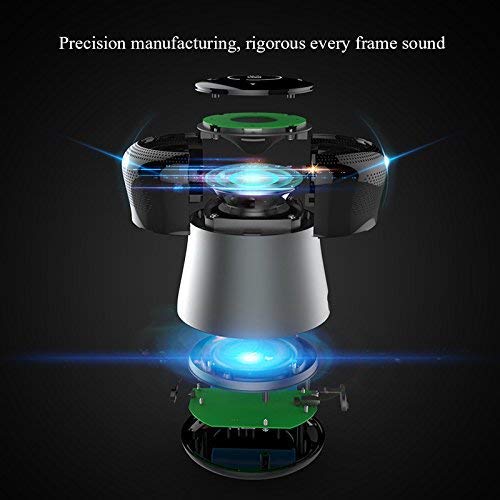
Ata 3: An exploded diagram of the MIFA A3 speaker, illustrating its internal components and structural design, emphasizing precision manufacturing.
| Fa'ata'ita'iga | MIFA A3 |
| Malosiaga o Galuega | 10W |
| Feso'ota'i | Bluetooth 4.2, AUX, Micro SD Card |
| Ma'a | 1800mAh Li-ion |
| Taimi ta'alo | E oʻo atu i le 8 itula (i le 60% voluma) |
| Taimi Totogi | Pe tusa o le 3-4 itula |
| Microphone | Fa'apipi'i i totonu mo telefoni e leai ni lima |
| Suavai | Yes (as per product specifications, but general caution advised for ports) |
| Metotia Pulea | Pa'i |
| Masini Fegalegaleai | Laptop, PC, Telefonipoto, Tablet |
Fa'amaonia ma Lagolago
MIFA products are designed to provide reliable performance. For warranty information or technical support, please refer to the warranty card included with your purchase or visit the official MIFA webnofoaga. Taofi lau fa'amaoniga o le fa'atau mo tagi fa'amaonia.
For further assistance, you may contact MIFA customer support through their official channels.