Folasaga
This manual provides instructions for the proper use and maintenance of your AW B990BL Neckband Wireless Bluetooth Earphones. Please read this manual thoroughly before using the product to ensure optimal performance and longevity.
The AW B990BL Neckband Wireless Bluetooth Earphones offer a convenient audio solution with a neckband design. Featuring Bluetooth V4.2 connectivity, these earphones provide up to 6 hours of talk or music time on a 1-hour charge. They are designed for wide compatibility with various devices, offering a reliable wireless experience.
O mea o lo'o i totonu
- AW B990BL Neckband Wireless Bluetooth Earphones
- USB Totogi Uaea
- Fautuaga o taliga (tulaga eseese)
- Tusi Taiala

Image: The AW B990BL Neckband Wireless Bluetooth Earphones, showcasing the neckband design, earbuds, and inline control panel.
Seti
1. Totogiina le taliga
- Connect the micro-USB end of the charging cable to the charging port on the earphone's control unit.
- Connect the USB-A end of the charging cable to a USB power source (e.g., computer USB port, wall adapter).
- The indicator light will illuminate during charging. Once fully charged (approximately 1 hour), the indicator light will change or turn off.
- Disconnect the charging cable once charging is complete.
Fa'aaliga: Ensure the earphones are fully charged before first use for optimal battery performance.
2. Paʻaga Bluetooth
- Ia mautinoa ua tape le taliga.
- Press and hold the Multi-function button (usually the center button on the control unit) for approximately 5-7 seconds until the indicator light flashes red and blue alternately. This indicates pairing mode.
- I luga o lau masini (smartphone, tablet, etc.), fa'agaoioi le Bluetooth ma su'e mo masini avanoa.
- Select "B990BL" from the list of found devices.
- Once successfully paired, the indicator light will flash blue slowly, and you may hear a confirmation tone.
- Afai e fa'aosoina mo se fa'aupuga, ulufale "0000".
Fa'aaliga: The earphones will automatically attempt to reconnect to the last paired device when turned on.
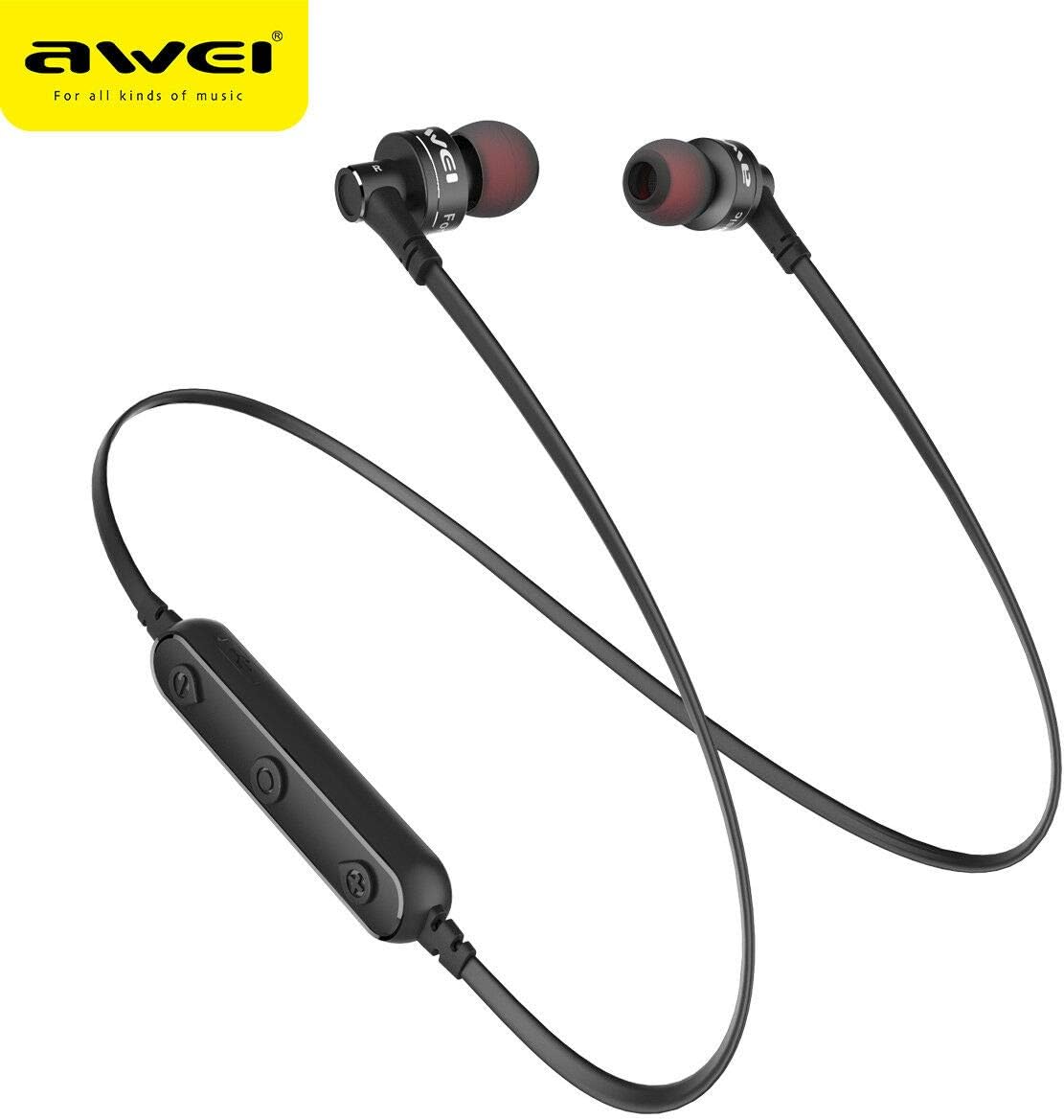
Ata: Se va'aiga view of the AW B990BL earphones, highlighting the inline control panel with its buttons and charging port.
Fa'atonuga o Galuega
Galuega Autu
- Malosiaga: Oomi ma uu le faamau Multi-function mo le 3 sekone.
- Tapē le eletise: Oomi ma uu le faamau Multi-function mo le 3 sekone.
- Ta'alo/Taofi: Oomi tasi le faamau Multi-function.
- I luga le Volume: Oomi le faamau "+".
- Volume Lalo: Oomi le faamau "-".
- Su'ega Sosoo: Oomi ma uu le faamau "+".
- Ala na muamua atu: Oomi ma uu le faamau "-".
Pulega o Valaau
- Tali Valaau: Oomi tasi le faamau Multi-function.
- Fa'ai'u le Valaau: Oomi tasi le faamau Multi-function i le taimi o le valaau.
- Te'ena Valaau: Oomi ma uu le faamau Multi-function mo le 2 sekone.
- Toe vili Numera Mulimuli: Faʻalua-lolomi le Multi-function button.
Tausiga
- Keep the earphones dry. Avoid exposure to extreme temperatures, humidity, or corrosive materials.
- Clean the earphones regularly with a soft, dry cloth. Do not use harsh chemicals or abrasive cleaners.
- Store the earphones in a clean, dry place when not in use.
- ʻAloʻese mai le pa'ū pe tuʻituʻi foʻi i ni paʻō malolosi o mea earphone.
- Do not attempt to disassemble or modify the earphones, as this will void the warranty and may cause damage.
Fa'afitauli
- Le mafai ona fetaui ma le masini:
- Ensure the earphones are in pairing mode (red and blue indicator light flashing alternately).
- Ensure Bluetooth is enabled on your device and it is within 10 meters of the earphones.
- Turn off and restart both the earphones and your device, then attempt pairing again.
- Fa'amama so'oga Bluetooth muamua i lau masini pe a mana'omia.
- Leai se leo pe maualalo le leo:
- Check the volume levels on both the earphones and your connected device.
- Ia mautinoa ua feso'ota'i lelei earphones i lau masini.
- Try playing different audio sources to rule out an issue with the media file.
- Earphones not charging:
- Ensure the charging cable is securely connected to both the earphones and the power source.
- Try a different USB charging cable or power source.
- Siaki le uafu fa'amomoli mo so'o se otaota po'o se fa'aleagaina.
Fa'amatalaga
| Fa'aaliga | Fa'amatalaga |
|---|---|
| Igoa Fa'ata'ita'iga | B990BL |
| Fa'aliliuga Bluetooth | V4.2 |
| Taimi Totogi | 1 itula |
| Taimi Talanoa | 6 itula |
| Taimi Musika | 6 itula |
| Tekinolosi Feso'ota'i | Uaealesi |
| Ma'ale'ale | 96 dB |
| Fua o Mea | 4 x 10 x 16.5 cm |
| mamafa | 4.54 g |
| Tufuga | Awei |
Fa'amaonia ma Lagolago
For warranty information or technical support, please refer to the documentation provided with your purchase or contact the retailer where the product was acquired. Keep your proof of purchase for warranty claims.