
Folasaga
This manual provides essential instructions for the Jam Audio Out There Active Noise Cancelling On-Ear Bluetooth Headphones. Please read this guide thoroughly to ensure proper use, maintenance, and to maximize your listening experience. These headphones offer active noise cancellation, Bluetooth connectivity, hands-free calling, and a comfortable on-ear design.
O a mea i totonu o le Pusa
Fa'amautinoa o lo'o iai mea uma i totonu o le afifiina:
- Out There Headphones
- AUX Cable (3.5mm)
- USB Totogi Uaea
- Quick Start Guide (silasila i lenei tusi lesona mo fa'amatalaga auiliili)

Image: Contents of the Jam Audio Out There headphone package, including the headphones, AUX cable, and USB charging cable.
Ua Umaview ma Pulea
Familiarize yourself with the headphone's layout and controls for optimal use.
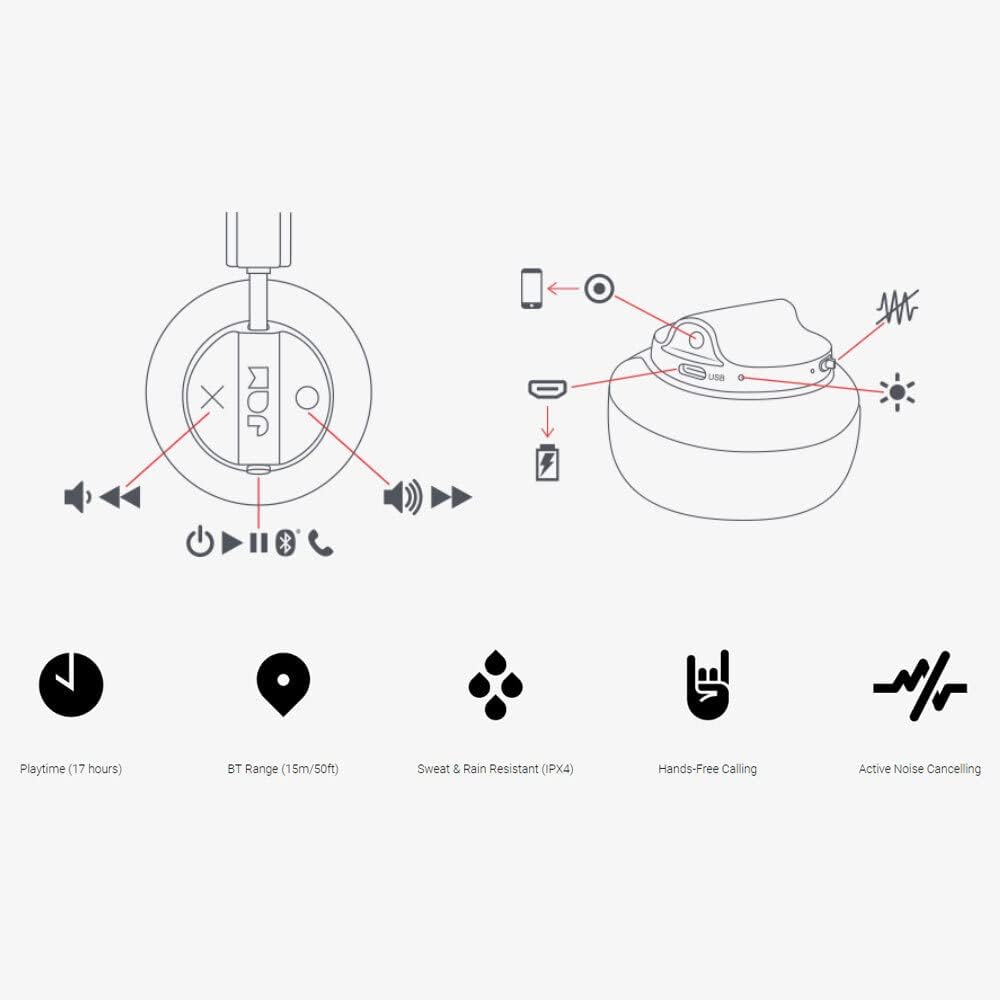
Image: Detailed diagram illustrating the control buttons and ports on the Jam Audio Out There headphones, including power, volume, track navigation, call management, and the charging port.
- Ki Malosi: Oomi ma taofi e ola/tape le mana.
- Volume Up / Leisi Ala: Oomi puupuu mo le leo i luga, lolomi umi mo le isi pese.
- Volume Lalo / Ala Talu: Oomi puupuu e fa'aitiitia ai le leo, oomi umi mo le pese na muamua atu.
- Ta'alo/Taofi/Tali Valaau: Single press to play/pause music or answer/end a call.
- Active Noise Cancelling (ANC) Switch: Toggle to activate or deactivate noise cancellation.
- Taulaga e Totogi: Uafu Micro USB mo le fa'atumuina.
- Uafu AUX-in: 3.5mm jack for wired audio connection.
Seti
1. Totogiina le Headphones
Before first use, fully charge your headphones. Connect the provided USB charging cable to the charging port on the headphones and the other end to a USB power source. The LED indicator will show charging status and turn off when fully charged. A full charge takes approximately 2 hours and provides up to 17 hours of playtime.

Image: The Jam Audio Out There headphones provide up to 17 hours of playtime on a single charge.
2. Malosi i luga/Pepe
- To power on: Press and hold the Power button for 3 seconds. The LED indicator will flash.
- To power off: Press and hold the Power button for 3 seconds. The LED indicator will turn off.
3. Paʻaga Bluetooth
- Ia mautinoa ua tapē le taliga.
- Press and hold the Power button for 5 seconds until the LED indicator flashes red and blue, indicating pairing mode.
- I luga o lau masini (smartphone, tablet, computer), fa'agaoioi le Bluetooth ma saili mo masini avanoa.
- Select "JAM Out There" from the list of devices.
- Once paired, the LED indicator on the headphones will turn solid blue.
- The headphones have a Bluetooth range of up to 15 meters (50 feet).

Image: The Jam Audio Out There headphones offer Bluetooth compatibility, allowing a range of up to 15 meters or 50 feet from your connected device.
Fa'atonuga o Galuega
Taaalo Musika
- Ta'alo/Taofi: Oomi le faamau Taalo/Taofi tasi.
- Su'ega Sosoo: Oomi umi le faamau Fa'aopoopo le Volume.
- Ala na muamua atu: Oomi umi le faamau o le Volume Down.
- Fetuunaiga le Volume: Short press the Volume Up or Volume Down buttons.
Valaau e Sa'oloto Lima
- Tali/Fa'ai'u le Valaau: Oomi le faamau Taalo/Taofi tasi.
- Te'ena Valaau: Oomi ma uu le faamau Play/Pause mo le 2 sekone.
- Fai se Valaau: Initiate the call from your connected device. The audio will automatically transfer to the headphones.
- Music will automatically pause during a call and resume after the call ends.
Fa'aleaogaina le Pisa (ANC)
- To activate ANC: Slide the ANC switch to the ON position. The ANC indicator light will illuminate.
- To deactivate ANC: Slide the ANC switch to the OFF position. The ANC indicator light will turn off.
- Using ANC can reduce ambient noise, enhancing your listening experience. Note that ANC can be used independently or with Bluetooth audio.
Wired Connection (AUX-in)
For a wired connection, use the provided 3.5mm AUX cable. Plug one end into the headphone's AUX-in port and the other into your audio device. This allows you to continue listening even if the headphone battery is depleted or if Bluetooth is not available.
Tausiga
- Fa'amamaina: Solo le headphone i se ie vaivai ma mago. Aua le fa'aaogaina ni vaila'au malolosi po'o ni mea e olo ai.
- Teuina: Teu ia headphone i se nofoaga malūlū ma mago, 'ese mai le vevela tele.
- Suavai Tetee: These headphones are IPX4 rated, meaning they are resistant to sweat and light splashes of water. Do not submerge them in water or expose them to heavy rain. Ensure the charging port cover is securely closed when not charging to maintain water resistance.
- Tausiga maa: Ina ia umi se taimi e ola ai le maa, 'aua ne'i fa'aumatia atoa le eletise i taimi uma. Fa'atumu soo, tusa lava pe le o fa'aaogaina mo se taimi umi.
Fa'afitauli
| Fa'afitauli | Fofo |
|---|---|
| E le o kiina le headphone | Ensure the headphones are charged. Connect to a power source using the USB cable. |
| Le mafai ona fa'apipi'i e ala i le Bluetooth |
|
| Leai se leo poʻo se maualalo o le leo |
|
| Active Noise Cancelling not working | Ensure the ANC switch is in the ON position and the ANC indicator light is illuminated. |
| Headphones falling apart or breaking | While the product is designed for durability, excessive force or improper handling can cause damage. Handle with care. If issues persist, refer to warranty information. |
Fa'amatalaga
- Igoa Fa'ata'ita'i: I fafo
- Numera Fa'ata'ita'i: HX-HP303BK
- Feso'ota'i: Bluetooth, 3.5 mm Jack (AUX-in)
- Va'aiga uaealesi: E oo atu ile 15 mita (50 futu)
- Ola ma'a: E oʻo atu ile 17 itula
- Pulea le pisa: Fa'aleaogaina Pisa
- Suavai Tetee: IPX4 Rated (Sweat and Rain Resistant)
- Tu'u taliga: I le taliga
- Mea: Pa'u, Silikoni
- Mea mamafa: 5.1 aunese (0.32 pauna)
- Fua o Mea: 8.58 x 3.19 x 8.66 inisi
- Vaega e aofia ai: Headphones, Charging Cord, AUX Cable
Oloa Vitio Umaview
Matamata i lenei vitio oloa aloaia mo se vaaiga i lugaview of the Jam Audio product line, including the Out There headphones.
Video: An official Jam Audio sizzle video showcasing various products, including the Out There headphones, highlighting their design and features.
Fa'amaonia ma Lagolago
For warranty information, product registration, or technical support, please refer to the official Jam Audio webnofoaga po'o fa'afeso'ota'i la latou 'au'aunaga fa'atau. Taofi lau fa'amaoniga o le fa'atau mo tagi fa'amaonia.