
1. Folasaga
Thank you for choosing the Baseus Encok S16 Neck Hung Bluetooth Wireless In-Ear Earphone. This manual provides detailed instructions for setup, operation, and maintenance to ensure optimal performance and longevity of your device. Please read this manual thoroughly before use.
2. Mea i totonu o le afifi
Fa'amautinoa o lo'o iai mea uma i totonu o le afifi:
- 1 x Baseus Encok S16 Wireless Earphone
- 1 x Uaea Totogi
- 1 x Tusi Fa'aoga
- 1 x Pepa Fa'amaonia

Image: Contents of the Baseus Encok S16 earphone package, showing the earphones, charging cable, user manual, and warranty card.
3. Oloa Ua Ovaview
The Baseus Encok S16 earphones feature a neck-hung design for comfortable and secure wear. Key features include:
- Fa'amauina maneta: Earbuds can be magnetically joined when not in use, preventing tangling and loss.
- Adjustable Coils: The earphone line length can be adjusted by sliding for a customized fit.
- High Fidelity Sound: Equipped with a dynamic speaker unit, composite diaphragm, and independent tune trope structure for clear audio.
- Malosiaga lelei: Utilizes a British CSR chip and 120mAh battery for low power consumption and extended battery life.
- Uiga Faʻavaomalo: Smartly matches with smartphones and tablet PCs, compatible with all Bluetooth 4.0 enabled devices.

Image: Close-up of the Baseus Encok S16 earbuds demonstrating their magnetic connection capability.
4. Seti
4.1 Charging the Earphones
- Connect the provided charging cable to the charging port on the earphone's control unit.
- Fa'afeso'ota'i le isi pito o le uaea e fa'atumu ai le eletise i se punaoa eletise USB (e pei o le uafu USB o le komepiuta, po'o se mea fa'apipi'i USB i luga o le puipui).
- O le a moli le moli faailoilo a'o fa'atumuina ma o le a tape pe sui le lanu pe a fa'atumuina atoa.
- Ole totogi atoa e masani ona alu ile 1.5 ile 2 itula.
4.2 Fa'atasiga Bluetooth
- Ia mautinoa o lo'o fa'atumu atoatoa taligalu.
- Press and hold the Power button on the control unit until the indicator light flashes red and blue alternately, indicating pairing mode.
- I luga o lau telefoni po'o le masini e fa'aogaina le Bluetooth, alu i le fa'atulagaga Bluetooth.
- Saili mo available devices and select "Baseus Encok S16" from the list.
- Once connected, the indicator light will flash blue slowly or turn solid blue.
- Afai e fa'aosoina mo se fa'aupuga, ulufale "0000".
5. Fa'atonuga o Galuega
5.1 Pulea Autu
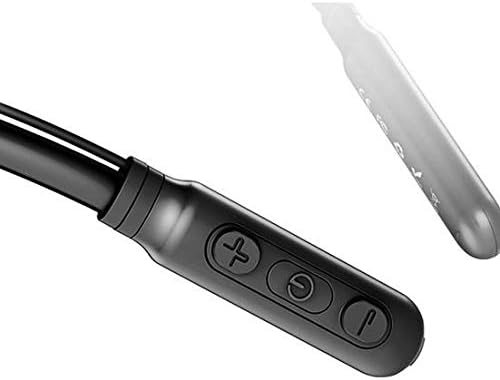
Image: Close-up of the Baseus Encok S16 earphone's inline control unit, showing the power/multi-function button, volume up, and volume down buttons.
| faamau | Galuega |
|---|---|
| Fa'amau o le Malosiaga (Ogatotonu) |
|
| I luga le Volume (+) |
|
| Tu'u le Volume (-) |
|
5.2 Ofuina o Fa'alogologo
Place the neckband around your neck, ensuring the control unit is easily accessible. Insert the earbuds comfortably into your ears. Adjust the earphone line length using the sliding coils for a secure and comfortable fit.
6. Tausiga
- Fa'amamā soo ia mea e taliga ma le iunite fa'aoga i se ie vaivai ma mago.
- Avoid exposing the earphones to extreme temperatures, humidity, or corrosive liquids.
- Store the earphones in a cool, dry place when not in use. The magnetic earbuds can help prevent tangling during storage.
- Do not attempt to disassemble or repair the earphones yourself, as this will void the warranty.
7. Faʻafitauli
| Fa'afitauli | Fofo |
|---|---|
| Le mafai ona ola | Ensure the earphones are fully charged. Press and hold the Power button for 3 seconds. |
| E le mafai ona fetaui ma le masini |
|
| Leai se leo poʻo se maualalo o le leo |
|
| Feso'ota'iga vavalo |
|
8. Fa'amatalaga
| Fa'aaliga | Fa'amatalaga |
|---|---|
| Fa'ailoga | Baseus |
| Numera Fa'ata'ita'i | FWP-E-S16 |
| Tekinolosi Feso'ota'i | Bluetooth |
| Fa'aliliuga Bluetooth | 4.0 (compatible with devices enabling Bluetooth 4.0) |
| Fa'ailoga Fa'ailoga | In Ear, Neck Hung |
| Ituaiga Pulea | Voice Control, Touch (via buttons) |
| Malosiaga ma'a | 120mAh |
| mamafa | 30 kalama |
| Fa'aaofia Vaega | Wireless Earphone, Charging Cable, User Manual, Warranty Card |
9. Fa'amaonia ma Lagolago
This product comes with a Limited Warranty. Please refer to the included Warranty Card for detailed terms and conditions regarding coverage and duration.
For technical support or warranty claims, please contact your retailer or visit the official Baseus web'upega tafaʻilagi mo faʻamatalaga auaunaga i tagata faʻatau.
Numera Fa'ailoa Fefa'ataua'iga a le Lalolagi (GTIN): 06953156264489