
1. Folasaga
This manual provides essential instructions for the installation, operation, maintenance, and troubleshooting of the APC Smart-UPS SRT3000RMXLT 3kVA 208V Rackmount Uninterruptible Power Supply (UPS). Please read this manual thoroughly before installing or operating the equipment to ensure proper usage and safety.
2. Fa'amatalaga Saogalemu
Observe all warnings and operating instructions in this manual. Failure to do so may result in injury or equipment damage.
- Saogalemu Faaeletise: O lenei iunite o lo'o i ai voltages. Do not attempt to disassemble the UPS. Servicing should only be performed by qualified personnel.
- Saogalemu maa: Batteries can present a risk of electrical shock and high short-circuit current. Remove watches, rings, or other metal objects before handling batteries. Use tools with insulated handles.
- mamafa: The UPS is heavy. Use proper lifting techniques and ensure adequate support during installation.
- Siosiomaga: Install the UPS indoors in a controlled environment, free from excessive dust, moisture, and extreme temperatures.
3. Mea i totonu o le afifi
Carefully unpack the UPS and inspect for shipping damage. The package should contain the following items:
- APC Smart-UPS SRT3000RMXLT Unit
- Power Supply (Built-In)
- Meafaigaluega fa'apipi'i fata
- CD fa'amaumauga
- uaea USB
- Uaea fa'asologa
4. Seti
4.1 Fa'apipi'i Fa'aletino
The SRT3000RMXLT is designed for rack installation. Ensure the rack is stable and capable of supporting the UPS weight (approximately 69 pounds).
- Mount the UPS into a standard 19-inch rack using the provided rack-mounting hardware.
- Ia mautinoa e lava le tafe o le ea i totonu o le iunite. Aua ne'i poloka avanoa e fa'aoso ai le ea.

Ata 4.1: Luma view of the APC Smart-UPS SRT3000RMXLT. This image shows the front panel with the display and ventilation grille.
4.2 Fa'afeso'ota'i le UPS
Connect the UPS to the utility power and your equipment.
- Connect the UPS input power cord to a dedicated 208V AC outlet. The UPS uses a Type B - 3 pin (North American) power plug.
- Connect your equipment to the output receptacles on the rear of the UPS. The unit provides 12 IEC 320 C13/C14 outlets.
- For communication, connect the USB cable or serial cable from the UPS to your computer or network management card.
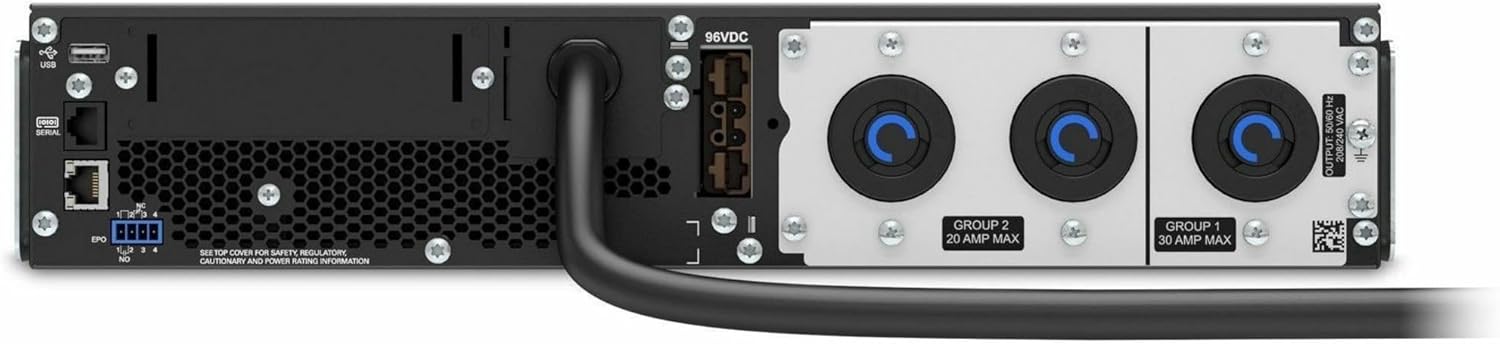
Ata 4.2: Tua view of the APC Smart-UPS SRT3000RMXLT. This image displays the various input and output ports, including USB, serial, EPO, and the 12 output receptacles, along with the main power input.
4.3 Uluai Malosiaga
After all connections are secure:
- Press the power button on the front panel to turn on the UPS.
- The UPS will perform a self-test and the display will show the current status.
- Allow the batteries to charge for at least 6 hours before relying on them for extended backup time.
5. Fa'agaoioia le UPS
5.1 Front Panel Display and Controls
The front panel features an LCD display and control buttons for monitoring and configuring the UPS.
- Fa'aaliga LCD: Shows real-time status, load, battery charge, input/output voltage, and event logs.
- Fa'amau ESC: Exits the current menu or cancels an operation.
- OK Faʻamau: Fa'amaonia se filifiliga pe ulufale i se lisi.
- Aū i luga/Ilalo: Su'e i le lisi o mea e fai pe fetu'una'i tulaga.
5.2 Galuega Fa'avae
- Kiina: Oomi ma uu le faamau o le paoa seia moli le lau.
- Tapē: Press and hold the power button until the UPS powers down. Ensure all connected equipment is safely shut down first.
- Faiga ma'a: A tupu se mana outage, the UPS will automatically switch to battery power. The display will indicate 'On Battery'.
- Su'ega a le tagata lava ia: Initiate a manual self-test through the front panel menu to verify battery and UPS functionality.
6. Tausiga
6.1 Suiga maa
The UPS uses sealed lead-acid batteries. Battery life is typically 3-5 years, depending on environmental conditions and usage. Replace batteries when the UPS indicates a 'Battery Fault' or 'Replace Battery' warning.
- Contact APC support or a certified service technician for battery replacement.
- Always use genuine APC replacement battery cartridges (RBCs) to ensure compatibility and optimal performance.
- Recycle old batteries responsibly.
6.2 Fa'amamāina
Keep the UPS free from dust and debris to ensure proper ventilation.
- Use a soft, dry cloth to clean the exterior of the UPS.
- Aua le fa'aaogaina ni vaila'au fa'amamā po'o ni vaila'au fa'amama.
- Ia mautinoa o avanoa e savili ai e mamā mai fa'alavelave.
7. Faʻafitauli
This section provides solutions to common issues. For more complex problems, contact technical support.
| Fa'afitauli | Mafuaaga e ono tupu | Fofo |
|---|---|---|
| UPS does not turn on | No input power; Battery disconnected or discharged | Check power cord connection; Ensure utility power is present; Allow batteries to charge. |
| E pipi pea lava pea le UPS | On battery power; Overload condition | Check utility power; Reduce connected load. |
| 'Replace Battery' indicator | Ua lata ina uma le ola o le maa | Order and replace the battery cartridge. |
| UPS not providing power to outlets | Output circuit breaker tripped; UPS in fault mode | Reset circuit breaker; Check display for fault codes and consult manual. |
8. Fa'amatalaga
Key technical specifications for the APC Smart-UPS SRT3000RMXLT.
| Fa'aaliga | Fa'amatalaga |
|---|---|
| Numera Fa'ata'ita'i | SRT3000RMXLT |
| Fa'ailoga | APC |
| Output Power Capacity | 3000 VA / 2700 Watts |
| Tulaga Fa'ailo Voltage | 208V AC |
| Fa'ailoga Fa'aulu Voltage | 208V AC / 230V AC |
| Fa'auiga Fa'atele | 60 Hz |
| Feso'ota'iga Tulaga | 12 x IEC 320 C13/C14 |
| Ituaiga maa | Lead Acid |
| Taimi Fa'aola masani | 6 Itula |
| Typical Backup Time (Full Load) | 4 minute |
| Fa'ailoga Fa'ailoga | Fata |
| Fua (H x W x D) | 9 x 23 x 34 inisi |
| mamafa | 69 pauna |
| Galulue Vevela | 0 - 40 °C (32 - 104 °F) |
9. Fa'amaonia ma Lagolago
9.1 Fa'amatalaga Fa'amaonia
APC provides a standard warranty for this product. Please refer to the warranty card included with your product or visit the official APC web'upega tafa'ilagi mo fa'amatalaga fa'amaonia tuutuuga ma aiaiga fa'apitoa i lau itulagi.
9.2 Lagolago Fa'ainisinia
For technical assistance, product information, or troubleshooting beyond the scope of this manual, please contact APC customer support. Have your model number (SRT3000RMXLT) and serial number ready when contacting support.
- Visit the official APC webnofoaga mo punaoa lagolago, FAQs, ma faʻamatalaga faʻafesoʻotaʻi.
- Online resources often include updated manuals, firmware, and diagnostic tools.