
TPC UC400
TPC Ultrasonic Cleaner UC400 User Manual
Fa'ata'ita'iga: UC400
1. Folasaga
Thank you for choosing the TPC Ultrasonic Cleaner UC400. This manual provides essential information for the safe and efficient operation, maintenance, and troubleshooting of your ultrasonic cleaner. Please read this manual thoroughly before operating the device and keep it for future reference. The UC400 is designed for professional cleaning applications, utilizing high-frequency sound waves to create cavitation bubbles that gently yet effectively clean various items.
2. Fa'amatalaga Saogalemu
Ia usita'i i taimi uma puipuiga saogalemu nei e puipuia ai manu'a pe fa'aleagaina le masini.
- Do not operate the unit without liquid in the tank. Dry running can damage the transducer.
- Ensure the unit is placed on a stable, level surface away from heat sources and direct sunlight.
- Do not immerse the main unit in water or other liquids. Only the tank is designed for liquid.
- Always unplug the unit before cleaning, filling, or emptying the tank.
- Use only cleaning solutions recommended for ultrasonic cleaners. Avoid flammable, corrosive, or abrasive solutions.
- Taofi ese mai tamaiti.
- Do not touch the tank or solution during operation, as it may become warm.
- If the unit shows signs of damage, do not operate it. Contact qualified service personnel.
3. Oloa Ua Ovaview
The TPC Ultrasonic Cleaner UC400 features a durable stainless steel tank and cover, designed for efficient and thorough cleaning.
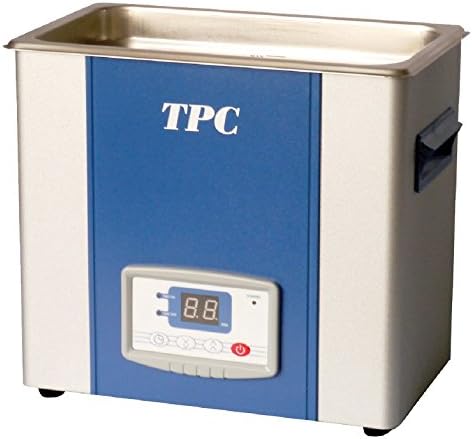
Ata 1: TPC Ultrasonic Cleaner UC400. This image shows the compact design of the ultrasonic cleaner, featuring a stainless steel tank at the top, a blue front panel with the "TPC" logo, and a digital control panel with a display and buttons at the bottom. Handles are visible on the sides.
Vaega:
- Tane uamea uamea: Holds the cleaning solution and items to be cleaned.
- Ufi u'amea uamea: Reduces noise and prevents splashing during operation.
- Vaega Pule: Features a digital display for time and temperature settings, along with control buttons.
- Uaea Malosi: Mo le faʻafesoʻotaʻi o le iunite i le eletise eletise.
- Alatoto alatoto: Located at the bottom for easy emptying of the tank.
4. Seti
- Tatalaina: Carefully remove the ultrasonic cleaner from its packaging. Inspect for any signs of damage. Retain packaging for future transport or storage.
- Tu'uga: Place the unit on a firm, level, and dry surface. Ensure there is adequate ventilation around the unit. Do not place it near heat sources or in direct sunlight.
- So'oga Malosi: Ensure the power switch is in the OFF position. Connect the power cord to a grounded electrical outlet with the correct voltage (tagai i faʻamatalaga auiliili).
- Faatumu le Tank: Open the cover and fill the stainless steel tank with the appropriate cleaning solution. Do not exceed the MAX fill line. Ensure the items to be cleaned are fully submerged but do not touch the bottom of the tank directly. Use a basket if provided.
5. Fa'atonuga o Galuega
- Malosiaga: Plug in the unit and turn on the main power switch. The digital display will illuminate.
- Seti Taimi Fa'amamā: Use the "Time" buttons on the control panel to set the desired cleaning duration. Typical cleaning cycles range from 5 to 15 minutes, depending on the items and level of contamination.
- Set Temperature (if applicable): If your model has a heating function, use the "Temp" buttons to set the desired solution temperature. Heating the solution can improve cleaning efficiency for certain applications. Allow time for the solution to reach the set temperature.
- Amata Fa'amamā: Press the "Start/Stop" button to begin the ultrasonic cleaning process. The unit will emit a high-frequency hum.
- I le taimi o le fa'agaioiga: Keep the cover closed during operation to minimize noise and prevent splashing. Do not touch the tank or solution.
- Fa'ai'uga o le Ta'amilosaga: The unit will automatically stop when the set time expires. You can also press the "Start/Stop" button to manually stop the process at any time.
- Aveese aitema: Carefully open the cover. Use gloves or a basket to remove the cleaned items from the tank. Rinse items thoroughly with clean water if necessary and dry them.
- Tapē le eletise: Turn off the main power switch and unplug the unit from the electrical outlet.
6. Tausiga
Regular maintenance ensures the longevity and optimal performance of your ultrasonic cleaner.
- Fa'amama le Tank: After each use or when the solution becomes visibly dirty, drain the tank using the drain valve.
- Fa'amama le Tank: Rinse the tank with clean water. For stubborn residues, use a soft cloth and a mild, non-abrasive cleaner. Do not use harsh chemicals or abrasive pads.
- Fa'amamaina i fafo: Fufulu le pito i fafo o le iunite ma le faʻasalalaugaamp cloth. Do not spray water directly onto the control panel or main unit.
- Suiga Fofo: Always use fresh cleaning solution for optimal results. Do not reuse heavily contaminated solutions.
- Teuina: When not in use, ensure the unit is clean, dry, and stored in a cool, dry place.
7. Faʻafitauli
| Fa'afitauli | Mafuaaga e ono tupu | Fofo |
|---|---|---|
| E le ola le iunite. | No power supply; power cord not connected; power switch off. | Check power outlet; ensure power cord is securely plugged in; turn on power switch. |
| No ultrasonic action (no hum). | Tank empty; unit not started; faulty transducer. | Fill tank with solution; press "Start" button; contact service if problem persists. |
| Le lelei o taunuuga o le faamamaina. | Incorrect solution; insufficient cleaning time; overloaded tank; solution too cold. | Use appropriate cleaning solution; increase cleaning time; reduce load; allow solution to heat up. |
| E soona vevela le iunite. | Prolonged operation; insufficient ventilation. | Allow unit to cool down; ensure proper ventilation around the unit. |
8. Fa'amatalaga
| Fa'aaliga | Fa'amatalaga |
|---|---|
| Fa'ata'ita'iga | UC400 |
| Fa'ailoga | TPC |
| Mea mamafa | 24 pauna |
| Pepa Fa'ailoga | Stainless steel cover and tank with welded drain |
| Fa'aoga Fa'apitoa mo Oloa | Sweep technology ensures exceptional cleaning efficiency |
| Faitauga o Iunite | 1.0 Faitau |
| Numera o Mea | 1 |
9. Fa'amaonia ma Lagolago
For warranty information, technical support, or service inquiries, please contact your authorized TPC dealer or visit the official TPC website. Please have your model number (UC400) and purchase date available when contacting support.
Fa'aaliga: Statements regarding dietary supplements have not been evaluated by the FDA and are not intended to diagnose, treat, cure, or prevent any disease or health condition. This product is intended for professional cleaning applications.
Ask a question about this manual
Ask about setup, troubleshooting, compatibility, parts, safety, or missing instructions. Manuals+ will review the question and use this page’s manual context to help answer it.