
SPINTSO SPT100-GR
SPINTSO Referee Watch SPT100-GR User Manual
Model: SPT100-GR
Folasaga
The SPINTSO Referee Watch SPT100-GR is a digital timepiece designed to assist referees with precise timing and game management. It features a large display, multiple timing functions, and a unique vibration notification system, making it a reliable tool for various sports officiating needs.
This manual provides detailed instructions on how to set up, operate, and maintain your SPINTSO Referee Watch SPT100-GR.
Ua Umaview

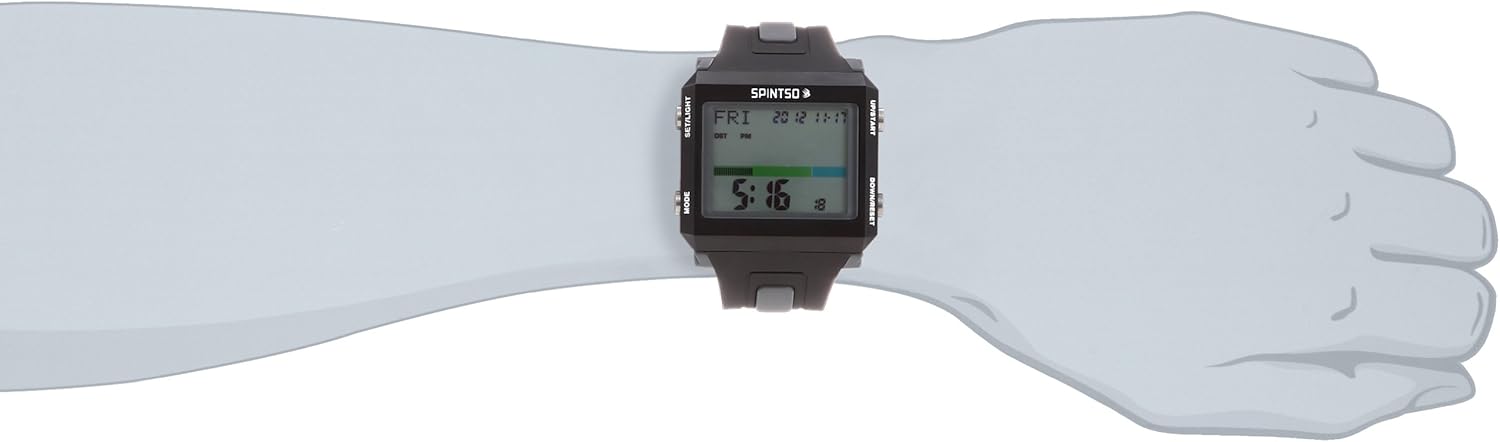
Ata 1: Luma view of the SPINTSO Referee Watch SPT100-GR, showing the large digital display and side buttons for control.

Ata 2: Tua view of the watch, highlighting the stainless steel back case and the watch strap.

Ata 3: Itu view of the watch, showing the "UP/START" and "DOWN/RESET" buttons.
Ata 4: The watch packaging, including the outer box and clear display case.
Seti
1. Fa'agaoioia Muamua o le Malosiaga ma le Setiina o le Taimi
Upon first use or after battery replacement, the watch may require initial setup.
- Oomi ma uu le SET/LIGHT button (left top) until the time display flashes.
- Fa'aaoga le UP/START (right top) and DOWN/RESET (right bottom) buttons to adjust the hour.
- Tusitala TULAGA (left bottom) to move to the next setting (minutes, year, month, day).
- Repeat step 2 and 3 until all settings are correct.
- Tusitala SET/LIGHT e alu ese mai le tulaga seti.
2. 12/24 Hour Format Setting
To switch between 12-hour and 24-hour display formats:
- In time display mode, press the UP/START button to toggle between 12H and 24H format.
3. Summer Time Setting (DST)
The watch supports a summer time (Daylight Saving Time) setting:
- In time display mode, press and hold the DOWN/RESET button to activate or deactivate DST. An indicator will appear on the display when DST is active.
Fa'atonuga o Galuega
1. Game Set and Period Setting
This function allows setting the game duration and periods.
- Mai le fa'aaliga autu o le taimi, oomi TULAGA repeatedly until you reach the "GAME" mode.
- Oomi ma uu SET/LIGHT e ulu atu i le tulaga seti.
- Fa'aoga UP/START ma DOWN/RESET to adjust the game duration (e.g., 45 minutes for a half).
- Tusitala TULAGA to move to the number of periods. Adjust as needed.
- Tusitala SET/LIGHT e fa'amaonia ma alu ese.
2. Count Up/Down and Lost Time Measurement
The watch can simultaneously display count-up time (game time), count-down time (remaining time), and lost time.
- In "GAME" mode, press UP/START to begin the game timer. The count-up and count-down timers will start.
- To pause the game, press UP/START again. The count-up and count-down timers will pause.
- While paused, the lost time timer will automatically begin counting.
- To resume the game and stop lost time counting, press UP/START.
- To reset the timers for a new half or game, press and hold DOWN/RESET.
3. Galuega taofi
The watch includes a 1/100 second stopwatch with a maximum measurement of 99 hours, 59 minutes, 59.99 seconds.
- Mai le fa'aaliga autu o le taimi, oomi TULAGA until you reach the "STOPWATCH" mode.
- Tusitala UP/START e amata le uati taofi.
- Tusitala UP/START toe malolo.
- Tusitala DOWN/RESET e toe seti le uati taofi i le zero.
- The watch also supports 20-lap memory. While the stopwatch is running, press DOWN/RESET to record a lap time.
4. Vibration Notification
All time notifications, including end of period and alarms, are indicated by vibration.
- The vibration function is automatically active for game time notifications.
- To use as an alarm clock, set an alarm time in the "ALARM" mode (accessed via TULAGA button). The watch will vibrate at the set time.
5. EL Backlight
The watch features an EL (Electroluminescent) backlight for visibility in low-light conditions.
- Oomi le SET/LIGHT button briefly to activate the backlight. It will illuminate for a few seconds.
Tausiga
1. Suiga maa
The watch uses two CR2032 batteries. Battery life is approximately 1 year, depending on usage frequency. A battery low indicator will appear on the display when replacement is needed.
- Carefully remove the screws on the back case of the watch.
- Gently lift the back cover. Note the position of the existing batteries.
- Remove the old batteries and insert new CR2032 batteries, ensuring correct polarity (+/-).
- Replace the back cover and tighten the screws securely to maintain water resistance.
- After battery replacement, you may need to perform the initial time setting (refer to "Setup" section).
2. Suavai Tetee
The watch has a daily life water resistance of 5 BAR. This means it is suitable for everyday use and can withstand splashes or brief immersion in water. However, it is not suitable for swimming, diving, or showering with hot water.
- Aua le fa'aogaina fa'amau a'o lo'o magoto le uati i le vai.
- Avoid exposing the watch to extreme temperature changes, as this can affect water resistance.
3. Fa'amamaina
To clean the watch, wipe it with a soft, dry cloth. For stubborn dirt, a slightly damp cloth can be used, followed by drying. Avoid using chemical cleaners or abrasive materials.
Fa'afitauli
| Fa'afitauli | Mafuaaga e ono tupu | Fofo |
|---|---|---|
| E avanoa pe faanenefu. | Low battery or dead battery. | Replace the CR2032 batteries (refer to "Battery Replacement"). |
| Watch freezes or displays erratic behavior. | Temporary software glitch or strong electromagnetic interference. | Remove batteries for a few minutes, then reinsert them. If the problem persists, contact customer support. |
| Buttons are unresponsive or sticky. | Dirt or debris lodged around buttons; internal mechanism issue. | Clean around the buttons with a soft brush. If still unresponsive, contact customer support. |
| Vibration function is weak or not working. | Low battery; internal vibration motor issue. | Sui maa. Afai e faaauau pea le faafitauli, faafesootai le tautua a tagata faatau. |
Fa'amatalaga
- Numera Fa'ata'ita'i: SPT100-GR
- Tele o mea: Approximately 42mm (vertical) x 48mm (horizontal)
- Punavai Malosi: CR2032 battery x 2
- Ola ma'a: Approximately 1 year (varies with usage frequency)
- Suavai Tetee: 5 BAR (Daily life water resistance)
- Galuega:
- Fa'aliga vibration
- Battery level warning display
- Game set/period setting
- Count up/down measurement (simultaneous display)
- Stop timing (lost time conversion)
- Fa'atulagaina o taimi o le taumafanafana
- 12/24 hour display setting
- Stopwatch (1/100 second, max 99 hours 59 minutes 59.99 seconds)
- 20-lap memory
- EL moli i tua
- amataga: Saina
Fa'amaonia ma Lagolago
This product comes with a warranty. Please refer to the warranty card included in the package for details regarding warranty period and conditions. For technical support, repairs, or inquiries not covered in this manual, please contact your retailer or the official SPINTSO customer service.
Keep your purchase receipt and warranty card in a safe place as proof of purchase.